
PhantomCSS
Visual/CSS regression testing with PhantomJS
Install / Use
/learn @HuddleEng/PhantomCSSREADME
Unmaintained notice: As of December 22nd 2017 this project will no longer be maintained. It's been a fantastic five years, a project that has hopefully had a positive influence on the shape and extent of Web UI testing. Read more on why its time to move on.
<img title="PhantomCSS" alt="Cute image of a ghost" width="200px" src="https://raw.github.com/Huddle/PhantomCSS/master/readme_assets/Phantom CSS.png">
CSS regression testing. A CasperJS module for automating visual regression testing with PhantomJS 2 or SlimerJS and Resemble.js. For testing Web apps, live style guides and responsive layouts. Read more on Huddle's Engineering blog: CSS Regression Testing.
Huddle is Hiring! We're looking for talented front-end engineers
What?
PhantomCSS takes screenshots captured by CasperJS and compares them to baseline images using Resemble.js to test for rgb pixel differences. PhantomCSS then generates image diffs to help you find the cause.
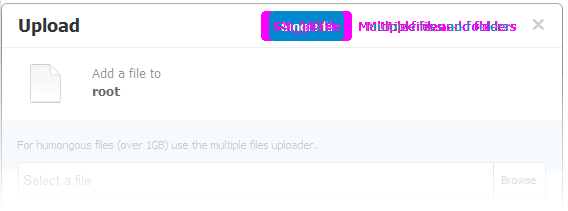
Screenshot based regression testing can only work when UI is predictable. It's possible to hide mutable UI components with PhantomCSS but it would be better to test static pages or drive the UI with faked data during test runs.
Example
casper.
	start( url ).
	then(function(){

		// do something
		casper.click('button#open-dialog');

		// Take a screenshot of the UI component
		phantomcss.screenshot('#the-dialog', 'a screenshot of my dialog');

	});
From the command line/terminal run:
casperjs test demo/testsuite.js
or
casperjs test demo/testsuite.js --verbose --log-level=debug --xunit=results.xml
Updating from PhantomCSS v0 to v1
Rendering is quite different with PhantomJS 2, so when you update, old visual tests will start failing. If your tests are green and passing before updating, I would recommend rebasing the visual tests, i.e. delete them, and run the test suite to create a new baseline.
You can still use the v0 branch if you wish, though it now unmaintained.
Download
PhantomCSS can be downloaded in various ways:
npm install phantomcss(PhantomCSS is not itself a Node.js module)bower install phantomcssgit clone git://github.com/Huddle/PhantomCSS.git
If you are not installing via NPM, you will need to run npm install in the PhantomCSS root folder.
Please note that depending on how you have installed PhantomCSS you may need to set the libraryRoot configuration property to link to the directory in which phantomcss.js resides.
Getting started, try the demo
- For convenience I've included CasperJS.bat for Windows users. If you are not a Windows user, you will have to install the latest version of CasperJS.
- Download or clone this repo and run
casperjs test demo/testsuite.jsin command/terminal from the PhantomCSS folder. PhantomJS is the only binary dependency - this should just work - Find the screenshot folder and have a look at the (baseline) images
- Run the tests again with
casperjs test demo/testsuite.js. New screenshots will be created to compare against the baseline images. These new images can be ignored, they will be replaced every test run. - To test failure, add/change some CSS in the file demo/coffeemachine.html e.g. make
.mugbright green - Run the tests again, you should see some reported failures
- In the failures folder some images should have been created. The images should show bright pink where the screenshot has visually changed
- If you want to manually compare the images, go to the screenshot folder to see the original/baseline and latest screenshots
SlimerJS
SlimerJS uses the Gecko browser engine rather than Webkit. This has some advantages over PhantomJS, such as a non-headless view. If this is of interest to you, please follow the download and install instructions and ensure SlimerJS is installed globally.
casperjs test demo/testsuite.js --engine=slimerjs
Options and setup
If you are using SlimerJS, you will need to specify absolute paths (see 'demo').
phantomcss.init({

    /*
    captureWaitEnabled defaults to true, setting to false will remove a small wait/delay on each
    screenshot capture - useful when you don't need to worry about
    animations and latency in your visual tests
    */
    captureWaitEnabled: true,

	/*
		libraryRoot is now optional unless you are using SlimerJS where
		you will need to set it to the correct path. It must point to
		your phantomcss folder. If you are using NPM, this will probably
		be './node_modules/phantomcss'.
	*/
	libraryRoot: './modules/PhantomCSS',

	screenshotRoot: './screenshots',

	/*
		By default, failure images are put in the './failures' folder.
		If failedComparisonsRoot is set to false a separate folder will
		not be created but failure images can still be found alongside
		the original and new images.
	*/
	failedComparisonsRoot: './failures',

	/*
		Remove results directory tree after run.  Use in conjunction
		with failedComparisonsRoot to see failed comparisons.
	*/
	cleanupComparisonImages: true,

	/*
		A reference to a particular Casper instance. Required for SlimerJS.
	*/
	casper: specific_instance_of_casper,

	/*
		You might want to keep master/baseline images in a completely
		different folder to the diffs/failures.  Useful when working
		with version control systems. By default this resolves to the
		screenshotRoot folder.
	*/
	comparisonResultRoot: './results',

	/*
		Don't add count number to images. If set to false, a filename is
		required when capturing screenshots.
	*/
	addIteratorToImage: false,

	/*
		Don't add label to generated failure image
	*/
	addLabelToFailedImage: false,

	/*
		Mismatch tolerance defaults to  0.05%. Increasing this value
		will decrease test coverage
	*/
	mismatchTolerance: 0.05,

	/*
		Callbacks for your specific integration
	*/
	onFail: function(test){ console.log(test.filename, test.mismatch); },

	onPass: function(test){ console.log(test.filename); },

	/*
		Called when creating new baseline images
	*/
	onNewImage: function(){ console.log(test.filename); },

	onTimeout: function(){ console.log(test.filename); },

	onComplete: function(allTests, noOfFails, noOfErrors){
		allTests.forEach(function(test){
			if(test.fail){
				console.log(test.filename, test.mismatch);
			}
		});
	},

	onCaptureFail: function(ex, target) { console.log('Capture of ' + target + ' failed due to ' + ex.message); }

	/*
		Change the output screenshot filenames for your specific
		integration
	*/
	fileNameGetter: function(root,filename){
		// globally override output filename
		// files must exist under root
		// and use the .diff convention
		var name = root+'/somewhere/'+filename;
		if(fs.isFile(name+'.png')){
			return name+'.diff.png';
		} else {
			return name+'.png';
		}
	},

	/*
		Prefix the screenshot number to the filename, instead of suffixing it
	*/
	prefixCount: true,

	/*
		Output styles for image failure outputs generated by Resemble.js
	*/
	outputSettings: {
		errorColor: {
			red: 255,
			green: 255,
			blue: 0
		},
		errorType: 'movement',
		transparency: 0.3
	},

	/*
		Rebase is useful when you want to create new baseline
		images without manually deleting the files
		casperjs demo/test.js --rebase
	*/
	rebase: casper.cli.get("rebase"),

	/*
		If true, test will fail when captures fail (e.g. no element matching selector).
	 */
	failOnCaptureError: false
});

/*
	Turn off CSS transitions and jQuery animations
*/
phantomcss.turnOffAnimations();
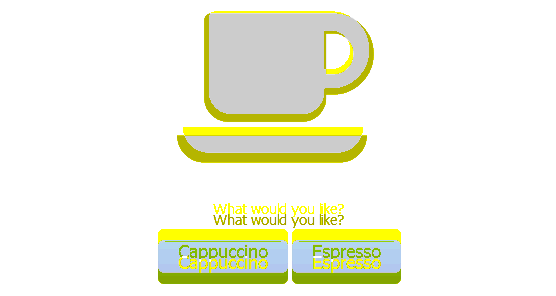
Don't like pink?
phantomcss.init({
	/*
		Output styles for image failure outputs generated by Resemble.js
	*/
	outputSettings: {

		/*
			Error pixel color, RGB, anything you want,
			though bright and ugly works best!
		*/
		errorColor: {
			red: 255,
			green: 255,
			blue: 0
		},

		/*
			ErrorType values include 'flat', or 'movement'.
			The latter merges error color with base image
			which makes it a little easier to spot movement.
		*/
		errorType: 'movement',

		/*
			Fade unchanged areas to make changed areas more apparent.
		*/
		transparency: 0.3
	}
});
There are different ways to take a screenshot
var delay = 10;
var hideElements = 'input[type=file]';
var screenshotName = 'the_dialog'

phantomcss.screenshot( "#CSS .selector", screenshotName);

// phantomcss.screenshot({
//  	'Screenshot 1 File name': {selector: '.screenshot1', ignore: '.selector'},
//  	'Screenshot 2 File name': '#screenshot2'
// });
// phantomcss.screenshot( "#CSS .selector" );
// phantomcss.screenshot( "#CSS .selector", delay, hideElements, screenshotName);

// phantomcss.screenshot({
//   top: 100,
//   left: 100,
//   width: 500,
//   height: 400
// }, screenshotName);
Compare the images when and how you want
/*
	String is converted into a Regular expression that matches on full image path
*/
phantomcss.compareAll('exclude.test');

// phantomcss.compareMatched('include.test', 'exclude.test');
// phantomcss.compareMatched( new RegExp('include.test'), new RegExp('exclude.test'));

/*
	Compare image diffs gener
