
LeapMotionInputForMRTK
LeapMotionInputForMRTK simulates hand inputs for MRTK with Leap Motion
Install / Use
/learn @HoloLabInc/LeapMotionInputForMRTKREADME
Notice
Leap Motion Controller is officially supported in MRTK v2.4.0.
It is recommended that you use the official controller.
https://microsoft.github.io/MixedRealityToolkit-Unity/Documentation/CrossPlatform/LeapMotionMRTK.html
LeapMotionInputForMRTK
LeapMotionInputForMRTK simulates hand inputs for MRTK with Leap Motion.
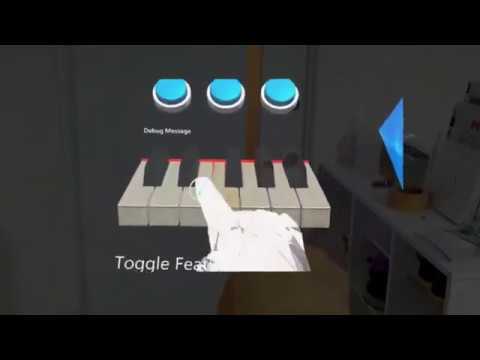
Demo video
Prerequisites
- Unity 2018.4.x
- HoloLens (1st gen)
- Leap Motion
- Leap Motion SDK (https://developer.leapmotion.com/get-started)
Getting Started
1.A. Clone this repository
> git clone git@github.com:HoloLabInc/LeapMotionInputForMRTK.git --recursive
> cd LeapMotionInputForMRTK
> External\createSymlink.bat
Open LeapMotionInputForMRTK project with Unity 2018.4.x.
1.B. Import unitypackage
Create project with Unity 2018.4.x.
Import MRTK v2
Download and import MRTK v2 unitypackages.
(https://github.com/microsoft/MixedRealityToolkit-Unity/releases/tag/v2.3.0)
- Microsoft.MixedReality.Toolkit.Unity.Foundation.2.3.0.unitypackage
- Microsoft.MixedReality.Toolkit.Unity.Extensions.2.3.0.unitypackage
- Microsoft.MixedReality.Toolkit.Unity.Tools.2.3.0.unitypackage
- Microsoft.MixedReality.Toolkit.Unity.Examples.2.3.0.unitypackage
Import LeapMotionInputForMRTK
Download and import the latest LeapMotionInputForMRTK unitypackage.
(https://github.com/HoloLabInc/LeapMotionInputForMRTK/releases)
2. Import Leap Motion Core Assets
Download "Unity Core Assets" and import to the unity project.
(https://developer.leapmotion.com/unity/#5436356)
3.A. Open sample scene
Open Assets/LeapMotionInputSimulation/Scenes/SampleScene.unity.
3.B. Setup scenes
MRTK Configuration
Add Leap Motion Input Simulator to Input Data Providers of your MRTK configuration or use LeapMotionMixedRealityToolkitConfigurationProfile.

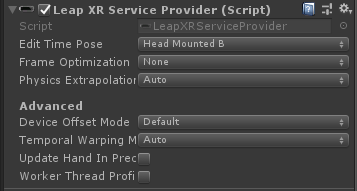
Add LeapXRServiceProvider
Select "Main Camera" in Hirerarchy and add LeapXRServiceProvider component.
Enable Hand Mesh
If you want to enable Hand Mesh, attach HandModelManager script to "Main Camera".
Edit the component like the following picture.
LoPoly Rigged Hand prefabs are in Assets\LeapMotion\Core\Prefabs\HandModelsNonHuman folder.

4. Switch platform
In the Build Settings window, switch platform to Universal Windows Platform.
5. Mount Leap Motion on HoloLens (1st gen)
Mount Leap Motion on HoloLens like the following picture.
3D Printable Models

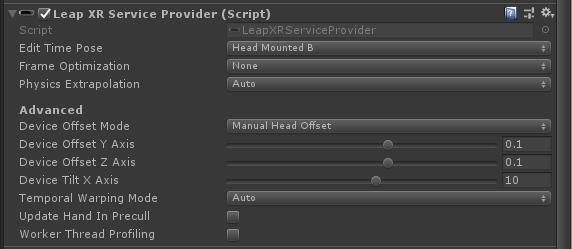
Adjust the offset and tilt values.
6. Play in Unity Editor
On your HoloLens, start the Holographic Remoting Player app.
In Unity, select "Window > XR > Holographic Emulation".
Enter the IP address of your HoloLens and press Connect button.

Press Play button in Unity Editor.
Author
Furuta, Yusuke (@tarukosu)
License
MIT
Related Skills
node-connect
347.0kDiagnose OpenClaw node connection and pairing failures for Android, iOS, and macOS companion apps
frontend-design
107.8kCreate distinctive, production-grade frontend interfaces with high design quality. Use this skill when the user asks to build web components, pages, or applications. Generates creative, polished code that avoids generic AI aesthetics.
openai-whisper-api
347.0kTranscribe audio via OpenAI Audio Transcriptions API (Whisper).
qqbot-media
347.0kQQBot 富媒体收发能力。使用 <qqmedia> 标签,系统根据文件扩展名自动识别类型(图片/语音/视频/文件)。
