
DigitalTrackingCalorimeterToolkit
Toolkit for the Monte Carlo and data analysis for the Digital Tracking Calorimeter project. https://doi.org/10.1016/j.nima.2017.02.007
Install / Use
/learn @HelgeEgil/DigitalTrackingCalorimeterToolkitREADME
Digital Tracking Calorimeter Toolkit
Toolkit for the Monte Carlo and data analysis for the Digital Tracking Calorimeter project. For more details see the publication <i>Pettersen, H. E. S. et al., Proton tracking in a high-granularity Digital Tracking Calorimeter for proton CT purposes. Nuclear Instruments and Methods in Physics Research A 860 (C): 51 - 61 (2017)</i> https://doi.org/10.1016/j.nima.2017.02.007 and the PhD thesis <i>A Digital Tracking Calorimeter for Proton Computed Tomography: University of Bergen 2018. http://bora.uib.no/handle/1956/17757</i>
Overview
It is developed for the management, pre-processing, reconstruction, analysis and presentation of data from the beam test and from MC simulations. It is of a modular and object-oriented design, such that it should be simple to extend the software with the following purposes in mind: to include analysis data from multiple sources such as the next-generation readout electronics and different MC simulation software; to give the user a broad selection of different geometrical, physical and reconstruction models; to include a more extensive proton CT simulation with complex phantoms and positional trackers before and after the phantom or patient; and to facilitate further development and usage of the software by making it available as a analysis library.
The software is written in C++ and ROOT, with some auxiliary tools written in Python and user scripts written in bash. Several hands-on teaching workshops have been held at the University of Bergen in order to demonstrate the usage of the software, and summaries of these are available at the project documentation website https://wiki.uib.no/pct/. In total the framework with tools consists of approximately 20 000 lines of code.
Functionality:
- Generating GATE simulation files
- Perfoming GATE simulations
- Making range-energy tables, finding the straggling, etc.
- Tracking analysis: This can be done both simplified and full
- Simplified: No double-modelling of the pixel diffusion process (use MC provded energy loss), no track reconstruction (use eventID tag to connect tracks from same primary).
- The 3D reconstruction of phantoms using tracker planes has not yet been implemented
- Range estimation
The analysis toolchain has the following components:
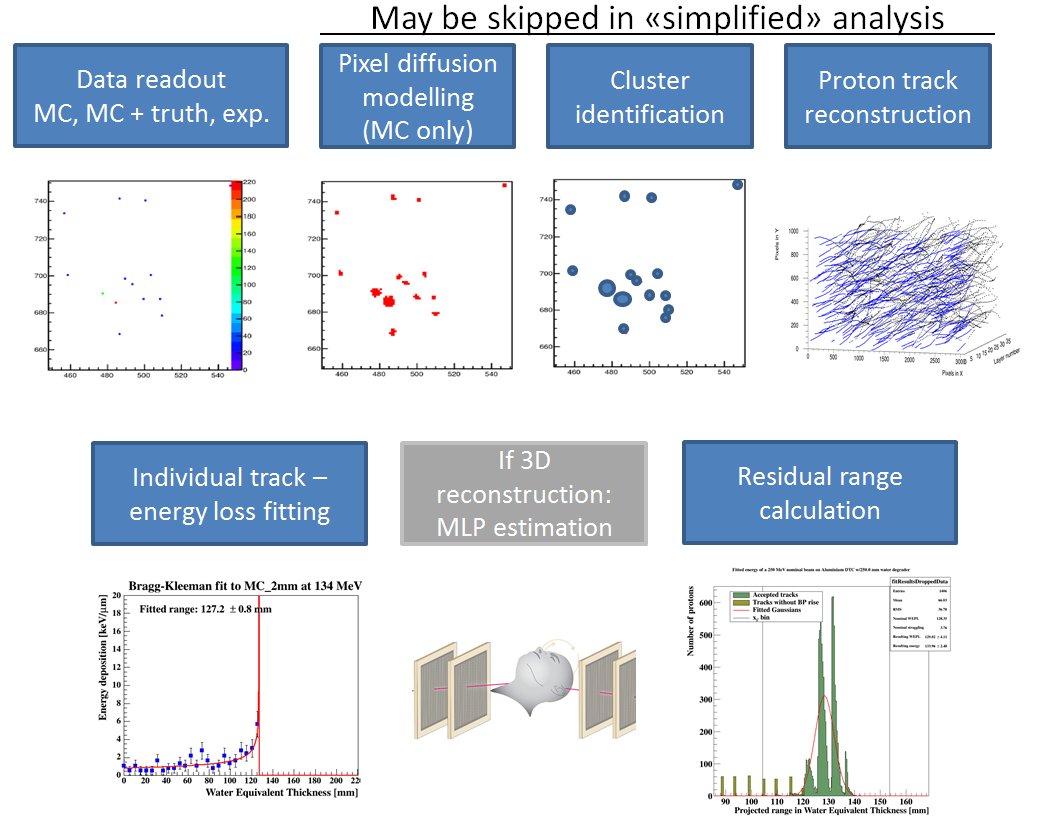
The full tracking workflow is implemented in the function <code>DTCToolkit/HelperFunctions/getTracks.C::getTracks()</code>, and the tracking and range estimation workflow is found in <code>DTCToolkit/Analysis/Analysis.C::drawBraggPeakGraphFit()</code>.
GATE simulations
Geometry scheme
The simplified simulation geometry for the future DTC simulations has been proposed as:
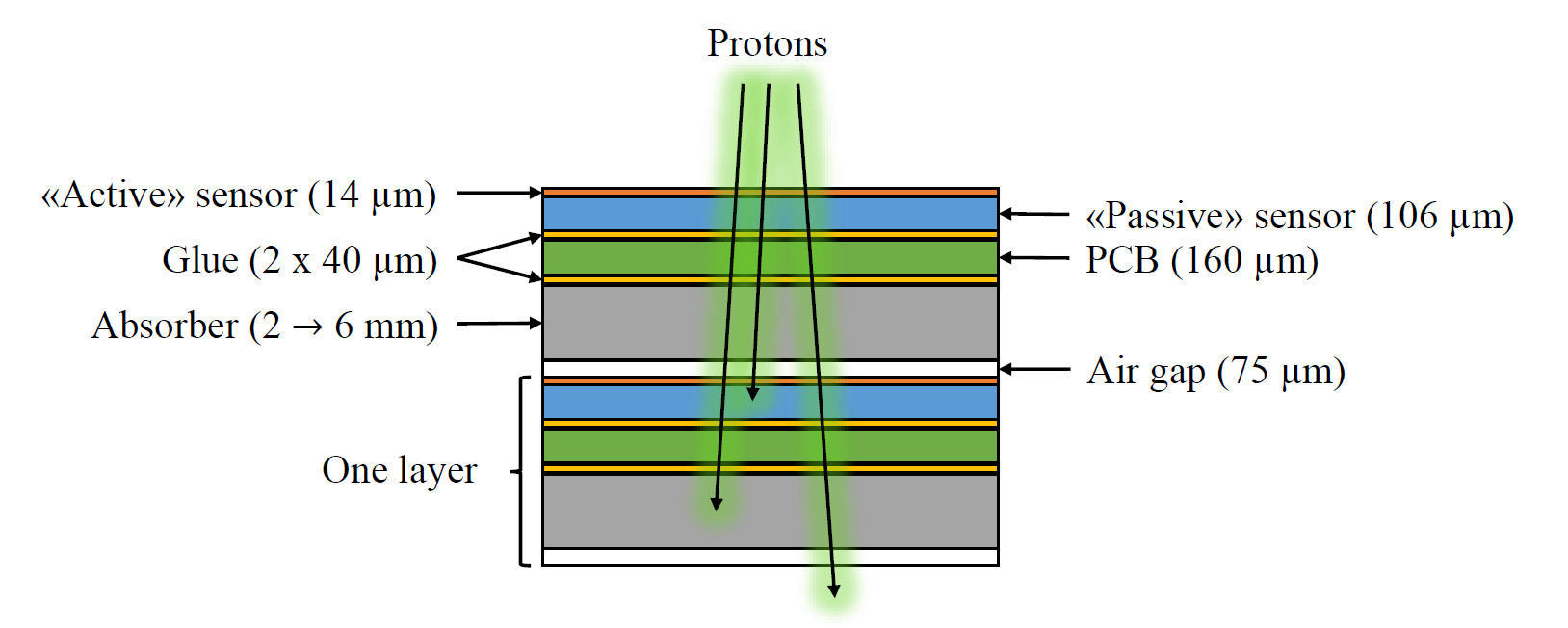
It is partly based on the ALPIDE design, and the FoCal design. The GATE geometry corresponding to this scheme is based on the following hierarchy:
World -> Scanner1 -> Layer -> Module + Absorber + Air gap
                              Module = Active sensor + Passive sensor + Glue + PCB + Glue
      -> Scanner2 -> [Layer] * Number Of Layers
The idea is that Scanner1 represents the first layer (where e.g. there is no absorber, only air), and that Scanner2 represents all the following (similar) layers which are repeated.
Generating the macro files
To generate the geometry files to run in Gate, a Python script is supplied. It is located within the ''gate/python'' subfolder.
[gate/python] $ python gate/python/makeGeometryDTC.py
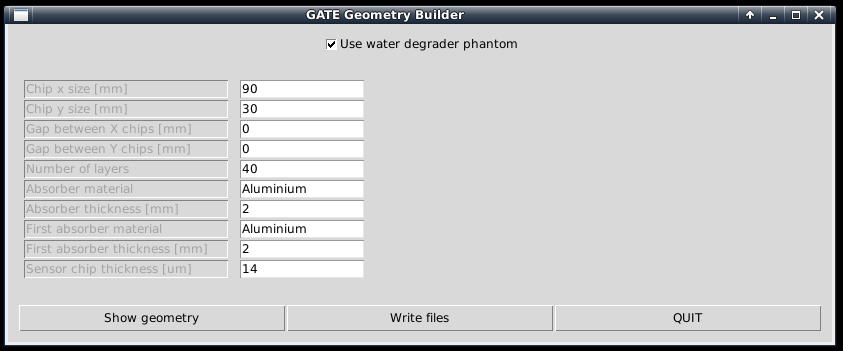
Choose the wanted characteristics of the detector, and use ''write files'' in order to create the geometry file Module.mac, which is automatically included in Main.mac. Note that the option "Use water degrader phantom" should be checked (as is the default behavior)!
Creating the full simulations files for a range-energy look-up-table
In this step, 5000-10000 particles are usually sufficient in order to get accurate results. To loop through different energy degrader thicknesses, run the script ''runDegraderFull.sh'':
[gate/python] $ ./runDegraderFull.sh <absorber thickness> <degraderthickness from> <degraderthickness stepsize> <degraderthickness to>
The brackets indicate the folder in the Github repository to run the code from. Please note that the program should not be executed using the <code>sh</code> command, as this refers do different shells in different Linux distribtions, and not all shells support the conditional bash expressions used in the script.
For example, with a 3 mm degrader, and simulating a 250 MeV beam passing through a phantom of 50, 55, 60, 65 and 70 mm water:
[gate/python] $ ./runDegraderFull.sh 3 50 5 70
Please note that there is a variable NCORES in this script, which ensures that NCORES versions of the Gate executable are run in parallel, and then waits for the last background process to complete before a new set of NCORES executables are run. So if you set NCORES=8, and run <code>sh runDegraderFull.sh 3 50 1 70</code>, first 50-57 will run in parallel, and when they're done, 58-65 will start, etc. The default value is NCORES=4.
Creating the chip-readout simulations files for resolution calculation
In this step a higher number of particles is desired. I usually use 25000 since we need O(100) simulations. A sub 1-mm step size will really tell us if we manage to detect such small changes in a beam energy.
And loop through the different absorber thicknesses:
[gate/python] $ ./runDegrader.sh <absorber thickness> <degraderthickness from> <degraderthickness stepsize> <degraderthickness to>
The same parallel-in-sequential run mode has been configured here.
Creating the basis for range-energy calculations
The range-energy look-up-table
Now we have ROOT output files from Gate, all degraded differently through a varying water phantom and therefore stopping at different places in the DTC. We want to follow all the tracks to see where they end, and make a histogram over their stopping positions. This is of course performed from a looped script, but to give a small recipe:
- Retrieve the first interaction of the first particle. Note its event ID (history number) and edep (energy loss for that particular interaction)
- Repeat until the particle is outside the phantom. This can be found from the volume ID or the z position (the first interaction with {math|z>0}). Sum all the found edep values, and this is the energy loss inside the phantom. Now we have the "initial" energy of the proton before it hits the DTC
- Follow the particle, noting its z position. When the event ID changes, the next particle is followed, and save the last z position of where the proton stopped in a histogram
- Do a Gaussian fit of the histogram after all the particles have been followed. The mean value is the range of the beam with that particular "initial" energy. The spread is the range straggling. Note that the range straggling is more or less constant, but the contributions to the range straggling from the phantom and DTC, respectively, are varying linearly.
This recipe has been implemented in <code>DTCToolkit/Scripts/findRange.C</code>. Test run the code on a few of the cases (smallest and biggest phantom size ++) to see that
- The correct start- and end points of the histogram looks sane. If not, this can be corrected for by looking how <code>xfrom</code> and <code>xto</code> is calculated and playing with the calculation.
- The mean value and straggling is calculated correctly
- The energy loss is calculated correctly You can run <code>findRange.C</code> in root by compiling and giving it three arguments; Energy of the protons, absorber thickness, and the degrader thickness you wish to inspect.
[DTCToolkit/Scripts] $ root
ROOT [1] .L findRange.C+
// void findRange(Int_t energy, Int_t absorberThickness, Int_t degraderThickness)
ROOT [2] findRange f(250, 3, 50); f.Run();
The output should look like this: Correctly places Gaussian fits is a good sign.
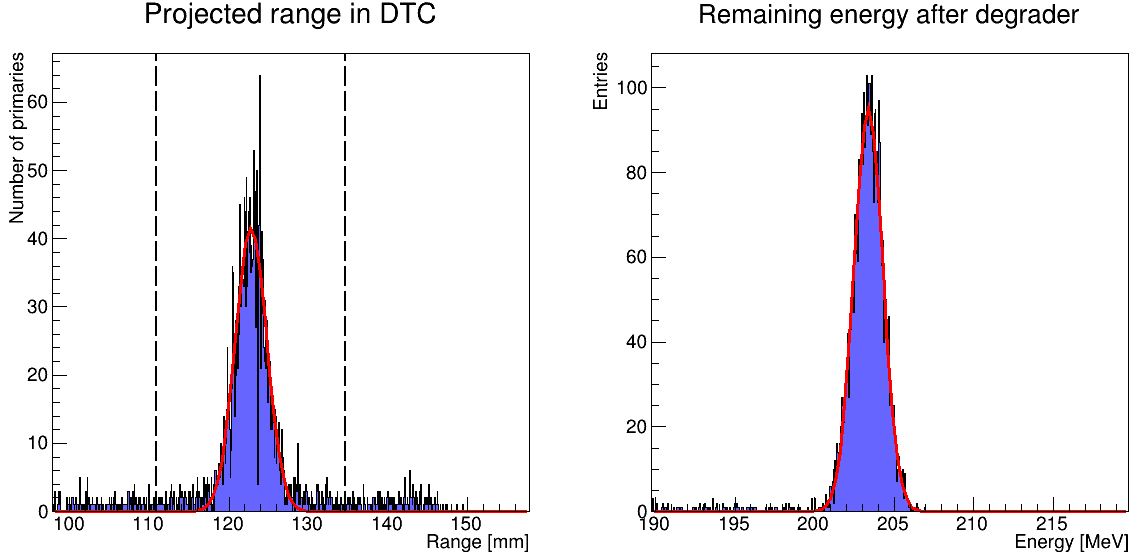
If you're happy with this, then a new script will run <code>findRange.C</code> on all the different ROOT files generated earlier.
[DTCToolkit/Scripts] $ root
ROOT [1] .L findManyRangesDegrader.C
// void findManyRanges(Int_t degraderFrom, Int_t degraderIncrement, Int_t degraderTo, Int_t absorberThicknessMm)
ROOT [2] findManyRanges(50, 5, 70, 3)
This is a serial process, so don't worry about your CPU. The output is stored in <code>DTCToolkit/Output/findManyRangesDegrader.csv</code>. It is a good idea to look through this file, to check that the values are not very jumpy (Gaussian fits gone wrong).
We need the initial energy and range in ascending order. The findManyRangesDegrader.csv files contains more rows such as initial energy straggling and range straggling for other calcualations. This is a bit tricky, but do (assuming a 3 mm absorber geometry):
[DTCToolkit] $ cat OutputFiles/findManyRangesDegrader.csv | awk '{print ($6 " " $3)}' | sort -n > Data/Ranges/3mm_Al.csv
NB: If there are many different absorber geometries in findManyRangesDegrader, either copy the interesting ones or use <code>| grep " X " |</code> to only keep X mm geometry
When this is performed, the range-energy table for that particular geometry has been created, and is ready to use in the analysis. Note that since the calculation is based on cubic spline interpolations, it cannot extrapolate -- so have a larger span in the full Monte Carlo simulation data than with the chip readout. For more information about that process, see this documen
