
Handit.AI
🧠 Your AI teammate that fixes your AI. No more 2am debugging sessions or silent failures. Automatically detects issues, generates fixes, tests them, and ships PRs. Built to make AI actually reliable in production.
Install / Use
/learn @Handit-AI/Handit.AIREADME
🎯 What is handit.ai?
handit.ai solves AI reliability.
Modern AI applications are fragile – they hallucinate, break schemas, leak PII, and fail silently. When your AI fails at 2am, customers complain, and you're debugging blind. Did the model change? Is a tool broken? Is there a logic error? Without visibility, you're playing whack-a-mole with quality issues.
handit.ai is your AI teammate that monitors your AI 24/7, detects issues, generates fixes, tests them against real data, and ships them as pull requests—all automatically.
Write JavaScript, TypeScript, Python, and more. What used to take manual debugging and firefighting now happens automatically with handit.ai.
🚀 Quick Start
Get your AI teammate up and running in under 5 minutes:
1. Start the Setup Process
Navigate to your AI project directory and run:
npx @handit/cli setup
The CLI will guide you through connecting your AI teammate:
- 🔧 Connect your handit.ai account
- 📱 Install the handit SDK in your project
- 🔑 Configure your API key for monitoring
- 🧠 Connect evaluation models (OpenAI, Together AI, etc.)
- 🔗 Connect your GitHub repository for automated PRs
3. Verify Your Setup
✅ Check your dashboard: Go to dashboard.handit.ai - you should see:
- Tracing data flowing in real-time
- Quality scores for evaluated interactions
- Agent Performance showing baseline metrics
✅ Confirm GitHub integration: Check your repository - you should see:
- handit app installed in repository settings
- Ready for PRs - your AI teammate can now create pull requests
That's it! Your AI teammate is now monitoring your AI, evaluating quality, and ready to create pull requests with fixes whenever issues are detected.
Manual Setup (Advanced)
Need custom control? Add monitoring decorators manually to your agent functions:
1. Install the SDK
# Python
pip install handit-ai

# JavaScript/TypeScript
npm install @handit.ai/handit-ai
2. Add monitoring to your main agent function
Python:
# Auto-generated by handit-cli setup
from handit_ai import tracing, configure
import os

configure(HANDIT_API_KEY=os.getenv("HANDIT_API_KEY"))

# Tracing added to your main agent function (entry point)
@tracing(agent="customer-service-agent")
async def process_customer_request(user_message: str):
    # Your existing agent logic (unchanged)
    intent = await classify_intent(user_message)      # Not traced individually
    context = await search_knowledge(intent)          # Not traced individually
    response = await generate_response(context)       # Not traced individually
    return response
JavaScript:
// Auto-generated by handit-cli setup
import { configure, startTracing, endTracing } from '@handit.ai/handit-ai';

configure({
  HANDIT_API_KEY: process.env.HANDIT_API_KEY
});

// Tracing added to your main agent function (entry point)
export const processCustomerRequest = async (userMessage) => {
  startTracing({ agent: "customer-service-agent" });
  try {
    // Your existing agent logic (unchanged)
    const intent = await classifyIntent(userMessage);     // Not traced individually
    const context = await searchKnowledge(intent);       // Not traced individually
    const response = await generateResponse(context);     // Not traced individually
    return response;
    } finally {
    endTracing();
  }
};
That's it! Check dashboard.handit.ai to see your traces.
🎯 How It Works
🔍 Detect - Real-Time Failure Detection
On-Call 24/7: Monitors every request, catches failures in real-time before customers complain.
- Hallucinations and incorrect responses
- Schema breaks and validation errors
- PII leaks and security issues
- Performance degradation and timeouts
🧠 Diagnose & Fix - Automated Fix Generation
Insights: Analyzes root causes, generates fixes and tests solutions on actual failure cases in production.
- Prompt improvements and optimizations
- Configuration changes and guardrails
- Code fixes for logic errors
- Model parameter adjustments
📝 Ship - GitHub-Native Deployment
Opens PRs with proven fixes: You review and merge, or auto-deploy with guardrails.
- Tested fixes with real performance data
- Detailed explanations of changes
- A/B testing results and metrics
- Rollback capabilities
🎯 Examples
🏆 Unstructured to Structured
Self-improving AI agent that automatically converts messy, unstructured documents into clean, structured data and CSV tables. Perfect for processing invoices, purchase orders, contracts, medical reports, and any other document types. But here's the kicker - it actually gets better at its job over time.
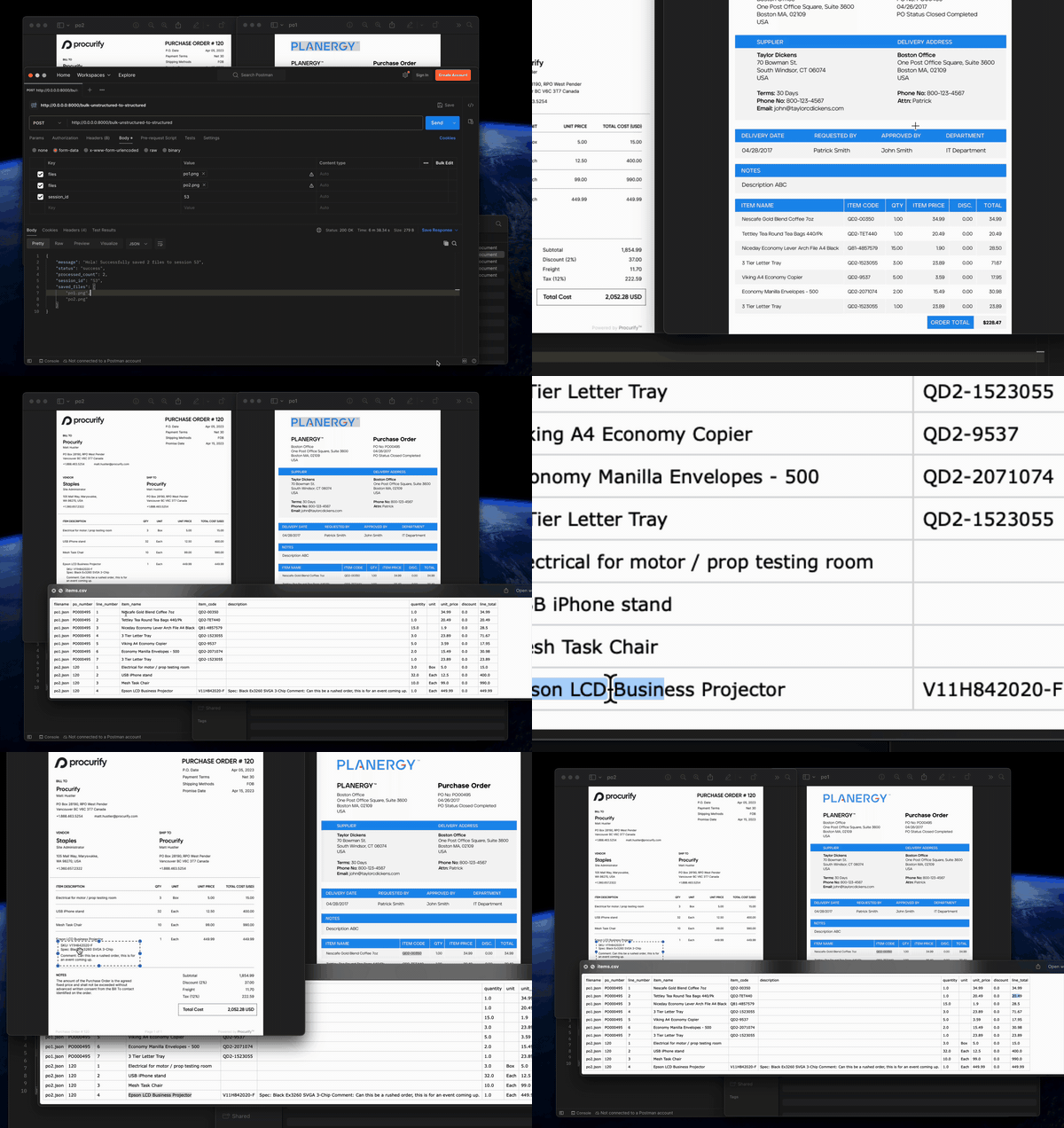
Key Features: ✨
- Schema Inference 🔍: AI analyzes documents and creates optimal JSON structure
- Data Extraction 📊: Maps document fields to schema with confidence scoring
- CSV Generation 📋: Automatically creates organized tables for data visualization
- Multimodal Support 🖼️: Handles images, PDFs, and text files
- Session Management 🗂️: Isolated processing for different document batches
- Self-improvement 🧠: Handit observes every agent interaction, and if a failure is detected, it automatically fixes it
Technologies: 🛠️ Python, LangGraph, LangChain, OpenAI, FastAPI, Pandas, Handit.ai
🌐 Language Support
Write your AI agents in your preferred language:
| Language | Status | SDK Package |
| -------------- | ------------- | --------------------- |
| Python | ✅ Stable | handit-ai>=0.0.62 |
| JavaScript | ✅ Stable | @handit.ai/handit-ai |
| TypeScript | ✅ Stable | @handit.ai/handit-ai |
| Go | ✅ Available | HTTP API integration |
| Any Stack/Framework | ✅ Available | HTTP API integration (n8n, Zapier, etc.) |
| Java, C#, Ruby, PHP | ✅ Available | REST API integration |
| LangChain & LangGraph | ✅ Available | Python/JS SDK |
| LlamaIndex, AutoGen | ✅ Available | Python/JS SDK + HTTP API |
| CrewAI, Swarm | ✅ Available | Python SDK + HTTP API |
🎯 Real Results
See how teams eliminated their AI firefighting with handit.ai:
Aspe.ai
ASPE.ai was running a high-stakes agent that was silently failing every time. Within 48 hours of connecting handit, the system identified the issue, tested fixes, and deployed the new prompts.
- +62.3% Accuracy improvement
- +36% Response relevance
- +97.8% Success rate
XBuild
XBuild's AI was suffering from prompt drift that tanked performance across key models. handit stepped in, ran automatic A/B tests, and deployed the top-performing versions.
- +34.6% Accuracy improvement
- +19.1% Success rate
- +6600 Automatic evaluations
🛠️ Advanced: Manual Setup
Advanced users only. If you need custom control over your AI teammate setup, you can manually add monitoring code instead of using the CLI.
When to use manual setup:
- Custom deployment environments
- Complex agent architectures
- Need granular control over monitoring
Quick manual setup:
- Manual Setup Guide - Ad
