
PyEcho
This is a Python script developed to facilitate planning and designing of biological experiments in Multi-well Plate setup, followed by automatically generating an input file for the Beckman Coulter Labcyte Echo® 525 Liquid Handler (used for automatic multi-well acoustic liquid transfer) to execute the planned experiments.
Install / Use
/learn @HN-lab/PyEchoREADME
PyEcho
This is a Python script developed to facilitate planning and designing of biological experiments in Multi-well Plate setup, followed by automatically generating an input file for the Beckman Coulter Labcyte Echo® 525 Liquid Handler (used for automatic multi-well acoustic liquid transfer) to execute the planned experiments. The script has been developed keeping in mind the case of high-throughput cell-free transcription and translation (TX-TL) experiments, however, its usage can further be expanded to all kinds of high-throughput experiments utilizing the Echo Liquid Handler for automatic multi-well pipetting.
Background
Conducting parallel experiments in research essentially saves a lot of time, as well as generates huge amounts of data to enhance the statistical significance of experimental results. Methods to increase the throughput of biological experiments have been widely accepted. However, it is important to keep track of the parallel experiments and organize it in a way that can be understood by others. An excel spreadsheet with a standard template could help the user organize and design their experiments. This template would allow the user to efficiently create complex experimental setups.
An issue with high-throughput biological experiments is the manual labor required for pipetting the reagents, which may sometimes lead to erroneous results. This is particularly harmful for experiments where the reaction volume is very low, for example, high-throughput cell-free TX-TL experiments. A method to automate the process of pipetting is the use of liquid handling robots such as the Beckman Coulter Labcyte Echo® 525 Liquid Handler, which can accurately and precisely transfer nanoliters of reagent across multi-well plates. The Echo software requires an input CSV file containing the information of volumes of reagent to be transferred from one well to another, which again is very laborious to create manually. Hence, we have developed an open-source python script to facilitate high-throughput experiment design as well as generating a CSV file compatible to the Echo software. An additional capability of this script is to output volume heatmaps in the microplate format for visual representation of the volume of reagents in each well.
Functionalities
Python functions from the two scripts in this module can be used for the following purposes:
| Description | Script Name | Function Called | | --- | --- | --- | | Generates an Experiment Design template <br> Output Filename: design_table.xlsx | generate_blank_design_table.py | create_file(total_rows, total_columns, reagents) | | Generates the Echo compatible CSV file <br> Output Filename: setup_<date>.csv <br> <br> Generates a user-friendly CSV file carrying information about volume of reagents required in the source wells <br> Output Filename: reagent_well_volumes.csv | generate_echo_setup_file.py | echo_format(total_rows, total_columns, total_volume, volume_factor, max_volume, min_volume, design_file, [calculate_water, water_plate_name, *water_source_wells]) | | Generates volume heatmaps in the microplate format for visual representation of the volume of reagents in each well <br> Output Filename: <reagent>.png | generate_echo_setup_file.py | input_heatmap(total_rows, total_columns, total_volume, volume_factor, design_file, [calculate_water, water_plate_name, *water_source_wells]) |
One can directly call the desired functions on the terminal from their corresponding Python scripts. However, more information regarding the arguments has been included within the scripts, and these scripts have been designed to be modulated as per the user's requirements.
A description on how to plan experiments using the Design table spreadsheet is given below.
Usage of the Experiment Design template
The first step is to generate the design table template using the generate_blank_design_table.py script to plan the experiments. An empty design table will look like the following figure:
|  |
|:--:|
| <b>Figure 1: A snippet of an empty design spreadsheet (96 well-plate format) with 3 reagents in the experiment</b>|
|
|:--:|
| <b>Figure 1: A snippet of an empty design spreadsheet (96 well-plate format) with 3 reagents in the experiment</b>|
There are 5 major components in this template:
-
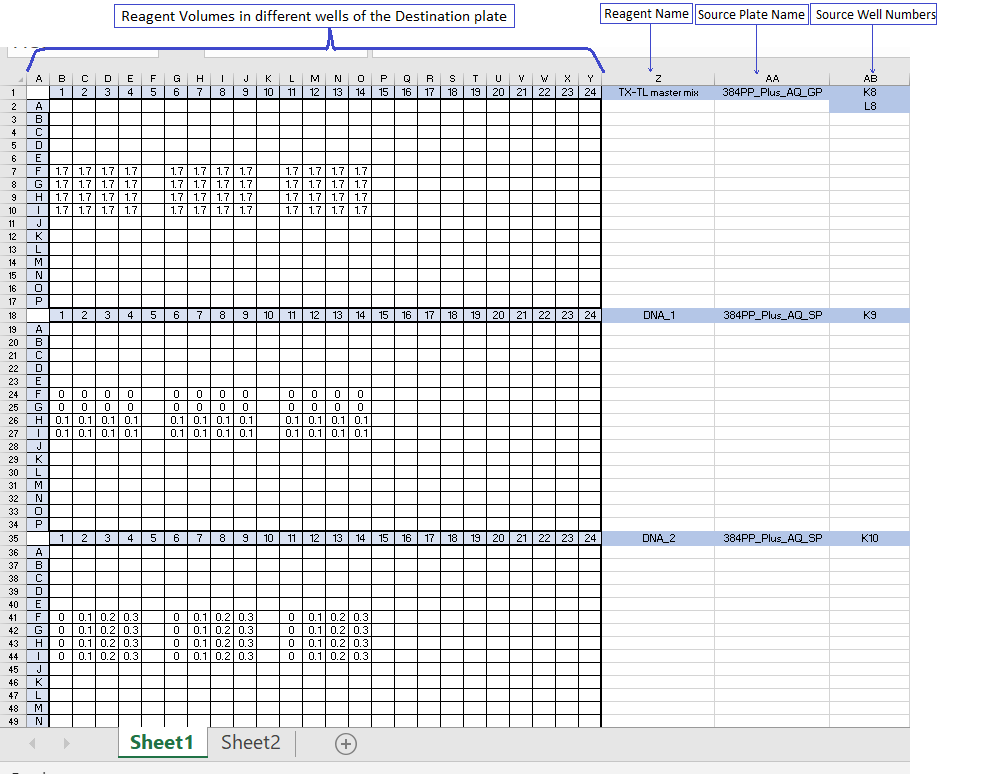
The Multi-well plate Grid : This is a 2-dimensional grid with dimensions as specified by the user. Each cell in the grid corresponds to a well on the plate. This is the area where volumes of liquid reagent to be dispensed in each well are entered. When the cell is blank, it means no dispensing operation is needed. Since the table is in an editable MS Excel format, one can explore options like "copy-paste", "Drag-down", "Autofill", etc to efficiently design the experiments. <br> <br> One thing to keep in mind here for Echo based experiments is that the minimal droplet volume (25 nl for Beckman Coulter Labcyte Echo® 525 Liquid Handler) defines both the minimal value and the step volume size that the Echo can dispense. Hence it is important to enter values that are multiples of this minimum droplet volume. <br> <br> Also, one can fill volumes in any unit of measurement, however, it is important to keep in mind the scaling factor with respect to the nanoliter scale. (For example, in figure 3, the volumes have been entered in microliter units. So, the corresponding volume factor that needs to be specified is 1000 (see description of script #2 below).
-
Reagent Name : This is the cell corresponding the first row of the grid and next column after the grid. In this cell, one must specify the name of the reagent. The volumes of this particular reagent to be dispensed in each of the wells need to be entered in the adjacent multi-well plate grid.
-
Source Plate Name : This is the cell adjacent to the reagent name. This entry is essential for using the Echo liquid dispenser. It helps the machine to identify the plate type and the liquid composition for accurate calibration from which the reagent has to be picked. More information about the Source Plate Types can be found on the official website of Labcyte. <br> <span style="color:SkyBlue"> Structure of source plate name: No. of wells + plate specs._liquid type_key feature_other features <br> Example 1: 384PP_AQ_BP (384-well+polypropylene _ aqueous_buffer) </span>
-
Source Well Number : This is the column adjacent to the source plate name. This entry is also essential for using the Echo liquid dispenser. It helps the machine to identify the well number from which the reagent has to be picked.
-
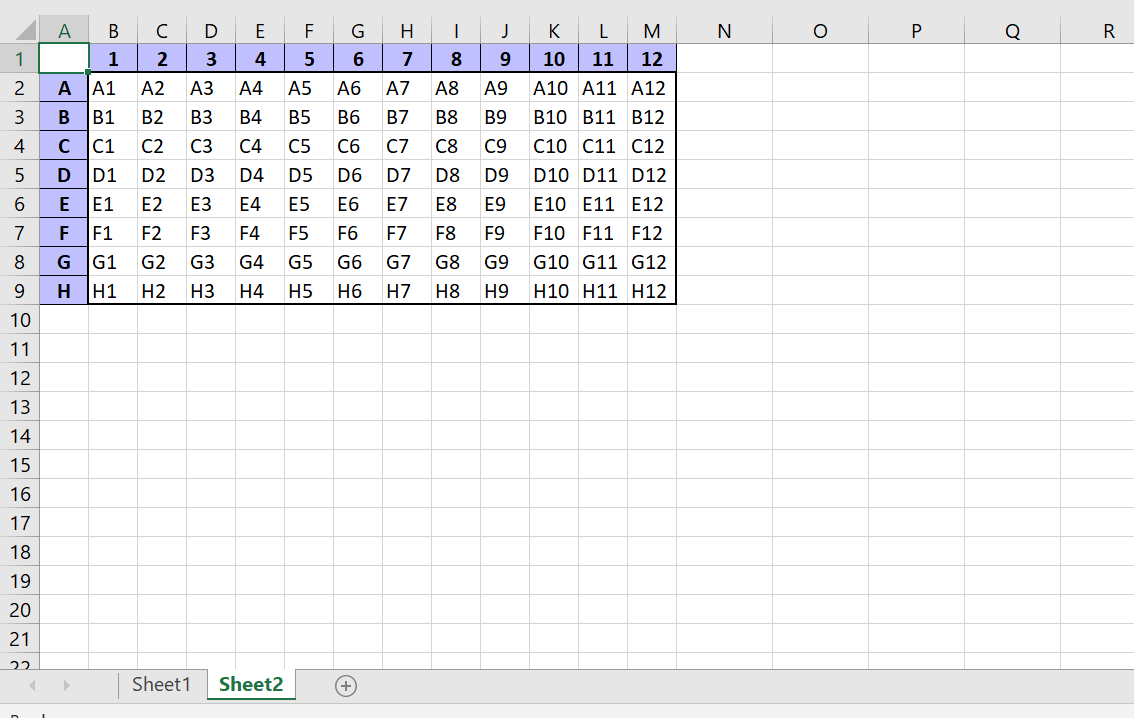
Sheet 2 : All the previous 4 components belong to Sheet 1 in the Excel file (see Figure 1). Sheet 2 in the Excel file carries information about the well numbers in the grid as it would be recognized by the machine. This Sheet would give an idea to the user about the well numbers and will facilitate experiment design. (See Figure 2)
|  |
|:--:|
| <b>Figure 2: A snippet of Sheet 2 of the Excel file (96 well-plate format)</b>|
|
|:--:|
| <b>Figure 2: A snippet of Sheet 2 of the Excel file (96 well-plate format)</b>|
With the modular Python Script, one can practically generate any kind of multi-well plate template including most of the standard formats(48-wells, 96-wells, 384-wells, 1536-wells).
A filled 384 well plate design table will look like the following figure:
|  |
|:--:|
| <b>Figure 3: Example of a Completely filled design spreadsheet (384 well-plate format) with 3 reagents in the experiment</b>|
|
|:--:|
| <b>Figure 3: Example of a Completely filled design spreadsheet (384 well-plate format) with 3 reagents in the experiment</b>|
An important thing to note over here is that if you have multiple source wells on the source plate for a particular reagent, please mention the well numbers one below the other in the same column (See the case of TX-TL master mix in Figure 3).
More About Using the Python Scripts
Script #1: generate_blank_design_table.py
If you open this script on an IDLE, immediately after the import statements, you will see an assignment section in the Script (see Figure 4). Variables in this section can be assigned by the user before running the script as per requirements of the experiment.
|  |
|:--:|
| <b>Figure 4: generate_blank_design_table.py opened on PyCharm</b>|
|
|:--:|
| <b>Figure 4: generate_blank_design_table.py opened on PyCharm</b>|
After completing the assignment, the user can directly run the script. In the end of the script, the function "create_file" has been called with the appropriate arguments. The desired Experiment Design template will be generated in the same directory as this Python file.
|  |
|:--:|
| <b>Figure 5: last two lines of generate_blank_design_table.py</b>|
|
|:--:|
| <b>Figure 5: last two lines of generate_blank_design_table.py</b>|
After generating the Design template, the user can plan their experiments according to the format described in the previous section. This design template shall be used as an input to the next script.
Script #2: generate_echo_setup_file.py
If you open this script on an IDLE, immediately after the import statements, you will see an assignment section in the Script (see Figure 6). Variables in this section shall be assigned before running the script.
|  |
|:--:|
| <b>Figure 6: generate_echo_setup_file.py opened on PyCharm</b>|
|
|:--:|
| <b>Figure 6: generate_echo_setup_file.py opened on PyCharm</b>|
Some of the variables are quite straightforward, however, some important points must be kept in mind while assigning values.
- Please double-check the name
Related Skills
ui-ux-pro-max-skill
59.1kAn AI SKILL that provide design intelligence for building professional UI/UX multiple platforms
ui-ux-pro-max-skill
59.1kAn AI SKILL that provide design intelligence for building professional UI/UX multiple platforms
onlook
25.0kThe Cursor for Designers • An Open-Source AI-First Design tool • Visually build, style, and edit your React App with AI
Figma-Context-MCP
14.2kMCP server to provide Figma layout information to AI coding agents like Cursor
