
OmniNxt
[IROS'24 Oral] A Fully Open-source and Compact Aerial Robot with Omnidirectional Visual Perception
Install / Use
/learn @HKUST-Aerial-Robotics/OmniNxtREADME
📢News
- [30/06/2024]: OmniNxt is accepted to IROS 2024.
- [15/08/2024] V0.1 Release
Outline
[TOC]
Please cite our paper if you use this project in your research:
- OmniNxt: A Fully Open-source and Compact Aerial Robot with Omnidirectional Visual Perception, Peize Liu, Chen Feng, Yang Xu, Yan Ning, Hao Xu, and Shaojie Shen, 2024 IEEE/RSJ International Conference on Intelligent Robots and Systems (IROS).
@inproceedings{liu2024omninxt,
  title={Omninxt: A fully open-source and compact aerial robot with omnidirectional visual perception},
  author={Liu, Peize and Feng, Chen and Xu, Yang and Ning, Yan and Xu, Hao and Shen, Shaojie},
  booktitle={2024 IEEE/RSJ International Conference on Intelligent Robots and Systems (IROS)},
  pages={10605--10612},
  year={2024},
  organization={IEEE}
}
Please kindly star ⭐️ this project if it helps you. We take great efforts to develop and maintain it 😁.
🤖Build your own OmniNxt
You should have basic knowledge of the standard quadrotor's electronic system.
BOM
| 🧰Component | 📏 Specification | 🔗 Purchase Link | | ------------------------------------- | ------------------------------------------------------------ | ------------------------------------------------------------ | | Quad-Fisheye Camera Set | | | | OAK-FFC-4P | Camera control board | Official / Taobao | | OAK-FFC-4P-new (Highly recommended! ) | Camera control board designed for OmniNxt | Official_Email / Taobao | | B0335 (OV9782) | Camera modules (Fisheye lens FOV larger than 210 degrees) | Official / Taobao | | Camera cables | Customized | Camera cable SCH | | Onboard computer | | | | Jetson Orin Nx | | | | Jetson Orin Nx carrier board | | DM | | Jetson Orin Nx radiator | | | | Jeston Orin Network card | | | | 2230 SSD | | | | Intel AX200 | | | | Flight platforms (6S) | | | | Nxt-FC | Project Page | MicoAir / Taobao | | Flight frame | Customized | Fusion360 | | Protector | Customized / Oddity RC XI35 protector | Fusion360 / Oddity RC | | Motors | 2204 1750KV/ 1804 2450KV | | | 6S Battery | | |
Our latest design can be accessed by Fusion360.🔗Link Access code: hkustUAV
Multi-fisheye Camera Module
ROS wrap driver 🔗oak_ffc_4p, which contains hardware information, ROS1 driver and test tools.
Calibration tool 🔗 quater-calib
Jetson Orin
Environment Info
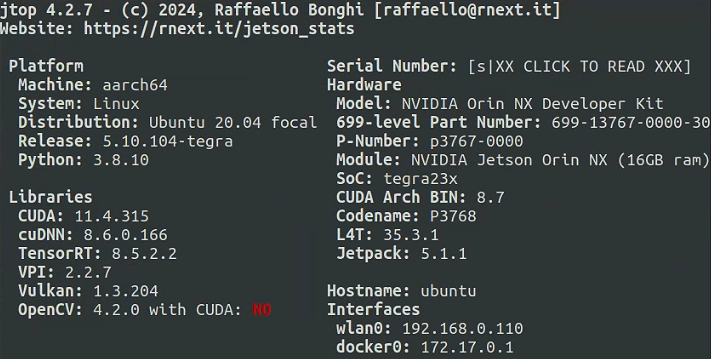
We suggest you follow these settings to avoid conflict (especially CUDA and TensorRT).
Nxt-FC
We open-source hardware designs at 🔗NXT-FC. Nxt-FC supports PX4 and Ardupilot firmware.
Follow the instructions for setting up the Nxt-FC part to configure your flight controller.
The PX4 parameter of OmniNxt can be downloaded from Onedrive.
💾Runtime setup
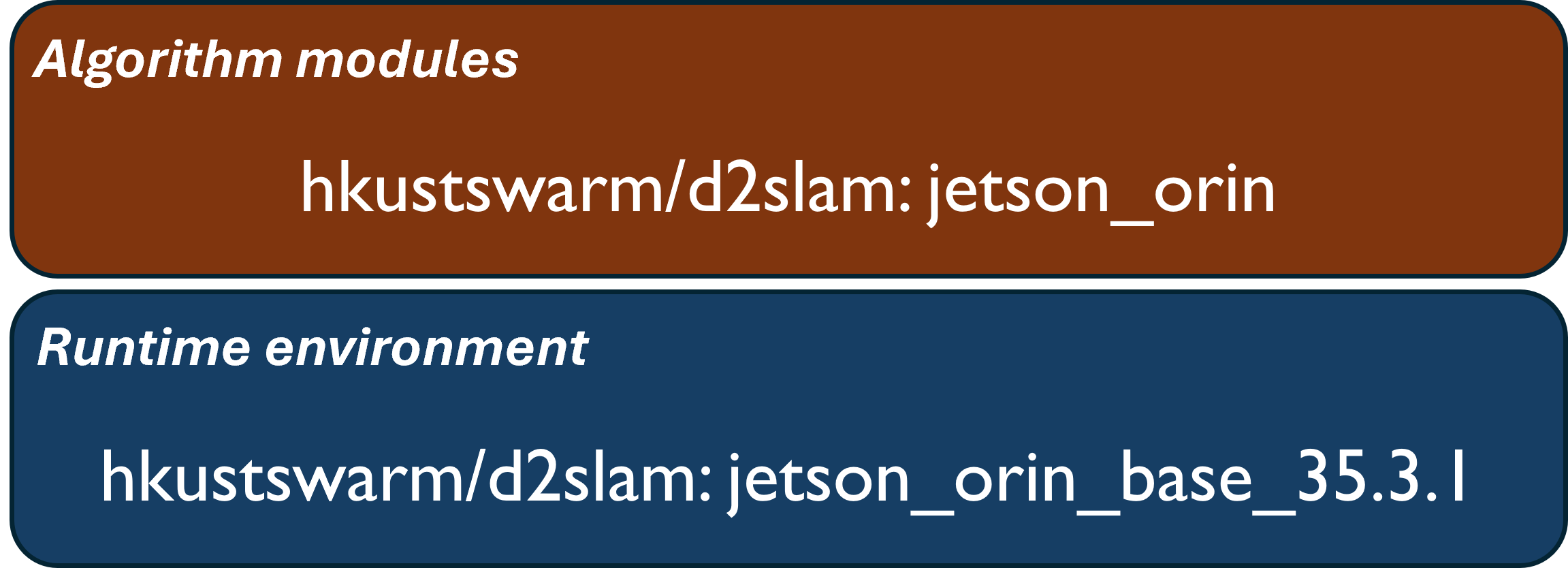
Our Omni-VINS and Omni-Depth are developed from D2SLAM. Since building the Docker images on the local machine(Jetson Orin) usually takes a long time, we suggest you pull the images from the Docker Hub. If you want to build the Docker image on your local machine, follow the instructions [Build Docker Images On Local Machine](#Build Docker images in local machines).
the docker images structure is as follows:
Step 1 Clone the repository into your local machine
git clone --branch pr_fix_main https://github.com/HKUST-Aerial-Robotics/D2SLAM.git
Step 2 Configure your quad-cam parameters and VINS parameters following our template
cd ./D2SLAM/config/quadcam_drone_nxt_tmp
If you have already calibrated your quad fisheye camera set, you can simply replace the files with the same name, which includes:
- stereo_calib_n_m_240_320.yaml (n and m is the camera number; used in Omni-Depth).
- fisheye_cams.yaml. (used in Omni-VINS)
Step 3 Configure ./start_docker.sh script with your local environment.
./start_docker.sh is under the ./D2SLAM directory.
Modify the following parameters with the absolute path under your local host environment.
- DATA_SET (where the data set is) (Optional)
Then run with the following command under the D2SLAM directory (very important, this will map your D2SLAM dir into the container):
./start_docker.sh 1
Step 4 Launch algorithm modules
run all algorithm modules together (Omni-VINS & Omni-Depth)
## you should under /root/swarm_ws/
source ./devel/setup.bash
roslaunch d2vins quadcam.laucnh
Only launch Omni-VINS. Please remove the nodes in the red box
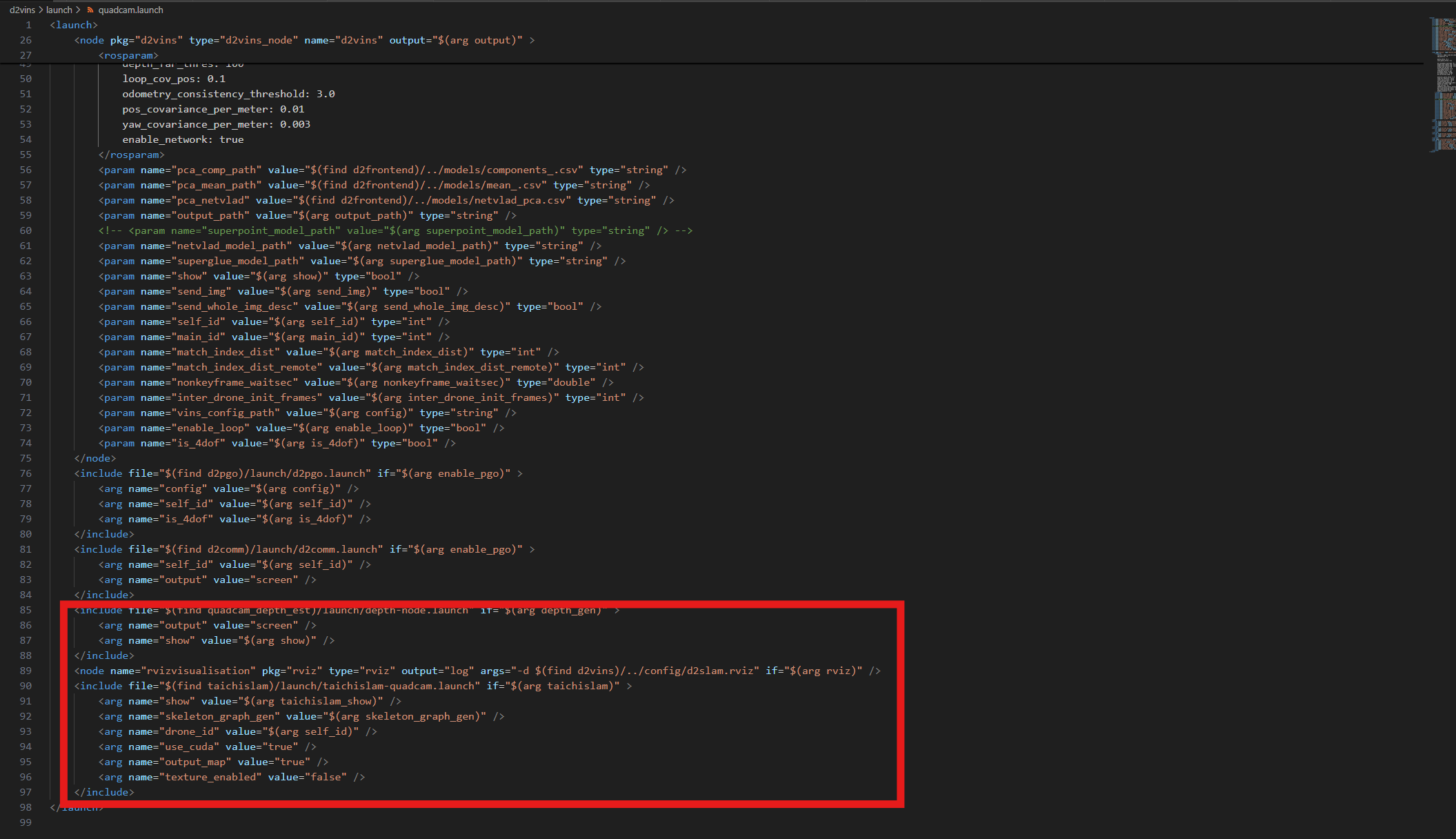
source ./devel/setup.bash
roslaunch d2vins quadcam.laucnh
Only launch Omni-Depth
Related Skills
node-connect
337.3kDiagnose OpenClaw node connection and pairing failures for Android, iOS, and macOS companion apps
frontend-design
83.2kCreate distinctive, production-grade frontend interfaces with high design quality. Use this skill when the user asks to build web components, pages, or applications. Generates creative, polished code that avoids generic AI aesthetics.
openai-whisper-api
337.3kTranscribe audio via OpenAI Audio Transcriptions API (Whisper).
commit-push-pr
83.2kCommit, push, and open a PR

Security Score
Audited on Mar 21, 2026