
Chesskit
Chess website to review games, play, learn and analyze for free on any device with Stockfish !
Install / Use
/learn @GuillaumeSD/ChesskitREADME
Chesskit is an open-source chess website to play, view, analyze and review your chess games for free on any device with Stockfish !
Mission
Chesskit aims to offer all the chess related features it can, while being free and open-source. It is designed to be easy to use, fast, and reliable.
Features
- Load and review games from chess.com and lichess.org
- Analysis board with live engine evaluation, custom arrows, evaluation graph, ...
- Moves classification (Brilliant, Great, Good, Mistake, Blunder, ...)
- Chess960 and Puzzles support
- Play against Stockfish at any elo
- Store your games in your browser database
Stack
Built with Next.js, React, Material UI, and TypeScript.
Deployed on AWS with AWS CDK, see it live here.
Running the app in dev mode
Using Node.js
[!IMPORTANT]
At least Node.js 22.11 is required.
Install the dependencies :
npm i
Run the development server :
npm run dev
Using Docker
Run the development server :
HOST_UID=$(id -u) HOST_GID=$(id -g) COMMAND=dev docker compose -f ./docker/docker-compose-dev.yml up
Open http://localhost:3000 in the browser to see the app running.
The app will automatically refresh on any source file change.
Lint
Run it with :
npm run lint
or with docker :
HOST_UID=$(id -u) HOST_GID=$(id -g) COMMAND=lint docker compose -f ./docker/docker-compose-dev.yml up
Contribute
See contributing for details on how to contribute to the project.
Deploy
To deploy the app, install AWS CLI and authenticate, then run :
npm run deploy
License
Chesskit is licensed under the GNU Affero General Public License 3. See copying for details.
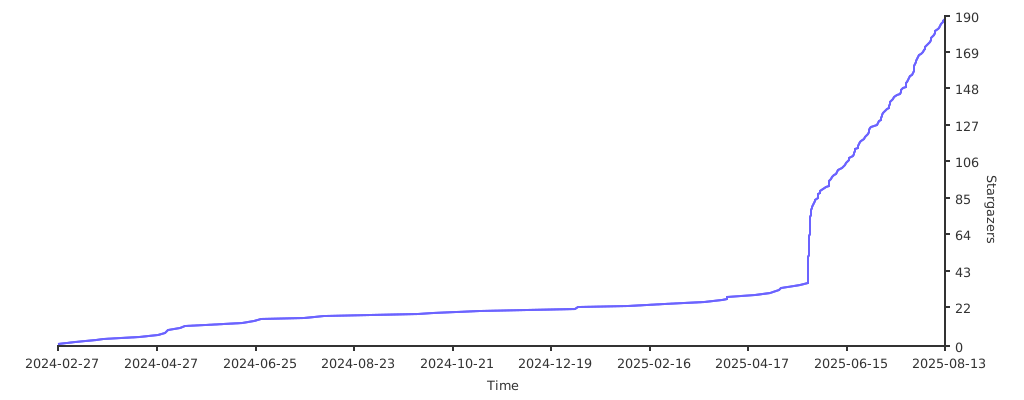
Growing thanks to you ❤️
Self-hosting
To run the project locally in production mode, you can use docker and the following command :
docker compose -f ./docker/docker-compose-prod.yml up
Related Skills
node-connect
344.4kDiagnose OpenClaw node connection and pairing failures for Android, iOS, and macOS companion apps
frontend-design
99.2kCreate distinctive, production-grade frontend interfaces with high design quality. Use this skill when the user asks to build web components, pages, or applications. Generates creative, polished code that avoids generic AI aesthetics.
Writing Hookify Rules
99.2kThis skill should be used when the user asks to "create a hookify rule", "write a hook rule", "configure hookify", "add a hookify rule", or needs guidance on hookify rule syntax and patterns.
review-duplication
99.9kUse this skill during code reviews to proactively investigate the codebase for duplicated functionality, reinvented wheels, or failure to reuse existing project best practices and shared utilities.
