
Gmic
GREYC's Magic for Image Computing: A Full-Featured Open-Source Framework for Image Processing
Install / Use
/learn @GreycLab/GmicREADME
<a href="https://gmic.eu"> </a>
</a>
A Full-Featured Open-Source Framework for Image Processing
https://gmic.eu
<a href="https://gmic.eu"> </a>
</a>
Overview
G'MIC is a full-featured open-source framework for digital image processing, distributed under the CeCILL free software licenses (LGPL-like and/or GPL-compatible). It provides several different user interfaces to convert/manipulate/filter/visualize generic image datasets, ranging from 1d scalar signals to 3d+t sequences of multi-spectral volumetric images, hence including 2d color images. These user interfaces are:
- 1 - gmic, a command-line interface , to use the G'MIC image processing features from a shell. In this setting, G'MIC may be seen as a friendly companion to the ImageMagick or GraphicsMagick software suites.
<a href="https://gmic.eu/img/gmic_cli.jpg">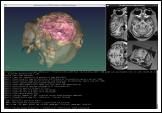 <a>
<a>
- 2 - libgmic, a small, portable, thread-safe and multi-threaded C++ image processing library to be linked to third-party applications. Its simple API allows programmers to add all G'MIC features in their own software without much efforts (a C API is available as well).
<a href="https://gmic.eu/img/gmic_libgmic.jpg">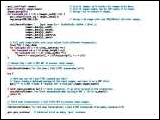 </a>
</a>
- 3 - G'MIC-Qt, a plug-in to bring G'MIC capabilities to the image retouching software GIMP, Krita, Photoshop and Paint.NET. More than 600 filters are already available, sorted by category (Artistic, Black & white, Colors, Contours, Deformations, Degradations, Details, Film emulation, Frames, Layers, Light & shadows, Patterns, Rendering, Repair, Sequences, etc.).
<a href="https://gmic.eu/img/gmic_gimp.jpg">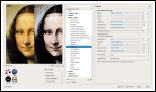 </a>
</a>
- 4 - G'MIC Online, a web service to allow users applying image processing algorithms on their images, directly from a web browser.
<a href="https://gmic.eu/img/gmic_gmicol.jpg">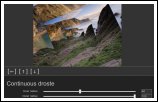 </a>
</a>
- 5 - ZArt, a Qt-based interface for real-time processing of video streaming coming from webcams or video files.
<a href="https://gmic.eu/img/gmic_zart.jpg">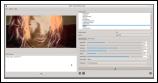 </a>
</a>
Other open-source projects are known to use some of the <b><font color="#000066">G'MIC</font></b> features:
- EKD, a free software dedicated to post-production processing for videos and images.
- Flowblade, a multitrack non-linear video editor for Linux released under GPL 3 license.
- Photoflow, a fully non-destructive photo retouching program.
- Veejay, a visual instrument and realtime video sampler.
Packaging Status


Testing the software
The correct functioning of the G'MIC software can be tested using these two commands, which execute all the commands and filters available in the framework:
$ gmic input_text https://gmic.eu/gmic_stdlib.\$_version parse_cli images
and
$ gmic input_text https://gmic.eu/gmic_stdlib.\$_version parse_gui images
Please make sure you run these commands in a new empty folder, as it generates a lot of new image files.
Referencing the software
To cite G'MIC in your own publications, please reference the JOSS article, published in January 2025:
-
D. Tschumperlé, S. Fourey and G. Osgood (2025). G'MIC: An Open-Source Self-Extending Framework for Image Processing, Journal of Open Source Software, 10(105), 6618, https://doi.org/10.21105/joss.06618
-
Corresponding BibTeX entry:
@article{Tschumperlé2025,
  doi = {10.21105/joss.06618},
  url = {https://doi.org/10.21105/joss.06618},
  year = {2025},
  publisher = {The Open Journal},
  volume = {10},
  number = {105},
  pages = {6618},
  author = {David Tschumperlé and Sébastien Fourey and Garry Osgood},
  title = {G'MIC: An Open-Source Self-Extending Framework for Image Processing},
  journal = {Journal of Open Source Software}
}
Related Skills
healthcheck
337.3kHost security hardening and risk-tolerance configuration for OpenClaw deployments
imsg
337.3kiMessage/SMS CLI for listing chats, history, and sending messages via Messages.app.
xurl
337.3kA CLI tool for making authenticated requests to the X (Twitter) API. Use this skill when you need to post tweets, reply, quote, search, read posts, manage followers, send DMs, upload media, or interact with any X API v2 endpoint.
peekaboo
337.3kCapture and automate macOS UI with the Peekaboo CLI.
