
SwiftUICalendar
Simple calendar for SwiftUI
Install / Use
/learn @GGJJack/SwiftUICalendarREADME
SwiftUICalendar


SwiftUICalendar is calendar view for SwiftUI
Installation
Swift Package Manager
- From url :
https://github.com/GGJJack/SwiftUICalendar
or
- Package.swift
.package(name: "SwiftUICalendar", url: "https://github.com/GGJJack/SwiftUICalendar", from: "0.1.14")
CocoaPods
pod 'SwiftUICalendar'
import
import SwiftUICalendar
Features
- Infinite scroll
- Support horizontal and vertical scroll
- Full custom calendar cell
- Pager lock
- Starting the week with Sunday or Monday
Example
Basic
CalendarView() { date in
    Text("\(date.day)")
}
Basic use
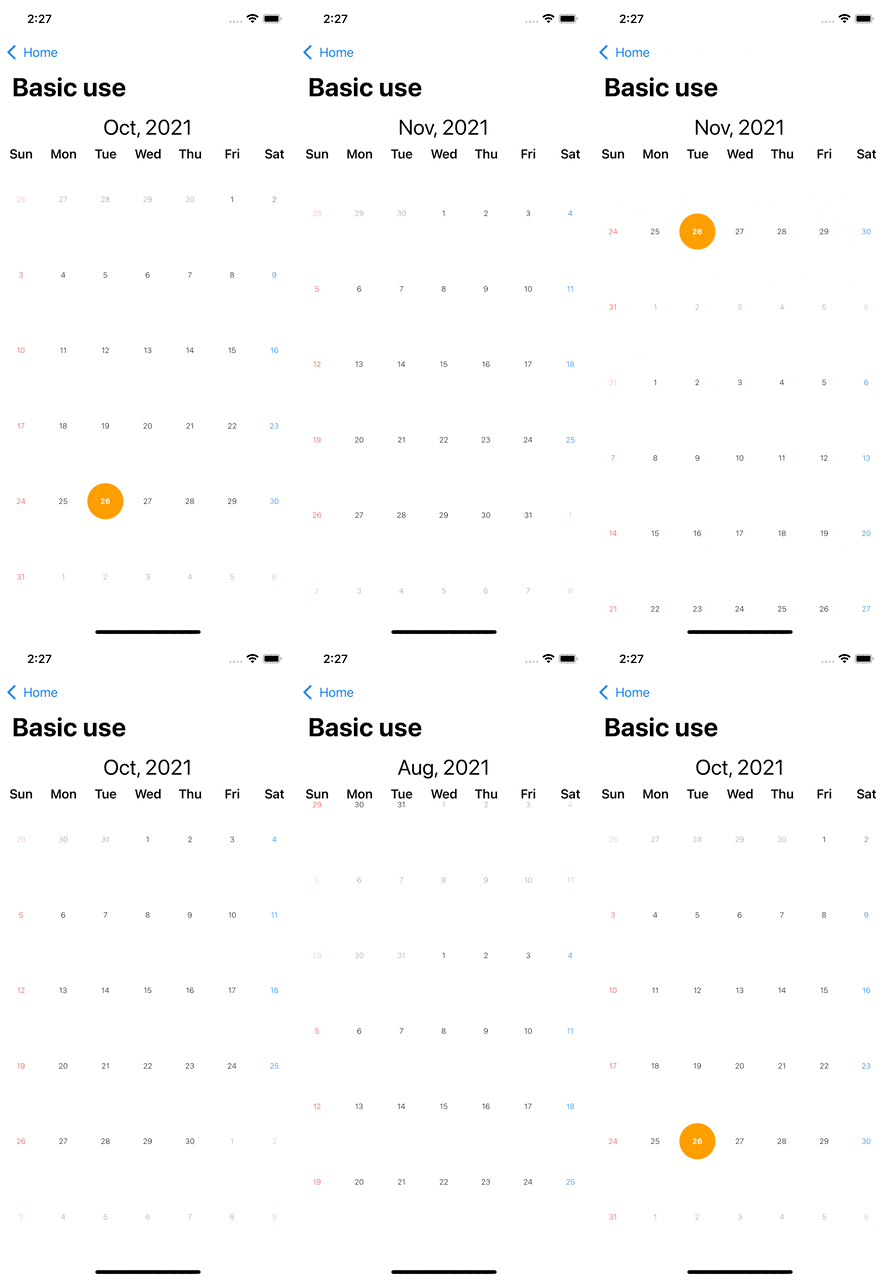
struct BasicUseView: View {
    @ObservedObject var controller: CalendarController = CalendarController(orientation: .vertical)

    var body: some View {
        GeometryReader { reader in
            VStack(alignment: .center, spacing: 0) {
                Text("\(controller.yearMonth.monthShortString), \(String(controller.yearMonth.year))")
                    .font(.title)
                    .padding(EdgeInsets(top: 8, leading: 0, bottom: 8, trailing: 0))
                HStack(alignment: .center, spacing: 0) {
                    ForEach(0..<7, id: \.self) { i in
                        Text(DateFormatter().shortWeekdaySymbols[i])
                            .font(.headline)
                            .frame(width: reader.size.width / 7)
                    }
                }
                CalendarView(controller) { date in
                    GeometryReader { geometry in
                        ZStack(alignment: .center) {
                            if date.isToday {
                                Circle()
                                    .padding(4)
                                    .frame(width: geometry.size.width, height: geometry.size.height, alignment: .center)
                                    .foregroundColor(.orange)
                                Text("\(date.day)")
                                    .frame(width: geometry.size.width, height: geometry.size.height, alignment: .center)
                                    .font(.system(size: 10, weight: .bold, design: .default))
                                    .foregroundColor(.white)
                            } else {
                                Text("\(date.day)")
                                    .frame(width: geometry.size.width, height: geometry.size.height, alignment: .center)
                                    .font(.system(size: 10, weight: .light, design: .default))
                                    .foregroundColor(getColor(date))
                                    .opacity(date.isFocusYearMonth == true ? 1 : 0.4)
                            }
                        }
                    }
                }
            }
        }
    }
}
Calendar scroll
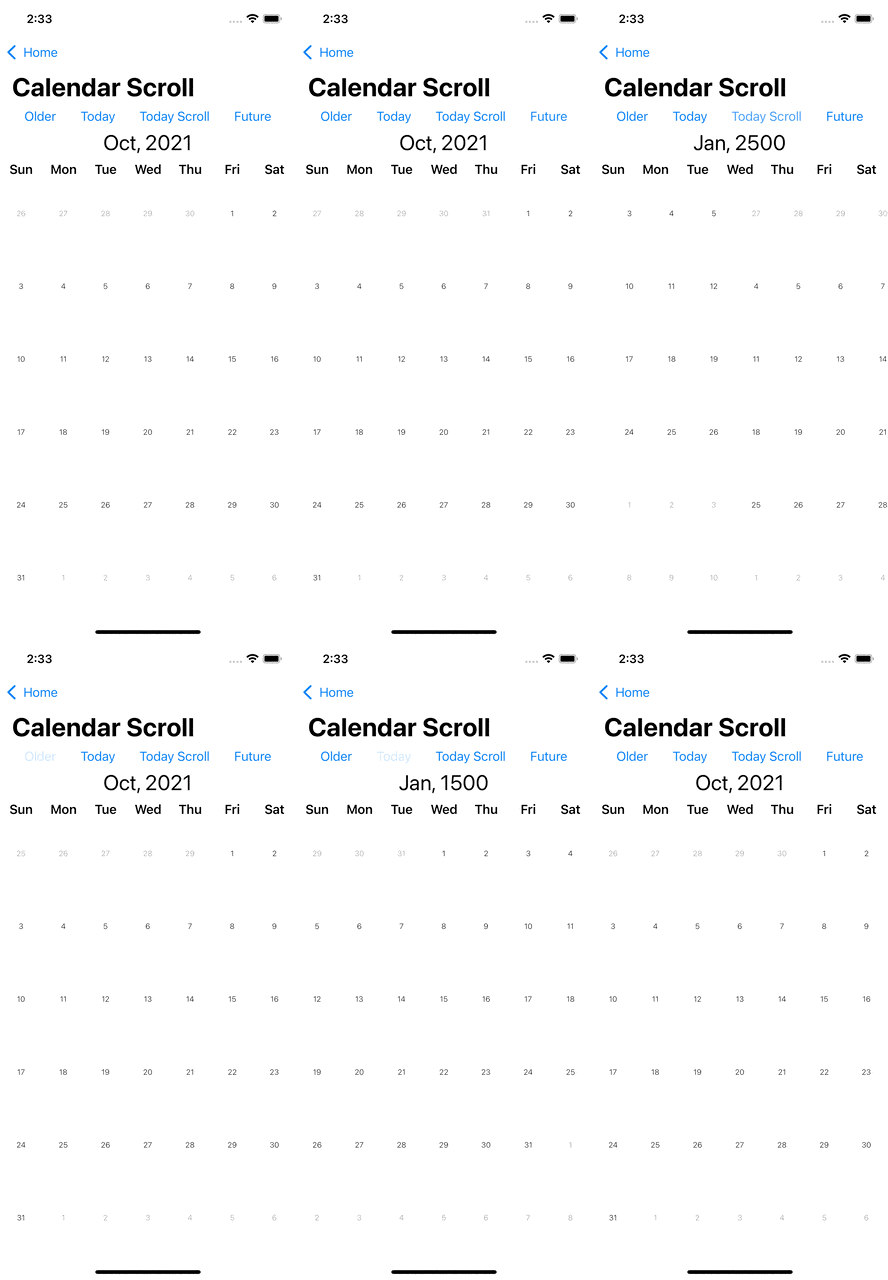
struct CalendarScrollView: View {
    @ObservedObject var controller: CalendarController = CalendarController()

    var body: some View {
        GeometryReader { reader in
            VStack(alignment: .center, spacing: 0) {
                HStack(alignment: .center, spacing: 0) {
                    Spacer()
                    Button("Older") {
                        controller.scrollTo(YearMonth(year: 1500, month: 1), isAnimate: true)
                    }
                    Spacer()
                    Button("Today") {
                        controller.scrollTo(YearMonth.current, isAnimate: false)
                    }
                    Spacer()
                    Button("Today Scroll") {
                        controller.scrollTo(YearMonth.current, isAnimate: true)
                    }
                    Spacer()
                    Button("Future") {
                        controller.scrollTo(YearMonth(year: 2500, month: 1), isAnimate: true)
                    }
                    Spacer()
                }
                Text("\(controller.yearMonth.monthShortString), \(String(controller.yearMonth.year))")
                    .font(.title)
                    .padding(EdgeInsets(top: 8, leading: 0, bottom: 8, trailing: 0))
                HStack(alignment: .center, spacing: 0) {
                    ForEach(0..<7, id: \.self) { i in
                        Text(DateFormatter().shortWeekdaySymbols[i])
                            .font(.headline)
                            .frame(width: reader.size.width / 7)
                    }
                }
                CalendarView(controller) { date in
                    GeometryReader { geometry in
                        Text("\(date.day)")
                            .frame(width: geometry.size.width, height: geometry.size.height, alignment: .center)
                            .font(.system(size: 10, weight: .light, design: .default))
                            .opacity(date.isFocusYearMonth == true ? 1 : 0.4)
                    }
                }
                .navigationBarTitle("Calendar Scroll")
                // .onChange(of: controller.yearMonth) { yearMonth in // If you want to detect date change
                //     print(yearMonth)
                // }
            }
        }
    }
}
Embed Header

struct EmbedHeaderView: View {

    @ObservedObject var controller: CalendarController = CalendarController()

    var body: some View {
        GeometryReader { reader in
            VStack {
                HStack(alignment: .center, spacing: 0) {
                    Button("Prev") {
                        controller.scrollTo(controller.yearMonth.addMonth(value: -1), isAnimate: true)
                    }
                    .padding(8)
                    Spacer()
                    Text("\(controller.yearMonth.monthShortString), \(String(controller.yearMonth.year))")
                        .font(.title)
                        .padding(EdgeInsets(top: 8, leading: 0, bottom: 8, trailing: 0))
                    Spacer()
                    Button("Next") {
                        controller.scrollTo(controller.yearMonth.addMonth(value: 1), isAnimate: true)
                    }
                    .padding(8)
                }
                CalendarView(controller, header: { week in
                    GeometryReader { geometry in
                        Text(week.shortString)
                            .font(.subheadline)
                            .frame(width: geometry.size.width, height: geometry.size.height, alignment: .center)
                    }
                }, component: { date in
                    GeometryReader { geometry in
                        Text("\(date.day)")
                            .frame(width: geometry.size.width, height: geometry.size.height, alignment: .center)
                            .font(.system(size: 10, weight: .light, design: .default))
                            .opacity(date.isFocusYearMonth == true ? 1 : 0.4)
                    }
                })
            }
        }
        .navigationBarTitle("Embed header")
    }
}
Information

extension YearMonthDay: Hashable {
    public func hash(into hasher: inout Hasher) {
        hasher.combine(self.year)
        hasher.combine(self.month)
        hasher.combine(self.day)
    }
}

struct InformationView: View {
    var informations = [YearMonthDay: [(String, Color)]]()

    init() {
        var date = YearMonthDay.current
        informations[date] = []
        informations[date]?.append(("Hello", Color.orange))
        informations[date]?.append(("World", Color.blue))

        date = date.addDay(value: 3)
        informations[date] = []
        informations[date]?.append(("Test", Color.pink))

        date = date.addDay(value: 8)
        informations[date] = []
        informations[date]?.append(("Jack", Color.green))

        date = date.addDay(value: 5)
        informations[date] = []
        informations[date]?.append(("Home", Color.red))

        date = date.addDay(value: -23)
        informations[date] = []
        informations[date]?.append(("Meet at 8, Home", Color.purple))

        date = date.addDay(value: -5)
        informations[date] = []
        informations[date]?.append(("Home", Color.yellow))

        date = date.addDay(value: -10)
        informations[date] = []
        informations[date]?.append(("Baseball", Color.green))
    }

    var body: some View {
        GeometryReader { reader in
            VStack {
                CalendarView(header: { week in
                    GeometryReader { geometry in
                        Text(week.shortString)
                            .font(.subheadline)
                            .frame(width: geometry.size.width, height: geometry.size.height, alignment: .center)
                    }
                }, component: { date in
                    GeometryReader { geometry in
                        VStack(a
