
Ascidia
A command-line utility for rendering technical diagrams from ASCII art
Install / Use
/learn @Frimkron/AscidiaREADME
Ascidia
A command-line utility for rendering technical diagrams from ASCII art.
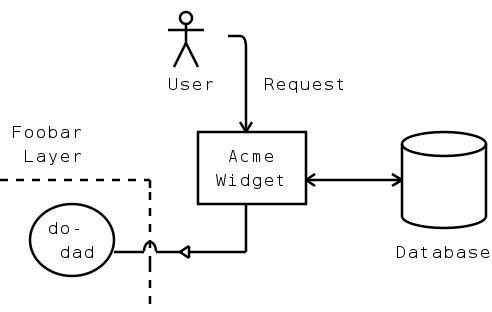
This:
               O
              -|-  -.
              / \   |
              User  | Request
                    V
 Foobar         +--------+       .------.
  Layer         |  Acme  |       '------'
- - - - - - +   | Widget |<----->|      |
   .----.   ;   +--------+       |      |
  | doo- |  ;       |            '------'
  |  dad |--^--<|---+            Database
   '----'   ;
            ;
Becomes this:
About Ascidia
Ascidia converts ASCII-art technical diagrams, created using particular symbols, into prettier raster and vector graphic formats. Technical diagrams can be created and embedded within plain text documentation (source code comments, for example) so that they can be maintained in the same place. Later, the diagrams can be rendered as images ready for publishing.
Ascidia was inspired by similar applications of this type, namely Ditaa and ASCIItoSVG. It also takes inspiration from the philosophy of John Gruber's Markdown, which aims to define a rich text format using intuitive formatting rules in place of the syntactic clutter of a markup language. Ascidia attempts to do the same for ASCII diagrams, by defining a set of patterns which are as recognisable in raw text as they are in their rendered form.
Ascidia is, apparently, another name for the Sea Squirt.
Requirements
Ascidia requires the following:
Installation
Installation via pipx is recommended to avoid potential conflicts with other system-managed Python modules. Regular pip will work too, though.
To install the latest stable release from the Python Package Index:
pipx install ascidia
Or to install from Github:
pipx install git+https://github.com/Frimkron/Ascidia.git
Or to install from the downloaded source code:
- Change into code directory
pipx install .
Finally, check the install by running:
ascidia --help
Usage
ascidia [options] [file]
Positional Arguments
file
Path to the input file to read. Use - to read from standard input. This is
the default.
Options
-h, --help
Show brief help text
-o, --outfile
Path to the output file to write. Use - to write to standard output. This is
the default if reading from standard input, otherwise defaults to
<input-file-name>.<output-extension>.
-f, --foreground
The foreground colour, as comma-separated RGB values between 0 and 1. Some basic predefined colour names are also supported ("black", "red", "blue", etc). Defaults to black.
-b --background
The background colour, as comma-separated RGB values between 0 and 1. Some basic predefined colour names are also supported ("black", "red", "blue", etc). "none" can also be used to use a transparent background. Defaults to white.
-c, --charheight
The height to render each character as, in pixels. This will affect the overall width and height of the output. Defaults to 24.
-t --type
The output format. Options are as follows:
svg- Scalable Vector Graphics format. An XML document describing the diagram as a set of shape-drawing instructions.png- PNG format. A losslessly-compressed raster image format.
Defaults to png.
-q, --quiet
If specified, causes informational output to be suppressed. Note that such output is omitted anyway when writing the diagram to standard output.
Examples
Convert the ASCII diagram diagram.txt to a PNG image:
$ ascidia diagram.txt
Convert diagram foobar.txt to the SVG file result.svg:
$ ascidia -o result.svg foobar.txt
Convert the output of mycommand to an SVG file called output:
$ mycommand | ascidia -o output -t svg -
Invoking from Python Code
Ascidia can be invoked as a Python library, as per the following example:
import ascidia as asc

# create diagram object from string
diagram = asc.process_diagram("""\
.---.    +-------+    +-----+
| ? |--->|  abc  |<-->|     |
'---'    +-------+    '._.-.|
""")

# configure output preferences
prefs = asc.OutputPrefs(fgcolour=asc.NAMED_COLOURS["blue"])

# write to a png file. SvgOutput takes the same arguments but the stream
# passed to it should be in text mode instead
with open('example.png', 'wb') as stream:
    asc.PngOutput.output(diagram, stream, prefs)
Diagram Format
Ascidia reads ASCII character data with Unix line endings and converts it to an image, recognising particular character patterns as diagram elements. The following subsections describe the patterns that Ascidia understands.
Lines
Ascidia recognises horizontal, vertical and diagonal lines of any length. Lines can be on their own, or attached to Boxes or Connectors. They may have square or rounded corners.
Horizontal Lines
Example Input
----------
- - - - -
Example Output
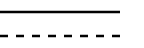
Solid horizontal lines consist of one or more dash or hyphen - characters.
Dashed horizontal lines consist of alternating dash or hyphen - characters,
and space characters. Note, a dashed horizontal line must begin with a
hyphen and end with a space. Dashed horizontal lines have a minimum length of
4:
- -
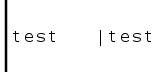
Note that single line characters with text beside them are not recognised as lines:
---test

-test

Vertical Lines
Example Input
| ;
| ;
| ;
| ;
Example Output

Solid vertical lines consist of one or more vertical-bar or pipe | characters.
Dashed vertical lines consist of one or more semi-colon ; characters.
Note that single line characters with text beside them are not recognised as lines:
|
|test   |test
|
Diagonal Lines
Example Input
  /  ,  \  `
 /  ,    \  `
/  ,      \  `
Example Output
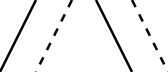
Solid, right-leaning diagonal lines consist of one or more forwardslash /
characters.
Dashed, right-leaning diagonal lines consist of one or more comma ,
characters.
Solid, left-leaning diagonal lines consist of one or more backslash \
characters.
And dashed, left-leaning diagonal lines consist of one or more grave-accent or backtick ` characters.
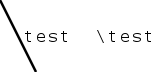
Note, the line characters should line up diagonally. Also, single line characters with text beside them are not recognised as lines:
\
 \test  \test
  \
Square Corners
Example Input
    +---+
|   |   |
|   |   +
+---+    \
       ---+---
Example Output
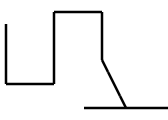
Square line corners are constructed using plus + characters.
Corners may be placed at the intersection of one or more horizontal, vertical or diagonal lines.
Rounded Corners
Example Input
    .---.
|   |   |
|   |   :
'---'    \
       ---'---
Example Output
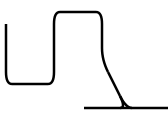
Rounded line corners that curve upwards are constructed using apostrophe or
single-quote ' characters.
For corners that curve downwards, full-stop or period characters . are used.
Corners that join lines above to lines below are constructed using colon :
characters.
Corners may be placed at the intersection of one or more horizontal, vertical or diagonal lines.
Hops
Example Input
   |        |        |
---)---  ---(---  ---^---
   |        |        |
Example Output
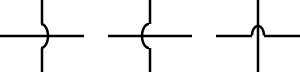
Hops are often used to indicate that two crossing lines are not connected to each other.
A hop may be placed at the intersection of any horizontal line with any vertical line.
A left-parenthesis or left-round-bracket ( character, right-parenthesis )
character, or caret ^ character may be used.
