
AndroidAOP
🔥🔥🔥A framework that helps Android App transform into an AOP architecture. (帮助 Android App 改造成AOP架构的框架,一个注解就可以请求权限、切换线程、禁止多点、监测所有点击事件、监测生命周期等等)
Install / Use
/learn @FlyJingFish/AndroidAOPREADME
README.md
It is recommended to click Docs below to directly view the documentation with better experience
Brief Description
This is a framework that helps Android App transform into AOP architecture. With just one annotation, you can request permissions, switch threads, prohibit multiple clicks, monitor all click events at once, monitor the life cycle, etc. You can also customize your own Aop code without using AspectJ.
Special feature
1 . This library has built-in some commonly used aspect annotations for your use
2 . This library allows you to make your own aspects, and the syntax is simple and easy to use
3 . This library supports Java projects and Kotlin projects at the same time
4 . This library supports cutting into third-party libraries
5 . This library supports the case where the cutting method is a Lambda expression
6 . This library supports the coroutine function modified by suspend for the cutting method
7 . This library supports the generation of all cutting information json and html files, which is convenient for viewing all cutting locations Configure here
8. This library supports multiple rapid development modes, which makes your packaging speed almost unchanged Configure here
9. This library supports Component-based development configure here
10. This library is pure static weaving into AOP code
11. This library is not implemented based on AspectJ. The amount of woven code is very small and the intrusion is extremely low
12. Rich and complete usage documentation helps you fully understand the usage rules of this library click here to go to the wiki document
13. There are also plug-in assistants that help you generate section codes for your use click here to download
Click here to download apk, or scan the QR code below to download
<img src="/docs/screenshot/qrcode.png" alt="show" width="200px" />Version restrictions
Minimum Gradle version: 7.6👇
<img src="/docs/screenshot/gradle_version.png" alt="show" />Minimum SDK version: minSdkVersion >= 21
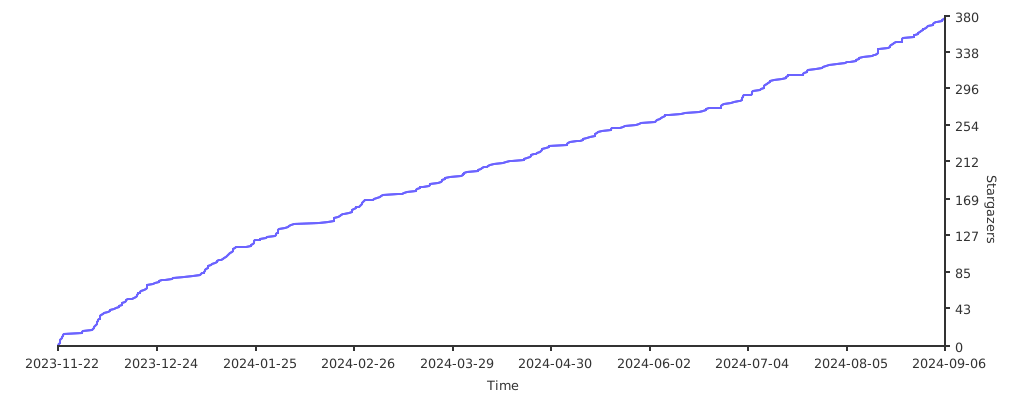
Star trend chart
Steps for usage
Can I give the project a Star before starting? Thank you very much, your support is my only motivation. Welcome Stars and Issues!
For the full version of the document, please click AndroidAOP
1. Introduce the plug-in, choose one of the two methods below (required)
Method 1: apply method
<p align = "left">
<picture>
<!-- 亮色模式下显示的 SVG -->
<source srcset="https://github.com/FlyJingFish/AndroidAOP/blob/master/docs/svg/one.svg" media="(prefers-color-scheme: light)">
<!-- 暗黑模式下显示的 SVG -->
<source srcset="https://github.com/FlyJingFish/AndroidAOP/blob/master/docs/svg/one_dark.svg" media="(prefers-color-scheme: dark)">
<!-- 默认图片 -->
<img src="https://github.com/FlyJingFish/AndroidAOP/blob/master/docs/svg/one.svg" align = "center" width="22" height="22" />
</picture>
Depend on the plug-in in <code>build.gradle</code> in the <strong>project root directory</strong>
</p>
-
Using the plugins DSL:
<details> <summary><strong>Using legacy plugin application:</strong></summary>plugins { //Required item 👇 apply is set to true to automatically apply debugMode to all modules, if false, manual configuration is required. id "io.github.flyjingfish.androidaop" version "2.7.4" apply true }
</details>buildscript { dependencies { //Required items 👇 classpath 'io.github.flyjingfish:androidaop-plugin:2.7.4' } } //👇Add this sentence to automatically apply debugMode to all modules. If not, follow step 5 below. apply plugin: "android.aop"
-
Using the plugins DSL:
<details> <summary><strong>Using legacy plugin application:</strong></summary>//Required items 👇 plugins { ... id 'android.aop'//It is best to put it on the last line }
</details>//Required items 👇 apply plugin: 'android.aop' //It's best to put it on the last line
~~Method 2: plugins method~~
-
Add directly to
build.gradleof app//Required items 👇 plugins { ... id "io.github.flyjingfish.androidaop" version "2.7.4" }
2. If you need to customize aspects, and the code is Kotlin (optional)
- Depend on the plug-in in
build.gradlein the project root directory
plugins {
     //Optional 👇, if you need to customize aspects and use the android-aop-ksp library, you need to configure it. The version number below is determined according to the Kotlin version of your project
     id 'com.google.devtools.ksp' version '1.8.0-1.0.9' apply false
}
List of matching version numbers for Kotlin and KSP Github
3. Introduce dependent libraries (required)
plugins {
     //Optional 👇, if you need to customize aspects and use the android-aop-ksp library, you need to configure it
     id 'com.google.devtools.ksp'
}

dependencies {
     //Required items 👇
     implementation 'io.github.flyjingfish:androidaop-core:2.7.4'
     //Optional 👇This package provides some common annotation aspects
     implementation 'io.github.flyjingfish:androidaop-extra:2.7.4'

     //Required item 👇If you already have this item in your project, you don’t need to add it.
     implementation 'androidx.appcompat:appcompat:1.3.0' // At least in 1.3.0 and above

     //Choose one 👇, if you want to customize aspects, you need to use them, ⚠️supports aspects written in Java and Kotlin code
     ksp 'io.github.flyjingfish:androidaop-apt:2.7.4'
     //Choose one 👇, if you want to customize aspects, you need to use them, ⚠️only applies to aspects written in Java code
     annotationProcessor 'io.github.flyjingfish:androidaop-apt:2.7.4'
     //⚠️Choose one of the above ksp and annotationProcessor
     //If you only use the functions in android-aop-extra, you don't need to select these two options
}
