
Flowengine
White-label client portal for automation agencies. Manage instances, invite clients, control what they see, and bill them via Stripe. Self-hosted, open source.
Install / Use
/learn @FlowEngine-cloud/FlowengineREADME
FlowEngine
White-label client portal for automation agencies (mainly using n8n). Manage instances, invite clients, control what they see, and bill them via Stripe. Self-hosted, open source.




Demo: https://demo.flowengine.cloud
</div>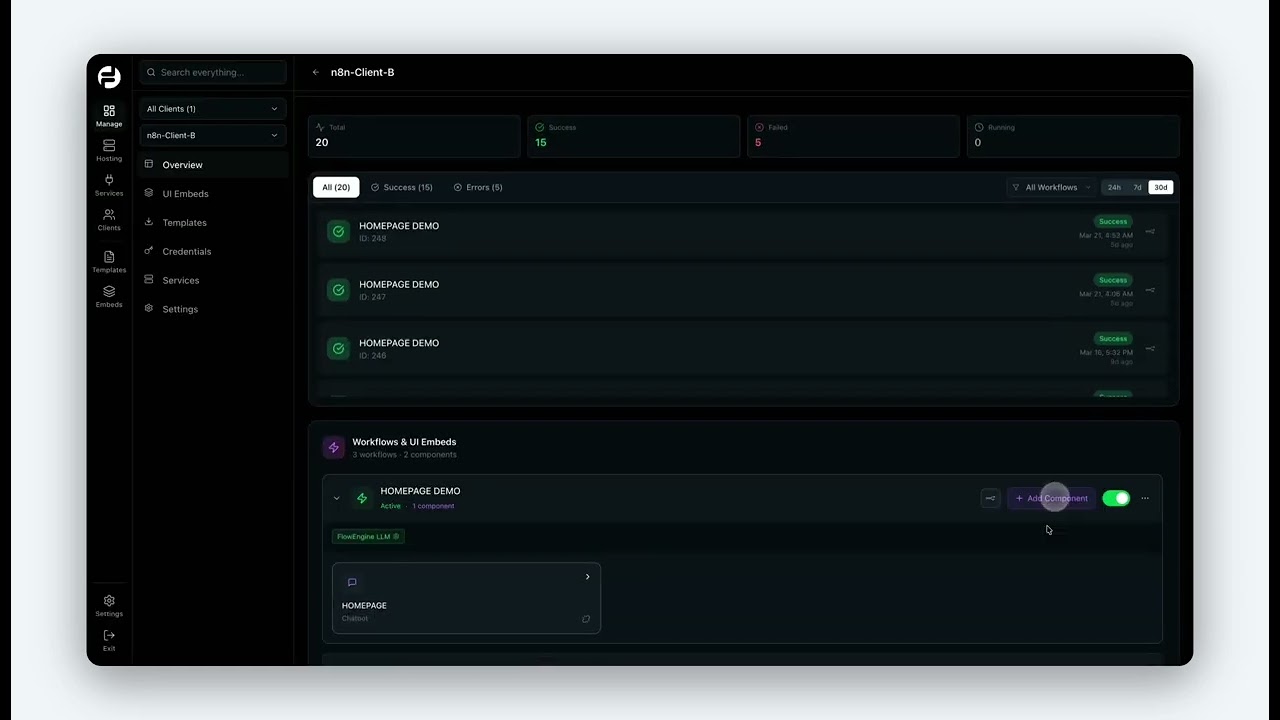
What It Does
You run the portal. Your clients log in and see only what you give them access to. You manage everything from behind the scenes.
Portal Tabs
Features
Manage
Built mainly for n8n — this is what your clients see. The hosting layer is hidden unless you choose to expose it. Also includes basic management for OpenClaw and Docker instances (status, URL, notes).
Overview
See detailed executions and workflows across all instances at once, with filters by workflow, status, and client.
UI Embeds
Build embeddable chatbots, forms, and UI elements and link them to n8n workflows in one click. it will automatically pick up the webhook and trigger type.
Templates
Set up once — clients browse and import workflows based on descriptions and see what credentials they need. Push updates so clients can update live workflows in one click, or push the same update to all your clients at once.
Credentials
Clients add their API keys through the portal and they go straight into their n8n instance. Configure one time the OAuth apps once under Settings (Microsoft, Google, Slack, X, Reddit, LinkedIn) and clients authenticate through the portal — their tokens go directly to their n8n.
Services
Link a WhatsApp API to clients' instances.
Settings
n8n API key and manage client AI usage and choose who pays for it (works when hosting with FlowEngine)
Hosting
Deploy and manage instances. Not visible to clients by default.
- n8n - connect your own self-hosted instance or deploy via FlowEngine managed hosting
- OpenClaw - multi-channel bot platform (Telegram, Discord, Slack)
- Docker / Website - deploy any Docker image or static site
- Connect external - link any existing instance via URL + API key
Clients
Invite clients and control what they see:
- Invite clients.
- Assign which instances a client can access
- Clients get their own login and see only what assinged for them.
- Manage payments/ subscription via Stripe
- AI usage
- Invite thier team members
Settings
- Branding - logo and company name
- Authentication - Google/GitHub OAuth, signup restrictions
- SMTP - email for client invitations
- Stripe - connect your Stripe account to bill clients
- OAuth apps - configure Microsoft, Google, Slack, X, Reddit, LinkedIn for n8n client authentication
- Team - invite team members with role-based access
Deploy
Option 1: Docker Compose — build from source
Everything runs in one stack — no external Supabase account needed.
git clone https://github.com/FlowEngine-cloud/flowengine.git
cd flowengine
./setup.sh
setup.sh copies .env.docker to .env, creates the Docker network, and starts the stack.
Edit .env with your domain and passwords, then:
docker compose up -d --build
Open http://your-server:3000 (or your domain if using Traefik).
Set PORTAL_DOMAIN=portal.yourdomain.com in .env for automatic HTTPS via Let's Encrypt (requires Traefik).
Option 2: Pre-built Docker image (recommended for production)
Uses the pre-built image from Docker Hub — no build step, faster setup.
git clone https://github.com/FlowEngine-cloud/flowengine.git
cd flowengine
./setup.sh --prod
Or manually:
cp .env.docker .env   # edit .env first
docker compose -f docker-compose.prod.yml up -d
Updating: Watchtower is included and checks for a new image every hour — it pulls and redeploys automatically. To update manually:
docker compose -f docker-compose.prod.yml pull portal
docker compose -f docker-compose.prod.yml up -d portal
To pin a specific version, set IMAGE_TAG=v0.1.0 in your .env.
Option 3: FlowEngine Managed Hosting
Deploy the portal on FlowEngine infrastructure — no server setup needed. Requires your own Supabase project.
Option 4: Coolify
- In Coolify, create a new Docker Compose service
- Source: GitHub →
FlowEngine-cloud/flowengine - Compose file:
docker-compose.prod.yml - Add your environment variables from
.env.docker - Deploy
Coolify will automatically redeploy when the latest image is updated (enable Watch for image changes in the service settings).
Option 5: DigitalOcean Droplet
# 1. Create a Droplet (Ubuntu 22.04, 2 GB+ RAM recommended)
# 2. SSH in and install Docker
curl -fsSL https://get.docker.com | sh

# 3. Clone and configure
git clone https://github.com/FlowEngine-cloud/flowengine.git
cd flowengine
./setup.sh --prod

# 4. Edit .env, then start
docker compose -f docker-compose.prod.yml up -d
For HTTPS, point your domain to the Droplet IP and set PORTAL_DOMAIN in .env (requires Traefik or Nginx Proxy Manager).
Option 6: External Supabase
If you already have a Supabase project:
cp .env.example .env.local
# Fill in your Supabase URL and keys
npm install
npm run build
npm start
Run the migration in your Supabase SQL editor:
-- paste contents of migrations/supabase-schema.sql
Environment Variables
Required
| Variable | Description |
|---|---|
| POSTGRES_PASSWORD | Postgres password (self-hosted only) |
| JWT_SECRET | JWT secret — openssl rand -base64 32 |
| ANON_KEY / SERVICE_ROLE_KEY | Supabase JWT keys (generate) |
| SITE_URL | Public URL users open in their browser (e.g. https://portal.yourdomain.com) |
| ENCRYPTION_SECRET | AES-256 key for stored credentials — openssl rand -hex 32 |
Optional
| Variable | Description |
|---|---|
| SMTP_HOST / SMTP_USER / SMTP_PASS / SMTP_FROM | Email for client invitations |
| STRIPE_SECRET_KEY / STRIPE_WEBHOOK_SECRET / NEXT_PUBLIC_STRIPE_PUBLISHABLE_KEY | Stripe for client billing |
| AI_BASE_URL / AI_API_KEY / AI_MODEL | AI assistant in UI Studio (OpenAI-compatible — OpenRouter, Ollama, etc.) |
| FLOWENGINE_API_KEY | Connect to FlowEngine managed hosting |
| PORTAL_DOMAIN | Domain for Traefik HTTPS routing (leave empty for standalone) |
Most settings (Stripe, SMTP, branding, n8n API key) are configured through the portal Settings UI after first login — not env vars.
Security
- Credentials encrypted at rest with AES-256 via
ENCRYPTION_SECRET - Client sessions use Supabase PKCE auth flow
- Row-level security (RLS) enforced in the database — clients can only query their own data
- Stripe and SMTP credentials are never exposed to the browser
- No telemetry, no analytics, no data sent to third parties
FlowEngine Managed Hosting (Optional)
The portal works with any self-hosted n8n. Optionally, connect to FlowEngine for managed instance hosting with automatic SSL, backups, WhatsApp, and OpenClaw multi-channel bots. Set your API key in Settings → FlowEngine API.
Tech Stack
- Next.js 15 + React 19 (App Router)
- Supabase — auth (GoTrue), database (PostgreSQL), storage
- Tailwind CSS 4
- Stripe (optional)
- Docker with self-hosted Supabase stack
License
MIT with Commons Clause and Additional Restrictions — free to self-host for personal or internal business use. Commercial embedding, component extraction, resale, and competing managed services are prohibited. See LICENSE for full terms or contact hello@flowengine.cloud for commercial licensing.
