
Recyclerlistview
High performance listview for React Native and web!
Install / Use
/learn @Flipkart/RecyclerlistviewREADME
RecyclerListView


If this project has helped you out, please support us with a star :star2:.
This is a high performance listview for React Native and Web with support for complex layouts. JS only with no native dependencies, inspired by both RecyclerView on Android and UICollectionView on iOS.
npm install --save recyclerlistview
For latest beta:
npm install --save recyclerlistview@beta
Note: Documentation will be upgraded soon, for now check code comments for clarity and exploring features. This component is actively tested with React Native Web as well.
Overview and features
RecyclerListView uses "cell recycling" to reuse views that are no longer visible to render items instead of creating new view objects. Creation of objects is very expensive and comes with a memory overhead which means as you scroll through the list the memory footprint keeps going up. Releasing invisible items off memory is another technique but that leads to creation of even more objects and lot of garbage collections. Recycling is the best way to render infinite lists that does not compromise performance or memory efficiency.
Apart from all performance benefits RecyclerListView comes with great features out of the box:
- Cross Platform, works on Web
- Supports staggered grid layouts
- Supports variable height items even if dimensions cannot be predetermined (prop -
forceNonDeterministicRendering) - Instant layout switching like going from GridView to ListView and vice versa
- End reach detections
- Horizontal Mode
- Viewability Events
- Initial render offset/index support
- Footer support
- Reflow support on container size change with first visible item preservation
- Scroll position preservation
- Window scrolling support for web
- (New) ItemAnimator interface added, customize to your will how RLV handles layout changes. Allows you to modify animations that move cells. You can do things like smoothly move an item to a new position when height of one of the cells has changed.
- (New) Stable Id support, ability to associate a stable id with an item. Will enable beautiful add/remove animations and optimize re-renders when DataProvider is updated.
- (New) Sticky recycler items that stick to either the top or bottom.
Why?
RecyclerListView was built with performance in mind which means no blanks while quick scrolls or frame drops. RecyclerListView encourages you to have deterministic heights for items you need to render. This does not mean that you need to have all items of same height and stuff, all you need is a way to look at the data and compute height upfront so that RecyclerListView can compute layout in one pass rather than waiting for the draw to happen. You can still do all sorts of GridViews and ListViews with different types of items which are all recycled in optimal ways. Type based recycling is very easy to do and comes out of the box.
In case you cannot determine heights of items in advance just set forceNonDeterministicRendering prop to true on RecyclerListView. Now, it will treat given dimensions as estimates and let items resize. Try to give good estimates to improve experience.
Demo
Production Flipkart Grocery Demo Video (or try the app): https://youtu.be/6YqEqP3MmoU
Infinite Loading/View Change (Expo): https://snack.expo.io/@naqvitalha/rlv-demo
Mixed ViewTypes: https://snack.expo.io/B1GYad52b
extendedState,stableIDs and ItemAnimator (Expo): https://snack.expo.io/@arunreddy10/19bb8e
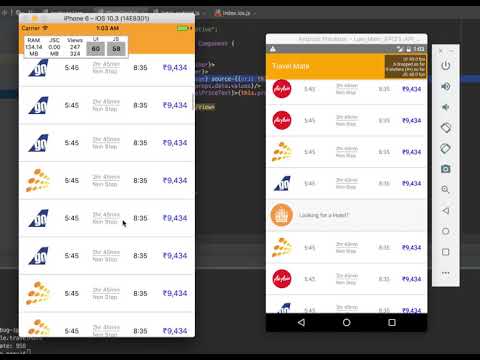
Sample project: https://github.com/naqvitalha/travelMate
Web Sample (Using RNW): https://codesandbox.io/s/k54j2zx977, https://jolly-engelbart-8ff0d0.netlify.com/
Context Preservation Sample: https://github.com/naqvitalha/recyclerlistview-context-preservation-demo
Other Video: https://www.youtube.com/watch?v=Tnv4HMmPgMc
Props
| Prop | Required | Params Type | Description |
| --- | --- | --- | --- |
| layoutProvider | Yes | BaseLayoutProvider | Constructor function that defines the layout (height / width) of each element |
| dataProvider | Yes | DataProvider | Constructor function the defines the data for each element |
| contextProvider | No | ContextProvider | Used to maintain scroll position in case view gets destroyed, which often happens with back navigation |
| rowRenderer | Yes | (type: string | number, data: any, index: number) => JSX.Element | JSX.Element[] | null | Method that returns react component to be rendered. You get the type, data, index and extendedState of the view in the callback |
| initialOffset | No | number | Initial offset you want to start rendering from; This is very useful if you want to maintain scroll context across pages. |
| renderAheadOffset | No | number | specify how many pixels in advance you want views to be rendered. Increasing this value can help reduce blanks (if any). However, keeping this as low as possible should be the intent. Higher values also increase re-render compute |
| isHorizontal | No | boolean | If true, the list will operate horizontally rather than vertically |
| onScroll | No | rawEvent: ScrollEvent, offsetX: number, offsetY: number) => void | On scroll callback function that executes as a user scrolls |
| onRecreate | No | (params: OnRecreateParams) => void | callback function that gets executed when recreating the recycler view from context provider |
| externalScrollView | No | { new (props: ScrollViewDefaultProps): BaseScrollView } | Use this to pass your on implementation of BaseScrollView |
| onEndReached | No | () => void | Callback function executed when the end of the view is hit (minus onEndThreshold if defined) |
| onEndReachedThreshold | No | number | Specify how many pixels in advance for the onEndReached callback |
| onEndReachedThresholdRelative | No | number | Specify how far from the end (in units of visible length of the list) the bottom edge of the list must be from the end of the content to trigger the onEndReached callback |
| onVisibleIndicesChanged | No | TOnItemStatusChanged | Provides visible index; helpful in sending impression events |
| onVisibleIndexesChanged | No | TOnItemStatusChanged | (Deprecated in 2.0 beta) Provides visible index; helpful in sending impression events |
| renderFooter | No | () => JSX.Element | JSX.Element[] | null | Provide this method if you want to render a footer. Helpful in showing a loader while doing incremental loads |
| initialRenderIndex | No | number | Specify the initial item index you want rendering to start from. Preferred over initialOffset if both specified |
| scrollThrottle | No | number |iOS only; Scroll throttle duration |
| canChangeSize | No | boolean | Specify if size can change |
| distanceFromWindow | No | number | (Depricated) Use applyWindowCorrection() API with windowShift. Usage? |
| applyWindowCorrection | No | (offset: number, windowCorrection: WindowCorrection) => void | (Enhancement/replacement to distanceFromWindow API) Allows updation of the visible windowBounds to based on correctional values passed. User can specify windowShift; in case entire RecyclerListWindow needs to shift down/up, startCorrection; in case when top window bound needs to be shifted for e.x. top window bound to be shifted down is a content overlapping the top edge of RecyclerListView, endCorrection: to alter bottom window bound for a similar use-case. Usage? |
| useWindowScroll | No | boolean | Web only; Layout Elements in window instead of a scrollable div |
| disableRecycling | No | boolean | Turns off recycling |
| forceNonDeterministicRendering | No | boolean | Default is false; if enabled dimensions provided in layout provider will not be strictly enforced. Use this if item dimensions cannot be accurately determined |
| extendedState | No | object | In some cases the data passed at row level may not contain all the info that the item depends upon, you can keep all other info outside and pass it down via this prop. Changing this object will cause everything to re-render. Make sure you don't change it often to ensure performance. Re-renders are heavy. |
| itemAnimator | No | ItemAnimator | Enables animating RecyclerListView item cells (shift, add, remove, etc) |
| style | No | object | To pass down style to inner ScrollView |
| scrollViewProps | No | object | For all props that need to be proxied to inner/external scrollview. Put them in an object and they'll be spread and passed down. |
| layoutSize | No | Dimension | Will prevent the initial empty render required to compute the size of the listview and use these dimensions to render list items in the first render itself. This is useful for cases such as server side rendering. The prop canChangeSize has to be set to true if the size can be changed after rendering. Note that this is not the scroll view size and is used solely for layouting. |
| onItemLayout | No | number | A callback function that is executed when an item of the recyclerListView (at an index) has been layout. This can also be used as a proxy to itemsRendered kind of callbacks. |
| windowCorrectionConfig | No | object | Used to specify is window correction config and whether it should be applie
