
XDiff3D
[NeurIPS 2025] Official implement of <No Object Is an Island: Enhancing 3D Semantic Segmentation Generalization with Diffusion Models>
Install / Use
/learn @FanLiHub/XDiff3DREADME
No Object Is an Island: Enhancing 3D Semantic Segmentation Generalization with Diffusion Models

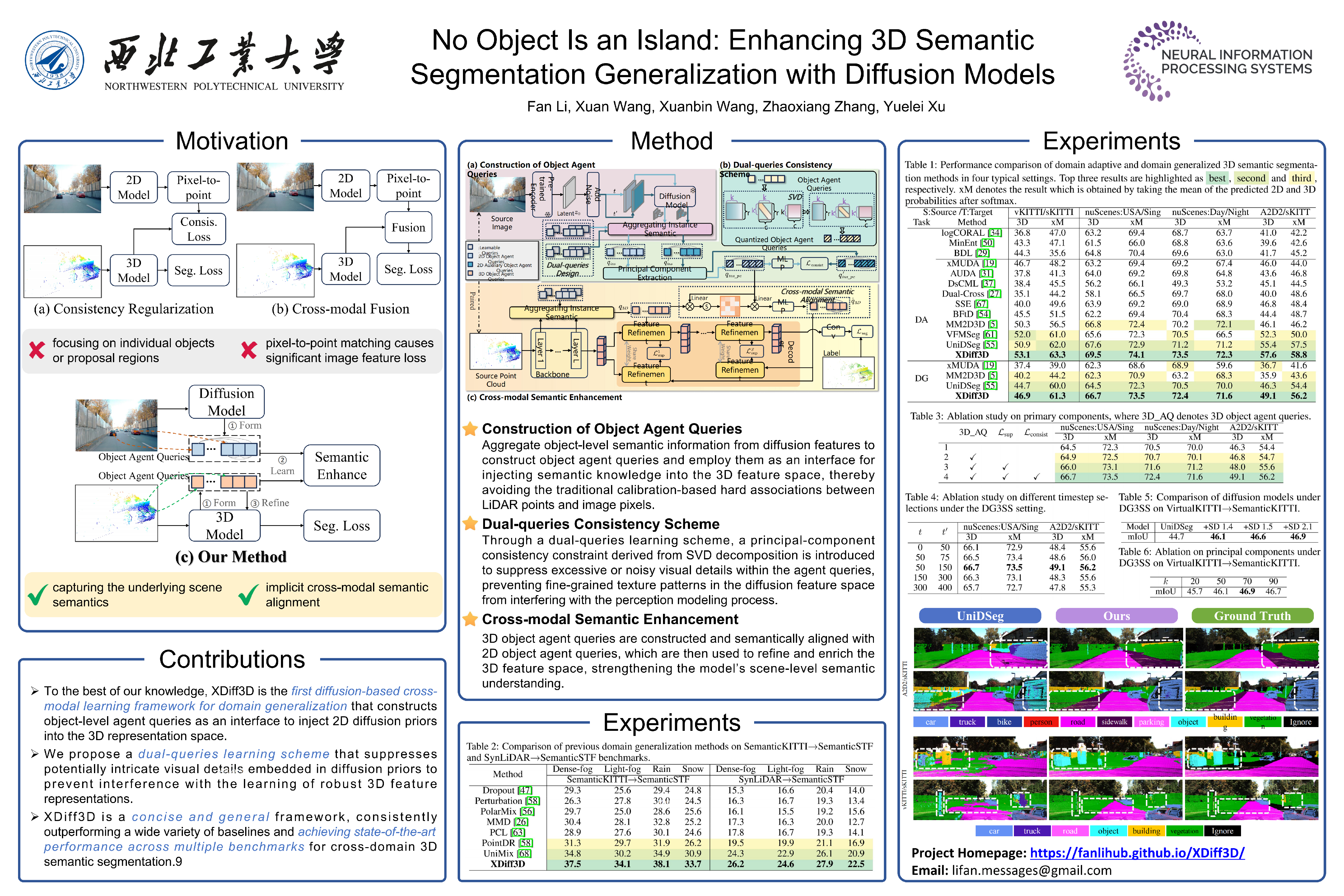


This repository is the official PyTorch implementation of the NeurIPS 2025 paper: No Object Is an Island: Enhancing 3D Semantic Segmentation Generalization with Diffusion Models, authored by Fan Li, Xuan Wang, Xuanbin Wang, Zhaoxiang Zhang, and Yuelei Xu.
Abstract: Enhancing the cross-domain generalization of 3D semantic segmentation is a pivotal task in computer vision that has recently gained increasing attention. Most existing methods, whether using consistency regularization or cross-modal feature fusion, focus solely on individual objects while overlooking implicit semantic dependencies among them, resulting in the loss of useful semantic information. Inspired by the diffusion model's ability to flexibly compose diverse objects into high-quality images across varying domains, we seek to harness its capacity for capturing underlying contextual distributions and spatial arrangements among objects to address the challenging task of cross-domain 3D semantic segmentation. In this paper, we propose a novel cross-modal learning framework based on diffusion models to enhance the generalization of 3D semantic segmentation, named XDiff3D. XDiff3D comprises three key ingredients: (1) constructing object agent queries from diffusion features to aggregate instance semantic information; (2) decoupling fine-grained local details from object agent queries to prevent interference with 3D semantic representation; (3) leveraging object agent queries as an interface to enhance the modeling of object semantic dependencies in 3D representations. Extensive experiments validate the effectiveness of our method, achieving state-of-the-art performance across multiple benchmarks in different task settings.

Visual Results

Environment
- Python (3.8.20)
- PyTorch (2.4.1)
- TorchVision (0.19.1)
- spconv (2.3.6)
- nuscenes-devkit (1.1.11)
- mmcv (2.2.0)
- mmsegmentation (1.2.2)
- diffusers (0.30.2)
Installation
conda create -n xdiff3d python=3.8
conda activate xdiff3d
conda install pytorch==1.13.1 torchvision==0.14.1 torchaudio==0.13.1 pytorch-cuda=11.7 -c pytorch -c nvidia
Dataset Preparation
NuScenes:
-
Download & Extract: Download the Full dataset (v1.0) from the official NuScenes website and extract it to
$NUSCENES_ROOT$. -
Run Preprocessing:
-
Edit
xmuda/data/nuscenes/preprocess.py. -
Set
root_dir = $NUSCENES_ROOT$. -
Set
out_dir = $NUSCENES_OUT$. -
Execute the script:
python xmuda/data/nuscenes/preprocess.py
-
A2D2
-
Download & Extract: Download the Semantic Segmentation dataset and Sensor Configuration from the Audi A2D2 website. Extract all files to
$A2D2_ROOT$. -
Run Preprocessing: (This step performs image undistortion and creates pickle files.)
-
Edit
xmuda/data/a2d2/preprocess.py. -
Set
root_dir = $A2D2_ROOT$. -
Set
out_dir = $A2D2_OUT$(Note: Must be different from$A2D2_ROOT$to avoid overwriting original images). -
Execute the script:
python xmuda/data/a2d2/preprocess.py
-
SemanticKITTI
-
Download & Extract:
- Download SemanticKITTI data (point clouds and labels) from the SemanticKITTI website.
- Download the color data from the KITTI Odometry website.
- Extract all files into a single folder:
$SK_ROOT$.
-
Run Preprocessing:
-
Edit
xmuda/data/semantic_kitti/preprocess.py. -
Set
root_dir = $SK_ROOT$. -
Set
out_dir = $SK_OUT$. -
Execute the script:
python xmuda/data/semantic_kitti/preprocess.py
-
VirtualKITTI
-
Clone & Download Raw Data: Clone the VirtualKITTI repo and use the tool to download the raw files.
git clone [VirtualKITTI repo link] vkitti3D-dataset cd vkitti3D-dataset/tools mkdir $VK_ROOT$ bash download_raw_vkitti.sh $VK_ROOT$ -
Generate Point Clouds (.npy):
cd vkitti3D-dataset/tools for i in 0001 0002 0006 0018 0020; do python create_npy.py --root_path $VK_ROOT$ --out_path $VK_ROOT$/vkitti_npy --sequence $i; done -
Run Preprocessing:
-
Edit
xmuda/data/virtual_kitti/preprocess.py. -
Set
root_dir = $VK_ROOT$. -
Set
out_dir = $VK_OUT$. -
Execute the script:
python xmuda/data/virtual_kitti/preprocess.py
-
SemanticSTF
-
Download SemanticSTF dataset from GoogleDrive.
-
Organize Files: After downloading and extracting, ensure the data adheres to the following directory structure under a main folder (e.g.,
SemanticSTF/). This mirrors the standard KITTI-style format for point cloud and label data./SemanticSTF/ ├── train/ │ ├── velodyne/ # Raw point cloud files (.bin) │ │ ├── 000000.bin │ │ └── ... │ └── labels/ # Semantic segmentation labels (.label) │ ├── 000000.label │ └── ... ├── val/ │ ├── velodyne/ │ └── labels/ ├── test/ │ ├── velodyne/ │ └── labels/ └── semanticstf.yaml # Configuration file
Evaluation
cd <root dir of this repo>
python xmuda/test.py /path/to/your/config.yaml /path/to/your/checkpoint/model_name.pt
For example:
python xmuda/test.py configs/a2d2_nuscenes/baseline_dg.yaml a2d2_nuscenes/dg/ViT-L-14/model_3d_045000.pth
Training DG
cd <root dir of this repo>
python xmuda/train_dg_clip_XDiff3D.py /path/to/your/config.yaml
For example:
python xmuda/train_dg_clip_XDiff3D.py configs/a2d2_nuscenes/baseline_dg.yaml
Training UDA
cd <root dir of this repo>
python xmuda/train_da_clip_XDiff3D.py /path/to/your/config.yaml
For example:
python xmuda/train_da_clip_XDiff3D.py configs/vkitti_skitti/baseline_da.yaml
Acknowledgements
This repo is built upon these previous works:
Citation
If you find it helpful, you can cite our paper in your work.
@inproceedings{li2025no,
  title={No Object Is an Island: Enhancing 3D Semantic Segmentation Generalization with Diffusion Models},
  author={Li, Fan and Wang, Xuan and Wang, Xuanbin and Zhang, Zhaoxiang and Xu, Yuelei},
  booktitle={The Thirty-ninth Annual Conference on Neural Information Processing Systems}
}
Related Skills
node-connect
349.0kDiagnose OpenClaw node connection and pairing failures for Android, iOS, and macOS companion apps
frontend-design
109.4kCreate distinctive, production-grade frontend interfaces with high design quality. Use this skill when the user asks to build web components, pages, or applications. Generates creative, polished code that avoids generic AI aesthetics.
openai-whisper-api
349.0kTranscribe audio via OpenAI Audio Transcriptions API (Whisper).
qqbot-media
349.0kQQBot 富媒体收发能力。使用 <qqmedia> 标签,系统根据文件扩展名自动识别类型(图片/语音/视频/文件)。
