
Blosky
Create Minecraft Java plugins with a visual programming editor (Scratch-like for Spigot)
Install / Use
/learn @Eole7/BloskyREADME
Blosky
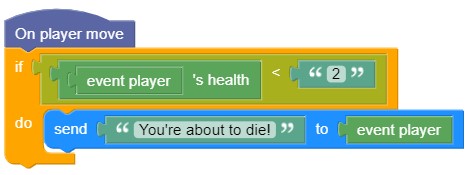
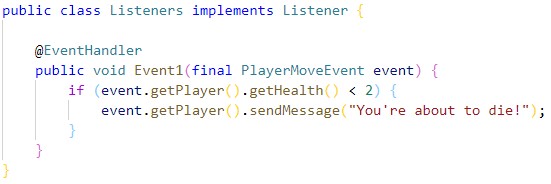
Blosky is a visual programming editor for creating Minecraft Java plugins
Installation
- Install the JDK (Java Development Kit) to be able to compile your plugins: https://www.oracle.com/java/technologies/javase-jdk14-downloads.html
- Download the latest version of Blosky in portable or installer version. If you want to use nightly builds, download them in Actions.
Blosky has been packaged for Windows, macOS and Linux, but it has only been tested on Windows for the moment
- If you select the version to be installed, ignore the Windows SmartScreen alerts, and then follow the instructions given by the installer
- If you choose the portable version, just extract the zip file
- Blosky has only a few syntaxes for the moment and lacks basic features; don't plan to make a real plugin with it
To-Do
- Commands
- Variables
- Plugin config.yml
- Bukkit Runnables
- Compiling to multiple Minecraft versions
- Real-time detection of potential compilation errors
- Syntaxes search bar
- Support for other server software: Sponge, NukkitX, ...
See the full To-Do list on Trello
Contributing
<img src="https://developers.google.com/blockly/images/logos/logo_built_on.svg" width="180">
- Install Node.js and Git
- Fork the repository then clone yours
- Open the command prompt in the folder you just cloned to
- Do
npm installto install all node modules
To launch the app, do electron . in the command prompt
Related Skills
node-connect
335.4kDiagnose OpenClaw node connection and pairing failures for Android, iOS, and macOS companion apps
frontend-design
82.5kCreate distinctive, production-grade frontend interfaces with high design quality. Use this skill when the user asks to build web components, pages, or applications. Generates creative, polished code that avoids generic AI aesthetics.
openai-whisper-api
335.4kTranscribe audio via OpenAI Audio Transcriptions API (Whisper).
commit-push-pr
82.5kCommit, push, and open a PR
