
MaterialBarcodeScanner
Easy to use barcode reader for your Android Project (Uses Google Mobile Vision API)
Install / Use
/learn @EdwardvanRaak/MaterialBarcodeScannerREADME
This project is not being maintained or updated, please don't use this library!
MaterialBarcodeScanner
Easy to use barcode reader for your Android Project (Uses Google Mobile Vision API)


###Overview
- Integrate in a few minutes
- Quick and simple api
- No external apps required
- Uses Google Mobile Vision API (fast, local and rotation free)
- Automatically parses QR Codes, Data Matrix, PDF-417, and Aztec values
- Supports 1D barcodes: EAN-13, EAN-8, UPC-A, UPC-E, Code-39, Code-93, Code-128, ITF, Codabar
- Supports 2D barcodes: QR Code, Data Matrix, PDF-417, Aztec
#Setup ##1. Provide gradle dependency
compile 'com.edwardvanraak:MaterialBarcodeScanner:0.0.6-ALPHA'
##2. Build a MaterialBarcodeScanner
    private void startScan() {
        /**
         * Build a new MaterialBarcodeScanner
         */
        final MaterialBarcodeScanner materialBarcodeScanner = new MaterialBarcodeScannerBuilder()
                .withActivity(MainActivity.this)
                .withEnableAutoFocus(true)
                .withBleepEnabled(true)
                .withBackfacingCamera()
                .withText("Scanning...")
                .withResultListener(new MaterialBarcodeScanner.OnResultListener() {
                    @Override
                    public void onResult(Barcode barcode) {
                        barcodeResult = barcode;
                        result.setText(barcode.rawValue);
                    }
                })
                .build();
        materialBarcodeScanner.startScan();
    }
Hook it up to a button
  fab.setOnClickListener(new View.OnClickListener() {
            @Override
            public void onClick(View view) {
                startScan();
            }
        });
##3. Start scanning!
Check out the full example project for code required for camera permissions on Android 6.0 Marshmallow
#Additional Setup
##Center tracking mode
By default a barcode is tracked/highlighted at the location at which it was found.
With <i>center tracking mode</i> a square image will be shown during scanning that will turn green when a barcode is found.
Please note that you can still scan a barcode outside the center tracker! This is purely a visual change.
To activate <i>center tracking mode</i> simply call the following builder method:
.withCenterTracker()
If you want to provide your own image for the tracker you can use:
.withCenterTracker(R.drawable.your_tracker_image, R.drawable.your_detected_state_tracker_image):
##Exclusive barcode scanning
In some situations you might want to scan for only a certain type of barcode like QR-Codes or 2D barcodes. You can do this with the following builder methods:
.withOnlyQRCodeScanning()
.withOnly3DScanning()
.withOnly2DScanning()
If you want to scan for a very specific combination of barcodes you can setup the builder like this:
.withBarcodeFormats(Barcode.AZTEC | Barcode.EAN_13 | Barcode.CODE_93)
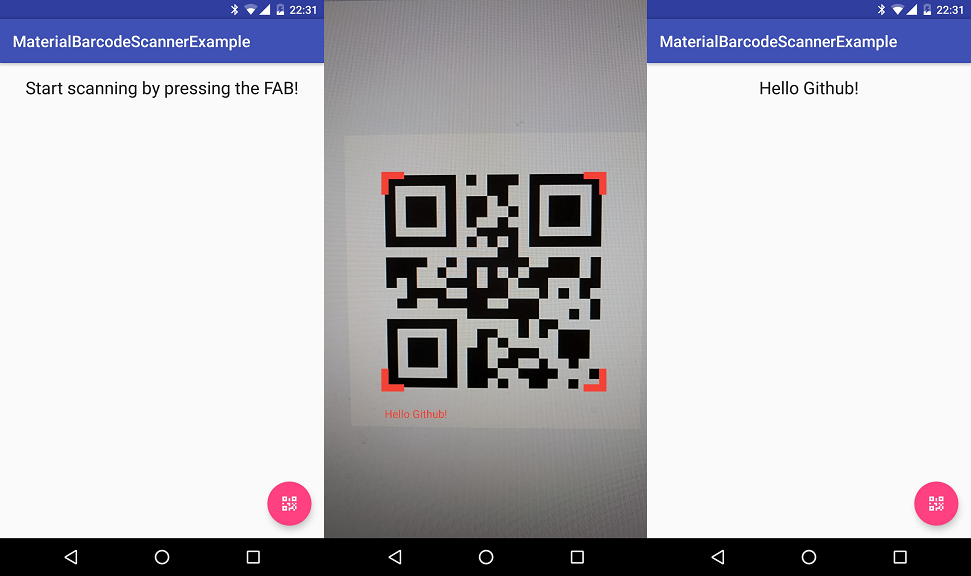
##Screenshots
#Developed By
- Edward van Raak
- edwardvraak@gmail.com
- Donate with Paypal
