
kvm-pilot
Smart hands for your AI agents — write-capable, multi-plane (KVM + BMC + SSH) MCP server for bare-metal control (PiKVM/GLKVM, Redfish/IPMI BMCs): gated, verified, audited. Beta: seeking hardware reports.
Install / Use
claude mcp add DustinTrap -- npx -y github:DustinTrap/kvm-pilotIf the server publishes to npm under a different name, use that package instead — check the repo README.
MCP Server
Model Context Protocol server
Quality Score
Category
Development & EngineeringSupported Platforms
Our assessment of kvm-pilot
kvm-pilot scores 84/100 on our quality scale, 2779th of 4,651 Development & Engineering skills we index.
Its MCP Server is 27 KB long, well organised into 21 sections with 6 code examples: a thorough specification that gives an agent plenty to work with.
It has 10 GitHub stars, so there is little community track record yet; judge it on its content.
Maintenance, license and trust
- The repository was last updated 4 days ago, so kvm-pilot is actively maintained.
- It is released under the Apache-2.0 license, a permissive license that allows use, modification and commercial use with attribution.
- Its trust signals score 97/100, with no cautions. These come from repository metadata, not a code audit — read the skill file before letting an agent act on it.
kvm-pilot compared with similar skills
All 4 of these similar skills score higher than kvm-pilot; compare them before choosing.
| Skill | Score | Stars | Updated | Format |
|---|---|---|---|---|
| kvm-pilot (this skill)by DustinTrap | 84 | 10 | 4d ago | MCP Server |
| headroomby headroomlabs-ai | 100 | 78.0k | today | CLAUDE.md |
| Agent-Reachby Panniantong | 100 | 104.6k | 2d ago | MCP Server |
| Scraplingby D4Vinci | 100 | 90.0k | today | MCP Server |
| crawl4aiby unclecode | 100 | 86.4k | 1d ago | MCP Server |
Frequently asked questions
- How do I install kvm-pilot?
- Run
claude mcp add DustinTrap -- npx -y github:DustinTrap/kvm-pilot. The install tabs above show the steps for each supported agent. - Which AI agents does kvm-pilot work with?
- It is written for Claude Code and Claude Desktop, as a MCP Server file. Other agents that read the same format can often use it too.
- Is kvm-pilot safe to use?
- It is Apache-2.0-licensed and scores 97/100 on trust signals. Skills are instructions an agent will follow, so read the file before installing it and do not approve commands you do not understand.
- Is kvm-pilot still maintained?
- The repository was last updated 4 days ago, so kvm-pilot is actively maintained.
Skill content
View source on GitHubkvm-pilot
Smart hands for your AI agents. A write-capable, multi-plane (KVM + BMC + SSH) MCP server for controlling physical machines — gated, verified, audited.
kvm-pilot lets an agent drive a headless box through POST, firmware, the
bootloader, and an OS install with no agent on the target: it works at the
pixel level through an IP-KVM (PiKVM, the GL.iNet GLKVM fork GL-RM1 /
GL-RM1PE, BliKVM), at the structured-state level through a BMC (Redfish on
iDRAC/iLO/OpenBMC, IPMI on BMCs that predate Redfish), at the firmware level
through Intel AMT/vPro (a BIOS/POST/GRUB screenshot + power + SOL on a
business laptop an HDMI-capture KVM can't see boot on), and over SSH once an OS
is up. A pluggable vision subsystem reads a KVM screenshot and tells you what
boot phase the machine is in — bios_menu, grub_menu, installer_progress,
login_prompt, crash_screen, and so on — and a safety layer gates every
destructive operation behind operator opt-ins and per-call approvals.
Vision runs on Claude or any local OpenAI-compatible VLM (LM Studio, Ollama, vLLM, llama.cpp). Point it at a model on your own GPU and the screenshots never leave your network and cost nothing per frame.
How it works
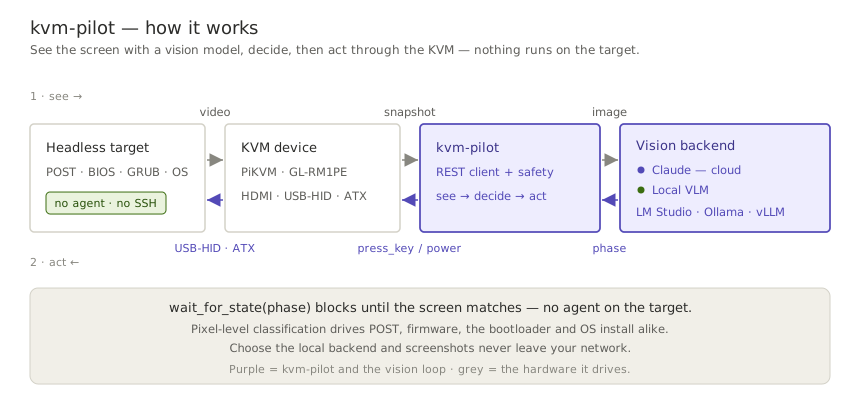
kvm-pilot runs a see → decide → act loop, and the screen is its only sensor:
it pulls a screenshot from the KVM, a vision model classifies the boot phase, and
kvm-pilot acts back through the KVM's keyboard and power. Because it works at the
pixel level, there is no agent on the target — the same loop drives POST,
firmware, the bootloader, and an OS install.
A real, unedited run against a GLKVM on the home fleet — an honest preflight, a headless snapshot (watch it wake the on-demand encoder), a gated dry-run power-cycle, and the boot console the agent actually saw:

Quickstart
One install gives you the whole product — the kvm-pilot CLI, the
kvm-pilot-mcp MCP server, and the bundled Claude skill — nothing to
clone.
pip install kvm-pilot                          # CLI + skill + MCP server + WebSocket events
pip install "kvm-pilot[totp]"                  # + 2FA / TOTP support (pyotp)
kvm-pilot install-skill                        # optional: put the bundled skill where Claude Code loads it
Driving a KVM from an AI agent (MCP)
claude mcp add kvm-pilot -s user \
    -e KVM_PILOT_PROFILE=mykvm -e KVM_PILOT_MCP_READ_ONLY=1 -- \
    kvm-pilot-mcp
KVM_PILOT_MCP_READ_ONLY=1 is the recommended first rung of the trust ladder
— the agent can see everything and touch nothing until your hardware is
verified. The Getting started guide
covers credentials, Claude Desktop JSON config, sample prompts, and climbing
the ladder. The server is published to the official
MCP registry
as io.github.DustinTrap/kvm-pilot, so registry-aware hosts can discover
and install it by name. Agents: the repo root carries an
llms.txt doc map.
Scripting from Python
from kvm_pilot import KVMClient
from kvm_pilot.vision import ScreenAnalyzer, make_backend

kvm = KVMClient("192.168.8.1", "admin", "secret")

# Classify the current screen with Claude (model auto-resolved at runtime)
analyzer = ScreenAnalyzer(kvm, make_backend("anthropic"))
print(analyzer.classify().phase)

# Or run entirely on a local VLM — nothing leaves your network
local = make_backend("local", base_url="http://127.0.0.1:1234/v1", model="qwen2.5-vl-7b")
analyzer = ScreenAnalyzer(kvm, local)

# Block until the box reaches the GRUB menu, then pick the first entry
analyzer.wait_for_state("grub_menu", timeout=120)
kvm.press_key("Enter")
For the latest unreleased tree:
pip install "kvm-pilot[totp] @ git+https://github.com/DustinTrap/kvm-pilot"
CLI
kvm-pilot info     --host 192.168.8.1 --user admin --ask-passwd   # prompt (no echo)
kvm-pilot capabilities --profile homelab                 # what this driver supports
kvm-pilot snapshot screen.jpg --profile homelab
kvm-pilot --timeout 60 power-cycle --profile homelab --dry-run   # log, don't send
kvm-pilot eject --profile homelab                        # detach virtual media
kvm-pilot events --profile homelab --count 5             # stream device events
kvm-pilot watch grub_menu --profile homelab \
    --backend local --vision-url http://127.0.0.1:1234/v1 --vision-model qwen2.5-vl-7b
The CLI prompts for confirmation before any destructive action (power, virtual
media — including uploads — keyboard/mouse injection, GPIO). Use --yes to
skip prompts in automation, or --dry-run to log intended actions without
sending them — dry-run short-circuits before the prompt, so it never blocks
waiting for input. --timeout (HTTP per-request timeout) is a global flag and
goes before the subcommand; watch keeps its own --timeout for the vision
wait deadline.
Profiles like homelab live in ~/.config/kvm-pilot/config.toml. See
docs/cli.md for the full command table (every subcommand, the
capability it needs, and its gating), and
docs/configuration.md for the config-file format,
every KVM_PILOT_* environment variable, and the precedence between flags,
env, and profiles.
GLKVM setup note: on GL.iNet firmware the PiKVM REST API is disabled by default and a firmware upgrade can re-disable it — enable it first, per Every
/api/*call returns 404.
The tool surface, by plane
The same capability protocols span three actuation planes, so one agent workflow can mix pixels, structured BMC state, and shell access — with every destructive effect gated per class:
| Plane | Read | Act (operator-gated) |
|---|---|---|
| KVM — pixels & HID (PiKVM · GLKVM · BliKVM) | snapshot · classify_screen · wait_for_state · power_state · logs · list_virtual_media | power · type_text / press_key / send_shortcut / mouse · calibrate_mouse · mount_iso / eject |
| BMC — structured state (Redfish · IPMI) | info · boot_options · logs (SEL) · sensors (CLI) | power · set_boot_device · SOL console (CLI console) |
| Firmware — Intel AMT/vPro (spans both planes) | info · snapshot (firmware BIOS/POST/GRUB) · boot_options · power_state | power · set_boot_device · type/mouse · SOL (console) · amt_enable (open SOL/KVM listeners) |
| SSH — in-band & appliance | ssh_reachable · appliance_status · access_paths | ssh_exec · host_exec (ssh/winrm auto-picked) · wake (WoL) · appliance_reboot |
| Meta — evidence & intake | capabilities · support_matrix · healthcheck | file_firmware_report |
A machine with no KVM and no BMC at all is itself a first-class target:
driver = "ssh" plus ssh_host (the machine's own address, #248) stands
kvm-pilot on the recovery ladder's in-band rung — every device capability
honestly absent, and the healthcheck saying plainly that there is no
out-of-band recovery path there.
The canonical per-tool reference — annotations, effect gates, approval lifecycle — is the MCP server README; the CLI covers the full surface in docs/cli.md.
Status & maturity
Status: 1.0, general availability — on the strength of the run ledger, not beyond it. Three device types have run live (GL-RM1PE, Dell R710 over iDRAC6/IPMI, Dell Latitude 5411 over Intel AMT); three of the seven device drivers (
redfish,pikvm,blikvm) have only ever run against emulators. See the Hardware-Compatibility list for what has actually been exercised — and please add to it. (The exact version lives in the CHANGELOG.) The core paths have graduated from mocked-only to live-verified: a fleet of GL-RM1PE units has exercisedsnapshot/healthcheck/logs/power_state/virtual_media/infoacross two firmware lines — on V1.9.1 the run ledger that ships in the wheel putsinfo/logs/healthcheck/power_stateat ga,snapshotat rc, andvirtual_mediaat beta — derived from real runs, never hand-edited — and a Dell iDRAC6 has exercised the IPMI driver live end-to-end (power, boot-device, sensors, event log, SOL serial console). The paths that can hurt are hardened: transports never re-fire a destructive request, MCP approvals are signed single-use receipts with an audit trail, and every destructive effect — power, HID, media, boot-config, appliance, SSH, external writes — has its own operator opt-in gate. Recent betas added remote boot-device control (Redfish, IPMI, and in-bandefibootmgr), Wake-on-LAN, an IPMI driver for BMCs that predate Redfish, a serial (SOL) console, mouse auto-calibration, and headless native-resolution GLKVM snapshots;kvm-pilot test-reportturns contributing evidence into one command, and the firmware registry feeds itself (firmware-checkauto-files registry updates). Now we need your hardware. PiKVM, BliKVM, other GLKVM models, and Redfish BMCs (iDRAC/iLO/OpenBMC) are the combos the matrix needs most — success or failure, a hardware report takes two minutes and the hourly ingest does the rest. Anything the Hardware-Compatibility list doesn't show as exercised is still unverified: the 1.x line keeps the public API stable, but a rating only moves when a live run moves it; note the remote firmware-flash no-op on GL-RM1PE ([#94](https://github.com/DustinTrap/kvm-pilot/issue
Truncated for display — read the full file on GitHub.
Related Skills
headroom
78.0kCompress tool outputs, logs, files, and RAG chunks before they reach the LLM. 20% fewer tokens for coding agents, 60-95% fewer tokens for JSON, same answers. Library, proxy, MCP server.
Agent-Reach
104.6kGive your AI agent eyes to see the entire internet. Read & search Twitter, Reddit, YouTube, GitHub, Bilibili, XiaoHongShu — one CLI, zero API fees.
Scrapling
90.0k🕷️ The BEST Web Scraping framework that handles everything from a single request to a full-scale crawl! Don't be shy, join here: https://discord.gg/EMgGbDceNQ and follow here for daily tips and tricks: https://x.com/Scrapling_dev
crawl4ai
86.4kOpen-source web crawler and scraper for LLMs and AI agents: any website into clean, LLM-ready Markdown. Run it yourself, or use Crawl4AI Cloud with one key. Join our Discord https://discord.gg/VuxzM8mtf

Languages
Trust signals
From repository metadata: license, adoption, age and documentation. Not a code audit — see the Safety scan above for what the skill file itself contains.