
OwlPlug
Audio plugin manager. Desktop application to manage VST / AU / LV2 plugins on Windows, MacOS and Linux.
Install / Use
/learn @DropSnorz/OwlPlugREADME




Overview
OwlPlug simplifies the way you organize, discover and install audio plugins. No more tedious file management, scattered folders, or missing dependencies — OwlPlug gives you a centralized experience for VST, AU, and LV2 plugins.
- 🔎 Manage — Detect and list your existing audio plugins.
- 🔗 Organize — Merge plugins from multiple locations into a single root directory.
- 📂 Analyze Projects — Scan DAW projects to identify referenced and missing plugins.
- 🌐 Discover — Connect to remote sources to browse and install plugins.
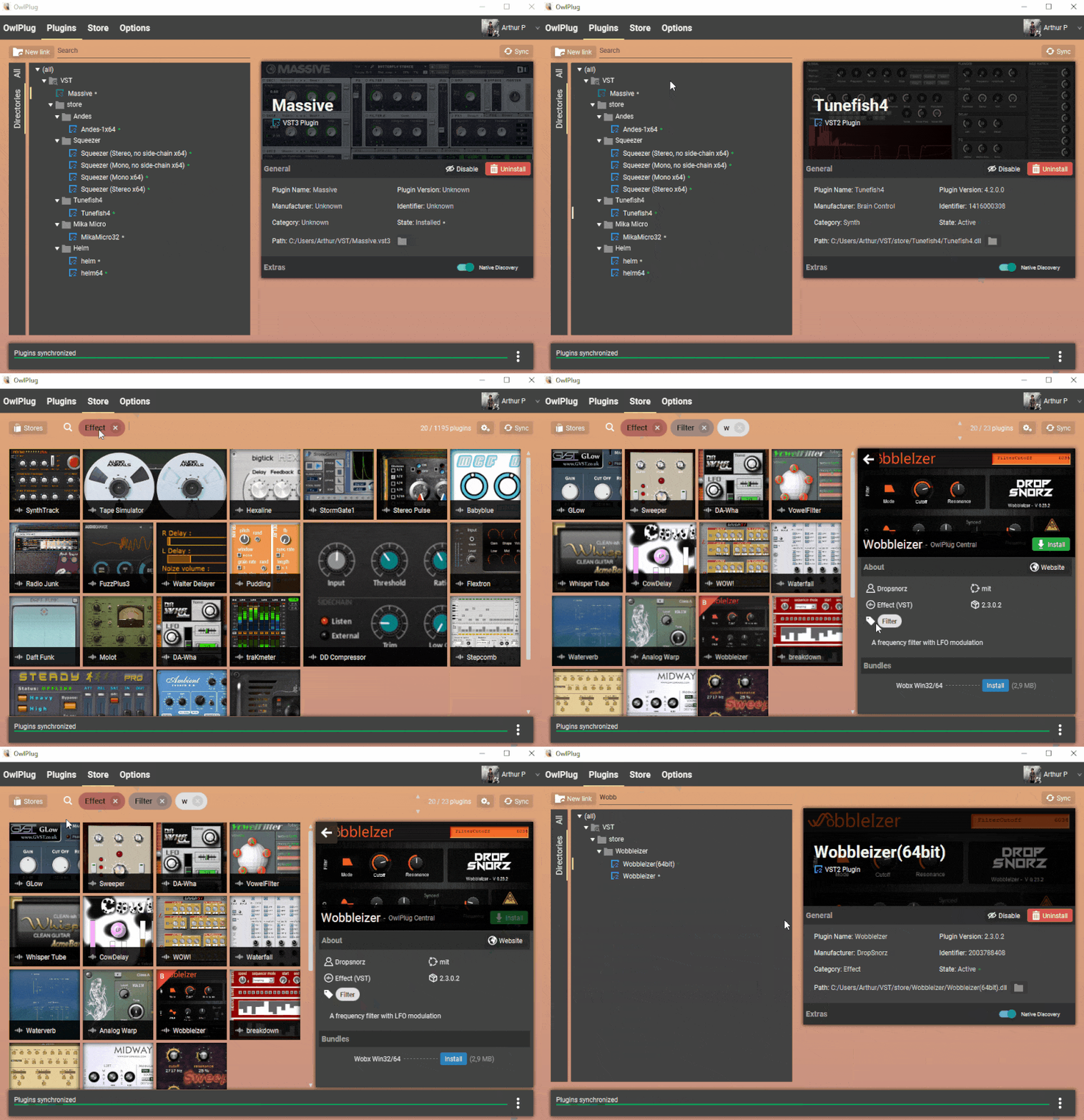
About
:earth_africa: OwlPlug Website | :pushpin: Roadmap | :page_facing_up: Documentation
OwlPlug is an open-source plugin manager designed to simplify the installation, discovery, and management of audio plugins. It was born out of frustration with the tedious process of installing and organizing plugins. Inspired by dependency managers and online content stores, OwlPlug offers a seamless way to manage your audio tools while also helping you discover new plugins from the community. All feedback, contributions, and suggestions are warmly welcomed.

Installation
Direct Download
- Download the installer for your platform from the Releases page.
- Windows (x64):
*-x64.msiinstaller - MacOS (x64):
*-x64.dmgfile - MacOS (arm64):
*-arm64.dmgfile - Linux (x64):
*-x64.debpackage or*-x64.AppImagefile
- Windows (x64):
- Run the installer.
- Launch OwlPlug.
⚠️ macOS Users: On some versions of macOS, you may see a warning that OwlPlug is damaged. This can be fixed by following the instructions on the Troubleshooting wiki page. This issue occurs because the app is not notarized by Apple.
Package Managers
Windows
winget install --exact --id=OwlPlug.OwlPlug
Features
Plugins discovery
OwlPlug can discover VST2, VST3, AU and LV2 Plugins. OwlPlug is compatible with all previously installed plugins as long as they are all in a specific root directory, for example C:/AudioPlugins. Additional directories can be configured if your plugin setup is fragmented on the filesystem.
After downloading Owlplug, you can still organize (add, move, delete, ...) your plugins with a file explorer or with your favorite DAW without breaking anything.
Links management
A Link allows you to create and manage symlinks across your filesystem and plugin directories. With Links, you can access directories anywhere on your filesystem (Hard drive, USB keys, custom directories...) through a single root plugin directory. For example, you can configure a link named usb-drive in C:/AudioPlugins to target your usb hard drive D:/myPlugins. All plugins in D:/myPlugins will be accessible using C:/AudioPlugins/usb-drive. This feature may be useful for DAW that scans plugins from predefined or limited number directories. On some Windows version, symlinks creation may require admin privileges.
DAW Projects analysis
OwlPlug can scan DAW projects to extract referenced plugins. Plugins references in project files are compared to plugins installed in configured directories. This way, users can quickly identify missing plugins required to open projects.
The list of compatible DAWs is available in the documentation
Explore and download Plugins
OwlPlug can be connected to several remote sources to download plugins. A Remote Source (or Registry) is a collection of downloadable plugins that can be installed locally. OwlPlug can be configured to use any compatible third-party source in Explore Tab > Sources > Add a new source.
Here are some recommended compatible sources.
OwlPlug Registry ⭐
OwlPlug official plugin registry for Free or Open Source plugins
- kind:
registry - url:
https://registry.owlplug.com/registry.min.json
Open Audio Stack Registry ⭐
Open Audio Stack registry plugins maintained by community.
- kind:
registry - url:
https://open-audio-stack.github.io/open-audio-stack-registry
Discover more plugin sources in this wiki page.
How to distribute plugins on OwlPlug?
- (Recommended) Distribute your plugins from the open-audio-stack-registry.
- Distribute your plugins from the legacy owlplug-registry.
- Setup and host a custom remote source to distribute multiple plugins, following the open-audio-stack-registry or owlplug-registry specification.
How to contribute?
There are several ways to support and get involved in the OwlPlug development.
- Downloading OwlPlug, using it, and talking about it around you.
- Reporting issues or feature suggestions. Most of the existing features have been inspired by the community feedback.
- Contributing to the OwlPlug source code.
- Submitting or requesting plugins to be distributed with OwlPlug.
- Donating to help support development and server costs
Development
Stack
- Spring boot
- JavaFx
- Hibernate & H2
- Maven
- JUCE
Development Setup
- Clone or download project sources
- Run following commands
# Install dependencies
mvn clean install
# Move to owlplug client folder
cd owlplug-client
# (Optional) Create the runnable JAR file in /target/ folder
mvn clean install spring-boot:repackage
# Run owlplug
mvn spring-boot:run
License
Related Skills
node-connect
349.2kDiagnose OpenClaw node connection and pairing failures for Android, iOS, and macOS companion apps
frontend-design
109.5kCreate distinctive, production-grade frontend interfaces with high design quality. Use this skill when the user asks to build web components, pages, or applications. Generates creative, polished code that avoids generic AI aesthetics.
openai-whisper-api
349.2kTranscribe audio via OpenAI Audio Transcriptions API (Whisper).
qqbot-media
349.2kQQBot 富媒体收发能力。使用 <qqmedia> 标签,系统根据文件扩展名自动识别类型(图片/语音/视频/文件)。
