
VisionFaceDetection
An example of use a Vision framework for face landmarks detection in iOS 11
Install / Use
/learn @DroidsOnRoids/VisionFaceDetectionREADME
VisionFaceDetection
An example of use a Vision framework for face landmarks detection
Landmark detection needs to be divided in to two steps.
First one is face rectangle detection by using VNDetectFaceRectanglesRequest based on pixelBuffer provided by delegate function captureOutput.
Next we need to setup the property inputFaceObservations of VNDetectFaceLandmarksRequest object, to provide the input.
Now we are redy to start landmarks detection.
It's possible to detects landmarks like: faceContour, leftEye, rightEye, nose, noseCrest, lips, outerLips, leftEyebrow, and rightEyebrow.
To display the results I'm using multiple CAShapeLayer with UIBezierPath.
Landmarks detection is working on live front camera preview.
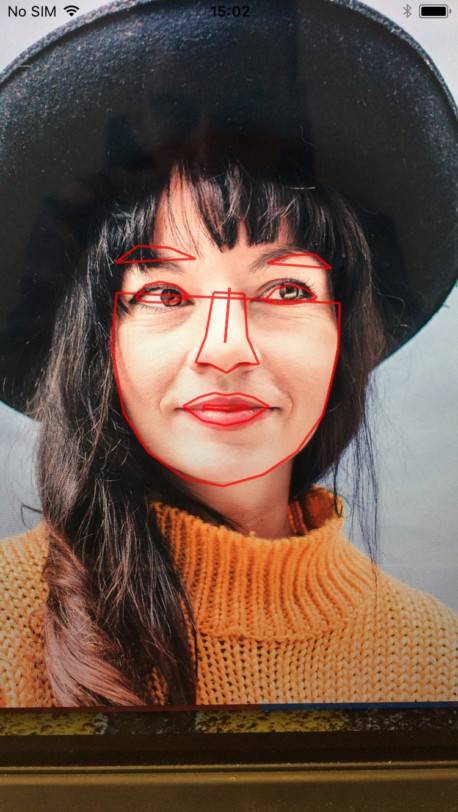
If you want more details about using Vision framework, go and check my blogpost about it
Related Skills
node-connect
335.8kDiagnose OpenClaw node connection and pairing failures for Android, iOS, and macOS companion apps
frontend-design
82.7kCreate distinctive, production-grade frontend interfaces with high design quality. Use this skill when the user asks to build web components, pages, or applications. Generates creative, polished code that avoids generic AI aesthetics.
openai-whisper-api
335.8kTranscribe audio via OpenAI Audio Transcriptions API (Whisper).
commit-push-pr
82.7kCommit, push, and open a PR
