
AssetsPickerViewController
Powerfully Customizable - Multiple Photo & Video Picker Controller
Install / Use
/learn @DragonCherry/AssetsPickerViewControllerREADME
Now iOS 14 supports multiple asset picker by default. I recommend use PHPickerViewController from iOS 14 instead of this, it's a much better solution.
AssetsPickerViewController


Customizable assets picker controller that supports selecting multiple photos and videos, fully written in Swift.
Comment
AssetsPickerViewController acts like Photos App in iOS.
If you found any bugs - even in develop branch, do not hesitate raise an issue for it.
Any advice, suggestions, and pull requests for new feature will be greatly appreciated.
Just try it in web simulator, don't waste your time
https://appetize.io/app/752b6azuj3d3varvmu1hkwuuqm
Screenshots
iOS friendly UI for Album & Asset



iPad Support
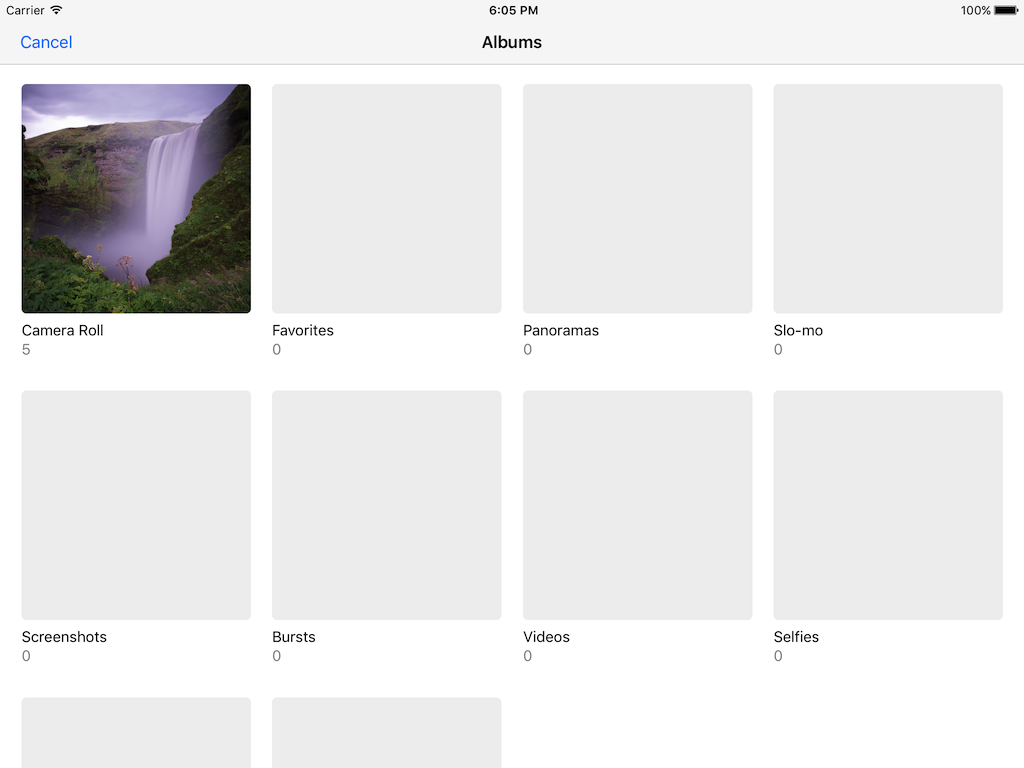
Keeps focusing indexes during orientation change.

Handles empty or no permisson cases.


Customizable Album & Asset Layout


3D Touch to Preview

Features Done
-
iOS friendly UI for album & photo controllers
-
select album
-
select multiple photos and videos
-
realtime synchronization for library change in albums & photos
-
option to show/hide empty albums
-
option to show/hide "Hidden" album
-
customizable album cell
-
customizable album sorting by PHFetchOptions or filter block
-
customizable album filtering by PHFetchOptions or filter block
-
customizable asset cell
-
customizable asset sorting by PHFetchOptions
-
customizable asset filtering by PHFetchOptions
-
iPad support
-
force(3D) touch to preview - (still, live photo, and video)
-
support many languages(German, French, Spanish, Chinese, Japanese, Arabic, Spanish, Korean, Indonesian, Russian, Turkish, Italian, etc)
-
set selected assets before present picker controller
-
supports dark mode from iOS 13
-
takes and auto-selects photo or video took inside picker
-
multiple selection by dragging cells (from iOS 13)
-
SPM(Swift Package Manager) support
Features To-do
- Cropping image before select
Basic Usage
To run the example project, clone the repo, and run pod install from the Example directory first.
// to show
let picker = AssetsPickerViewController()
picker.pickerDelegate = self
present(picker, animated: true, completion: nil)

// to handle
extension SimpleExampleController: AssetsPickerViewControllerDelegate {

    func assetsPickerCannotAccessPhotoLibrary(controller: AssetsPickerViewController) {}
    func assetsPickerDidCancel(controller: AssetsPickerViewController) {}
    func assetsPicker(controller: AssetsPickerViewController, selected assets: [PHAsset]) {
        // do your job with selected assets
    }
    func assetsPicker(controller: AssetsPickerViewController, shouldSelect asset: PHAsset, at indexPath: IndexPath) -> Bool {
        return true
    }
    func assetsPicker(controller: AssetsPickerViewController, didSelect asset: PHAsset, at indexPath: IndexPath) {}
    func assetsPicker(controller: AssetsPickerViewController, shouldDeselect asset: PHAsset, at indexPath: IndexPath) -> Bool {
        return true
    }
    func assetsPicker(controller: AssetsPickerViewController, didDeselect asset: PHAsset, at indexPath: IndexPath) {}
}
Bonus
Basic
To hide empty albums,
pickerConfig.albumIsShowEmptyAlbum = false
To show "Hidden" albums,
pickerConfig.albumIsShowHiddenAlbum = true
To set pre-selected assets before present picker,
pickerConfig.selectedAssets = self.assets
To limit selected assets count,
func assetsPicker(controller: AssetsPickerViewController, shouldSelect asset: PHAsset, at indexPath: IndexPath) -> Bool {
    if controller.selectedAssets.count > 3 {
        // do your job here
        return false
    }
    return true
}
To enable single image select mode, deselect all items when the limit has reached,
func assetsPicker(controller: AssetsPickerViewController, shouldSelect asset: PHAsset, at indexPath: IndexPath) -> Bool {
    if controller.selectedAssets.count > 0 {
        controller.photoViewController.deselectAll()
    }
    return true
}
To automatically deselect oldest selected asset for limited selection count,
pickerConfig.assetsMaximumSelectionCount = 5
Appearence
To apply custom album cell,
pickerConfig.albumCellType = CustomAlbumCell.classForCoder()
// and implement your own UICollectionViewCell which conforms to AssetsAlbumCellProtocol
To apply custom asset cell,
pickerConfig.assetCellType = CustomAssetCell.classForCoder()
// and implement your own UICollectionViewCell which conforms to AssetsPhotoCellProtocol
Sorting
To sort albums by PHFetchOptions,
let options = PHFetchOptions()
options.sortDescriptors = [NSSortDescriptor(key: "estimatedAssetCount", ascending: true)]

pickerConfig.albumFetchOptions = [
    .smartAlbum: options
]
To sort by block for a certain reason,
pickerConfig.albumComparator = { (albumType, leftEntry, rightEntry) -> Bool in
    // return: Is leftEntry ordered before the rightEntry?
    switch albumType {
    case .smartAlbum:
        return leftEntry.album.assetCollectionSubtype.rawValue < rightEntry.album.assetCollectionSubtype.rawValue
    case .album:
        return leftEntry.result.count < rightEntry.result.count     // ascending order by asset count
    case .moment:
        return true
    }
}
To sort assets by PHFetchOptions,
let options = PHFetchOptions()
options.sortDescriptors = [
    NSSortDescriptor(key: "pixelWidth", ascending: true),
    NSSortDescriptor(key: "pixelHeight", ascending: true)
]

pickerConfig.assetFetchOptions = [
    .smartAlbum: options
]
Filtering
To filter albums by PHFetchOptions,
let options = PHFetchOptions()
options.predicate = NSPredicate(format: "estimatedAssetCount = 0")
pickerConfig.albumFetchOptions = [.smartAlbum: options]
To filter albums by block for a certain reason,
// return true to include, false to discard.
let smartAlbumFilter: ((PHAssetCollection, PHFetchResult<PHAsset>) -> Bool) = { (album, fetchResult) in
    // filter by album object
    if album.assetCollectionSubtype == .smartAlbumBursts { return false }
    if album.assetCollectionSubtype == .smartAlbumTimelapses { return false }
    if album.assetCollectionSubtype == .smartAlbumFavorites { return false }

    // filter by fetch result
    if fetchResult.count > 50 {
        return true     // only shows albums that contains more than 50 assets
    } else {
        return false    //
    }
}
pickerConfig.albumFilter = [
    .smartAlbum: smartAlbumFilter
]
To filter assets by PHFetchOptions,
let options = PHFetchOptions()
options.predicate = NSPredicate(format: "mediaType = %d", PHAssetMediaType.video.rawValue)
options.sortDescriptors = [NSSortDescriptor(key: "duration", ascending: true)]

pickerConfig.assetFetchOptions = [
    .smartAlbum: options,
    .album: options
]
Custom Localization Support
To set your own custom strings just use the static customStringConfig property of AssetsPickerConfig which is of type AssetsPickerCustomStringConfig.
Overriding every string
AssetsPickerConfig.customStringConfig = [
    .cancel: "Cancel",
    .done: "Done",
    .titleAlbums: "Albums",
    .titleSectionMyAlbums: "My Albums",
    .footerPhotos: "%@ Photos",
    .footerVideos: "%@ Videos",
    .footerItems: "%@ Photos, %@ Videos",
    .titleSelectedPhoto: "%@ Photo Selected",
    .titleSelectedPhotos: "%@ Photos Selected",
    .titleSelectedVideo: "%@ Video Selected",
    .titleSelectedVideos: "%@ Videos Selected",
    .titleSelectedItems: "%@ Items Selected",
    .titleNoItems: "No Photos or Videos",
    .messageNoItems: "You can take photos and videos using the camera, or sync photos and videos onto your %@ using iTunes.",
    .messageNoItemsCamera: "You can sync photos and videos onto your %@ using iTunes.",
    .titleNoPermission: "This app does not have access to your photos or videos.",
    .messageNoPermission: "You can enable access in Privacy Settings.",
]
Overriding specific strings
AssetsPickerConfig.customStringConfig = [
    .titleNoItems: "No Photos or Videos",
    .messageNoItems: "You can take photos and videos using the camera, or sync photos and videos onto your %@ using iTunes.",
    .messageNoItemsCamera: "You ca
Related Skills
healthcheck
341.8kHost security hardening and risk-tolerance configuration for OpenClaw deployments
imsg
341.8kiMessage/SMS CLI for listing chats, history, and sending messages via Messages.app.
xurl
341.8kA CLI tool for making authenticated requests to the X (Twitter) API. Use this skill when you need to post tweets, reply, quote, search, read posts, manage followers, send DMs, upload media, or interact with any X API v2 endpoint.
docs-writer
99.6k`docs-writer` skill instructions As an expert technical writer and editor for the Gemini CLI project, you produce accurate, clear, and consistent documentation. When asked to write, edit, or revie
