
Ulog
The universal logger
Install / Use
/learn @Download/UlogREADME
ulog <sub><sup>v2.0.0-beta.19</sup></sub>
The Universal Logger




<sup><sub><sup><sub>.</sub></sup></sub></sup>

The logger for javascript applications
ulog is the logger for Javascript applications. It's universal, meaning it runs everywhere. You can use ulog in your Express server application running on Node JS just as well as in your React single page application running in the browser. It just works.
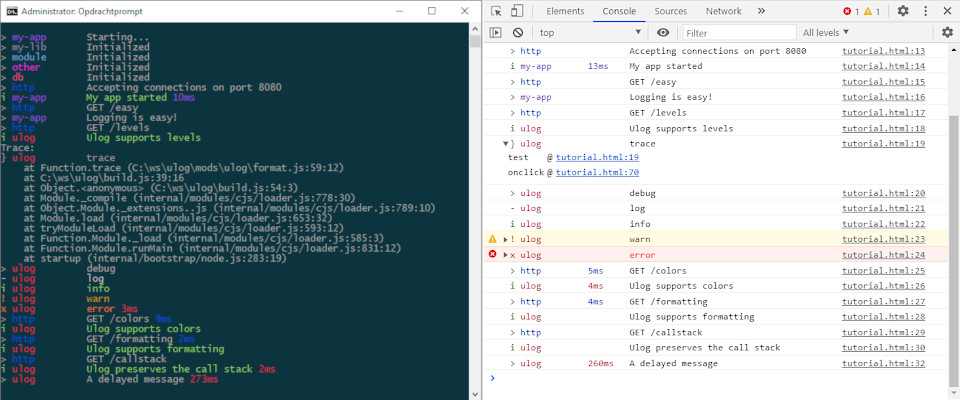
Features
Ulog marries the feature sets from debug and loglevel and adds some of it's own!
| Feature | debug | loglevel | ulog | | ------------------------------------------- | ------------------- | ------------------- | ------------------ | | Footprint | 3.2 kB | 1.4 kB | 2.7 kB | | Debug mode | ✓ | ✓ (1) | ✓ | | Levels | | ✓ | ✓ | | Configurable | ✓ | ✓ (2) | ✓ | | Dynamic config | | | ✓ | | Channels | | | ✓ | | Outputs | | | ✓ | | Custom outputs | | | ✓ | | Formatting | ✓ | | ✓ | | Preserves callstack | | ✓ | ✓ | | Configurable format | | | ✓ | | Custom formats | | | ✓ | | Colors | ✓ | | ✓ | | Alignment | | | ✓ | | Add-ons / Mods | | ✓ | ✓ | | Lazy loading | | | ✓ | | Anylogger support | ✓ (3) | ✓ (3) | ✓ |
(1) emulated with levels (2) in browser only (3) via an adapter
Try it
Have a look at the interactive
<a href="https://ulog.js.org/tutorial/index.html">tutorial</a>. It's the
fastest way to get a quick taste of ulog.
Compare it
Want to check how ulog measures up to it's competitors? Check out these
loggers side-by-side:
Install
npm i -S anylogger ulog
Add to entry point
In the entry point of your application import ulog:
index.js
import "ulog"
Use
In your code, import anylogger and use it to create loggers and do logging:
import anylogger from 'anylogger'
const log = anylogger('my-app')
log('Logging is easy!')
This way, your code is decoupled from ulog and if you ever want to switch to another logging library, you will be able to do so without having to change any of that code.
Anylogger support
anyloggeris a logging facade that allows code to use logging without getting coupled to a specific logging system. You can use that code with any logging system out there.uloghas anylogger support built in. For other loggers, adapters are available.
The logger for libraries
When we write a library, we install ulog as a development dependency so the library remains decoupled from ulog.
Install ulog as a dev dependency
Install anylogger as a regular dependency and ulog as a dev dependency:
npm install --save anylogger && npm install --save-dev ulog
In our tests:
test.js
import `ulog`
In our library code:
my-lib.js
import anylogger
const log = anylogger('my-lib')
log('Logging is easy')
Script tag
If you want, you can import ulog with a script tag:
<script src="https://unpkg.com/ulog@2.0.0-beta.19/ulog.min.js"></script>
<!-- publishes to `self.anylogger` and `self.ulog`. -->
<!-- lazy loads ulog.lazy.min.js on demand. -->
<script src="myscript.js"></script>
myscript.js
var log = anylogger('my-module')
log('Logging is easy!')
Download
If you want the file for the browser to include in your project yourself, you can download it from here.
- ulog.min.js (~2.7kB minified and gzipped)
- ulog.lazy.min.js (~4.3kB minified and gzipped)
ulog.min.jslazy loadsulog.lazy.min.json demand, so make sure to include both files in your download
- full.min.js (~5.6kB minified and gzipped)
Full bundle, no lazy loading
I recommend to use a bundler instead. Loading lots of script tags is inefficient and hard to manage. Also see the section on lazy loading with webpack
Why ulog
The two most popular logging libraries on NPM at the moment are debug and loglevel. They are both great loggers, but neither of them completely satisfied my requirements for a logging library.
debug allows for namespaced debug logging, where each logger has a name. Whether these loggers output debug logging is configurable, though not dynamic, requiring a restart before changes take effect. It's simplicity makes debug an excellent choice for debug logging (as it's name implies), but it lacks support for log levels, so if you want to log error messages for example, you end up needing another library for that. It offers nicely formatted (and even colored!) log messages, but because of that mangles the call stack, which is a huge downside in the browser imho. It's not very extensible, basically being a monolith.
loglevel also supports namespaced logging and it does offer log levels. It's configurable via localStorage but not via environment variables and just like debug requires a restart before configuration changes take effect. By default, it leaves your call stack alone, making the filename/line number entries in the browser console that much more useful. It does not offer alternative log destinations or formatters out of the box. It can be extended via plugins and there are some good plugins out there, but it's base feature set is coded as a monolith, so you cannot easily remove features. You probably won't have to though as it weighs only 1.4kB.
Both these loggers lack the ability to configure the logger from the querystring, which I found to be a very desirable feature for web development as it allows you to create a URL that has the log config embedded, which you can then send to other developers or users etc. E.g: https://example.com/page?log=debug.
What I want is a logging library that combines the best aspects of both these loggers and adds the features that I miss in both.
ulog is my attempt at building this library. It's base API is compatible with that of debug and loglevel and with the console, making it a drop-in replacement for all of these in many cases. It has a configuration mechanism that is compatible with that of debug, but that is more powerful and is monitored for changes at runtime. It accepts configuration from the querystring allowing you to craft URLs with log config embedded in it. It has powerful, configurable formatting included by default and it does this without mangling the call stack, so the filename/line number entries in the browser console remain unharmed. You can specify where the log output should go and where it should drain. It's completely modular, so you can not only easily add features through 'mods', but you can actually even drop features you don't need by not loading the mods those features are in. It has native anylogger support, decoupling the client code from the logger. And it supports lazy loading so we can get all those great features without bloating our bundle.
I hope you will give ulog a try. If you have feedback on it, or found an issue, please let me know on the issue tracker.
API
ulog is very natural to use:
var log = require('anylogger')('my-module') // same as with `debug`
log('A log message')                        // same as with `debug`
log('info', 'An info message')              // not possible with `debug`
log('warn', 'A warning message')            // not possible with `debug`
log.info('Starting...')                     // same as with `loglevel` or console
log.log('Yeah!')                            // same as with console
log.error('Something went wrong', new Error('Oh no!'))
if (log.enabledFor('warn')) {
  log.warn(expensiveArguments())
}
Note
Related Skills
node-connect
344.4kDiagnose OpenClaw node connection and pairing failures for Android, iOS, and macOS companion apps
frontend-design
99.2kCreate distinctive, production-grade frontend interfaces with high design quality. Use this skill when the user asks to build web components, pages, or applications. Generates creative, polished code that avoids generic AI aesthetics.
openai-whisper-api
344.4kTranscribe audio via OpenAI Audio Transcriptions API (Whisper).
qqbot-media
344.4kQQBot 富媒体收发能力。使用 <qqmedia> 标签,系统根据文件扩展名自动识别类型(图片/语音/视频/文件)。
