WPalaControl
D1Mini to replace Palazzetti, Jotul, TurboFonte, Godin stove ConnectionBox
Install / Use
/learn @Domochip/WPalaControlREADME


WPalaControl
WPalaControl is a device designed to control and monitor Fumis-based stoves using a D1 Mini.
It allows you to power on/off, adjust the set point, change fan speeds, and retrieve status, alarms, and temperature data from your stove.
It supports native HTTP requests which makes it fully compatible with all existing Palazzetti/Fumis home automation plugins/apps.
It also integrates with MQTT to monitor/control your stove in a much more efficient way.
Stove Compatibility
WPalaControl is compatible with stoves using the Fumis Controller, which is used by many manufacturers, including:
Palazzetti / Jotul / TurboFonte / Godin / Fonte Flamme / Invicta / Casatelli / Alpis / Faizen / HETA / ...
To determine if your stove is compatible with WPalaControl, look for the following Control Panel or Motherboard:


Home Automation compatibility
| <img src="https://www.home-assistant.io/images/home-assistant-logo-vertical.svg" alt="Logo HASS" height="128"> | MQTT Integration (autodiscovery) <br> Most options and fans control |  |
| ------------- | ------------- | ------------- |
| <img src="https://www.home-assistant.io/images/home-assistant-logo-vertical.svg" alt="Logo HASS" height="128"> | Palazzetti Integration<br> (2024.11 minimum) <br> Basic implementation for now |
|
| ------------- | ------------- | ------------- |
| <img src="https://www.home-assistant.io/images/home-assistant-logo-vertical.svg" alt="Logo HASS" height="128"> | Palazzetti Integration<br> (2024.11 minimum) <br> Basic implementation for now |  |
|
|
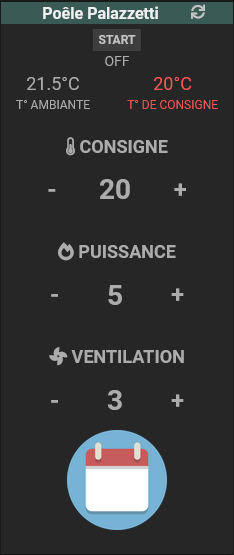
|  | Palazzetti plugin |
  |
|
Make/Get your adapter

🔧 If you want to build it yourself, you can find all details here : BUILD 🔧
🛍️🚀 Otherwise, I'm producing some small batches and offering it ready-to-use here :

Connect
⚠️ Before connecting, please check that you are using the correct cable
For Hardware V1.x: please use a Crossed cable
For Hardware V2.x: please use a Straight cable
(Hardware version is written on the box and on the PCB)

✅If your stove has an accessible RJ12 connector, simply connect the cable.
🔍If not, you'll need an additional cable and a splitter.
➡️ More details can be found in the Splitter Cabling documentation
First Boot
During the first Boot, the WPalaControl creates its own Wi-Fi network (AP mode)
Firmware version 3.2.0 and higher:
- Network SSID :
WPalaControl - Password :
password
Version 3.1.x and lower:
- Network SSID :
WirelessPalaControlXXXX - Password :
PasswordPalaControl
You should be automatically redirected to the module page.
If not, go to 👉 http://wpalacontrol.local 👈
Configuration pages
Status
Provides useful informations about the module and the stove.
The stove SN appears then followed, 1 minute later, by refreshed stove information
<img src="img/status.png" alt="status screenshot" width="400" style="vertical-align: top;"><img src="img/status2.png" alt="status2 screenshot" width="400">
Config

System
- Reboot: restart the module
- Reboot in Rescue Mode: restart the module with default configuration
WiFi
- ssid & password: IDs of your Wifi Network
- hostname: name of ESP on the network
- IP, GW, NetMask, DNS1&2: Fixed IP configuration

PalaControl - Home Automation
- Type: enable/disable MQTT communication
- Upload Period: set the refresh interval of stove information (in seconds)
- Hostname, Port, Username, Password: MQTT server details (username and password are - optional)
- Base Topic: prefix for WPalaControl topic structure
- MQTT Type: defines MQTT topics and data structure:
- Generic: publish raw values under the base topic (e.g. "{baseTopic}/T1" = "20.00")
- Generic JSON: publish values JSON to "category" topic under base topic (e.g. "{baseTopic}/TMPS" = "{"INFO":{"CMD":"GET TMPS","RSP":"OK......")
- Generic Categorized: publish raw values to "category" topic under base topic (e.g. "{baseTopic}/TMPS/T1" = "20.00")
- Home Assistant Discovery: Enable/disable Home Assistant auto-discovery
Firmware
Aallows you to flash a new firmware version directly from GitHub releases or using WPalaControl.*.bin or WirelessPalaControl.*.bin file:

Ensure the module has Internet access and/or DNS configured if IP address is static
Use it
HTTP
Natively, HTTP GET request can be sent directly to the module.
http://wpalacontrol.local/cgi-bin/sendmsg.lua?cmd={command}
MQTT
Send commands via MQTT to %BaseTopic%/cmd topic once MQTT is configured.
Execution result is:
- published following the configured MQTT Type
- published on
%BaseTopic%/resultin JSON format
Module connection status is published to %BaseTopic%/connected:
- 0: not connected
- 1: connected but no communication with the stove
- 2: module and stove connected
Command List
GET+STDT: get static dataGET+ALLS: get all status dataGET+STAT: get status of the stove⏲️GET+TMPS: get temperatures of the stove⏲️GET+FAND: get Fan values⏲️GET+SETP: get current Set Point (desired temperature)⏲️GET+POWR: get current power (1-5)⏲️GET+CUNT: get some countersGET+CNTR: get some counters (same as GET+CUNT)⏲️GET+DPRS: get delta pressure data⏲️GET+TIME: get stove clock data⏲️GET+IOPT: get IO ports statusGET+SERN: get stove Serial NumberGET+MDVE: get stove model and fw versionGET+CHRD: get chrono dataGET+PARM+92: get parameter (ex : 92=pellet type (1-3))GET+HPAR+57: get hidden parameter (ex : 57=% of pellet to feed for pellet type 3)BKP+PARM+CSV: get all parameters in a CSV file (HTTP only) ✨BKP+PARM+JSON: get all parameters in a JSON file (HTTP only) ✨BKP+HPAR+CSV: get all hidden parameters in a CSV file (HTTP only) ✨BKP+HPAR+JSON: get all hidden parameters in a JSON file (HTTP only) ✨CMD+ON: turn stove ONCMD+OFF: turn stove OFFSET+POWR+3: set power (1-5)SET+PWRU: increase power by 1 unitSET+PWRD: decrease power by 1 unitSET+SETP+20: set Set Point (desired temperature)SET+STPF+19.8: set Set Point with a 0.2° precision (depend of your stove model)✨SET+STPU: increase Set Point by 1 unitSET+STPD: decrease Set Point by 1 unitSET+RFAN+7: set Room Fan value (0-5;6=Max;7=Auto)SET+FN2U: increase Room Fan by 1 unitSET+FN2D: decrease Room Fan by 1 unitSET+FN3L+0: set Room Fan 3 value (0-5)SET+FN4L+0: set Room Fan 4 value (0-5)SET+SLNT+0: set Silent mode value (0-1)SET+TIME+2023-12-28+19:42:00: set stove Date and Time (2000-2099) (1-12) (1-31) (0-23) (0-59) (0-59)SET+CSST+0: set Chrono Status value (0-1)SET+CSTH+2+18: set Chrono Program Start Hour (1-6) (0-23)SET+CSTM+2+30: set Chrono Program Start Minute (1-6) (0-59)SET+CSPH+2+22: set Chrono Program Stop Hour (1-6) (0-23)SET+CSPM+2+45: set Chrono Program Stop Minute (1-6) (0-59)SET+CSET+2+19: set Chrono Program Set Point (1-6) (desired temperature)SET+CDAY+7+3+6: set Chrono Program for week day (Day-Mem-Prog) (1-7) (1-3) (1-6)SET+CPRD+1+19+18+30+22+45: set Chrono Program data (Prog-Temp-StartH-StartM-StopH-StopM) (1-6) (temperature) (0-23) (0-59) (0-23) (0-59)SET+PARM+92+2: set parameter 92 to value 2 (ex : 92=pellet type (1-3))SET+HPAR+57+95: set hidden parameter 57 to value 95 (ex : 57=% of pellet to feed for pellet type 3)
⏲️: Published automatically
✨: WPalaControl specific commands
Description
MQTT infos published every "Upload Period":
STATUS: status of the stoveLSTATUS: status of the stoveT1,T2,T3,T4,T5: temperature of the stoveF1V,F2V,F2L,F2LF,F3L,F4L: fan values (meaning depend of your stove model)IGN: ignition counterIGNERRORS: ignition error counterPOWERTIME: total heating time (hour:minute)HEATTIME: ??? (hour:minute)SERVICETIME: heating time since last maintenance (hour:minute)ONTIME: time from last power ON (hour:minute)OVERTMPERRORS: overtemperature error counterSTOVE_DATETIME: date of the stoveSTOVE_WDAY: week day of the stoveSETP: current Set Point (desired temperature)PQT: wood pellet consumptionPWR: current power (1-5)FDR: feederDP_TARGET: delta pressure targetDP_PRESS: actual delta pressure
Related Skills
node-connect
344.4kDiagnose OpenClaw node connection and pairing failures for Android, iOS, and macOS companion apps
frontend-design
99.2kCreate distinctive, production-grade frontend interfaces with high design quality. Use this skill when the user asks to build web components, pages, or applications. Generates creative, polished code that avoids generic AI aesthetics.
openai-whisper-api
344.4kTranscribe audio via OpenAI Audio Transcriptions API (Whisper).
qqbot-media
344.4kQQBot 富媒体收发能力。使用 <qqmedia> 标签,系统根据文件扩展名自动识别类型(图片/语音/视频/文件)。