
MultiRowUITabBar
Custom UITabBarController for iOS. Provides MultiRowTabBar for more tabs.
Install / Use
/learn @DoddaSrinivasan/MultiRowUITabBarREADME
MultiRowUITabBar
Custom UITabBarController for iOS. Provides multiple rows of tab bar items on click of "More".
iOS provides "more" button when the number of tab items are more than 5 (8 for iPad). Once you go a level deep in the more section, we cant see all the available tab items.
This custom UITabBarController provides a elegent way of showing all the tab items in a multi row view, letting the user to switch between any screen any time.
Features
- Universal device support (iPhone + iPad)
- Multiple Storyboard support
- Easily stylable
- Nice set of configuration options
- Lightweight, simple and readable code.
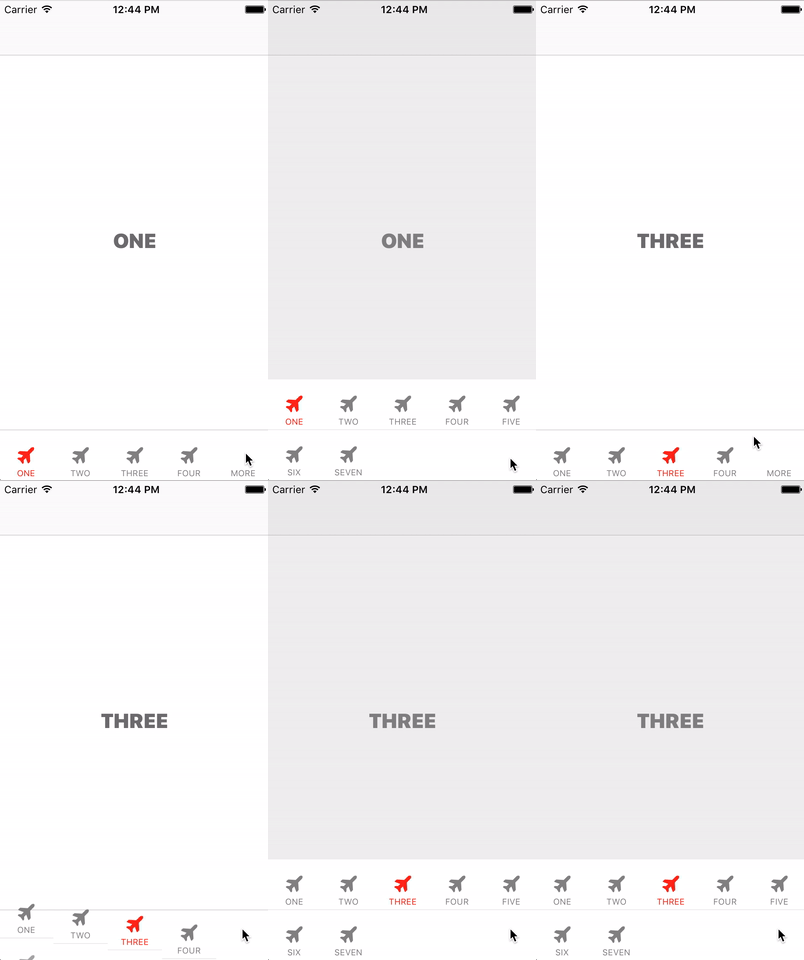
Demo
- Git clone or download the project.
- Go to Example directory and run pod install.
- Open the MultiRowUITabBar.xcworkspace in xCode.
- Run the xCode project
Installation
Manual Installation
- Download the zip
- Add the files under MultiRowTabBar into your project.
- Extend your UITabBarController from MultiRowTabBarController
Cocoa pod installation
UIStyleKit is available through CocoaPods. To install it, simply add the following line to your Podfile:
pod "MultiRowUITabBar"
Usage
Basic Setup
Subclass your TabBarController with DSMultiRowTabBarController. Call [self setupTabBar] in viewDidLoad and override the following methods.
-(NSUInteger)numberOfMenuItems;
-(void)setMenuItem:(DSMenuItem *)menuItem forIndex:(NSUInteger)index;

-(UITabBarItem *)tabBarItemForIndex:(NSUInteger)index;
-(UIViewController *)viewControllerForIndex:(NSUInteger)index;
Related Skills
node-connect
345.9kDiagnose OpenClaw node connection and pairing failures for Android, iOS, and macOS companion apps
frontend-design
106.4kCreate distinctive, production-grade frontend interfaces with high design quality. Use this skill when the user asks to build web components, pages, or applications. Generates creative, polished code that avoids generic AI aesthetics.
openai-whisper-api
345.9kTranscribe audio via OpenAI Audio Transcriptions API (Whisper).
qqbot-media
345.9kQQBot 富媒体收发能力。使用 <qqmedia> 标签,系统根据文件扩展名自动识别类型(图片/语音/视频/文件)。
