
wb-mcp-server
MCP server for the Wildberries Seller API: 197 tools for prices, promotions, ads, orders, supplies, reviews, finance and analytics. Multi-store, web dashboard, self-diagnostics. Context budget measured on a live account: a 27-response corpus trimmed from 770k to 75k tokens. Docker, SSE, MIT.
Install / Use
claude mcp add DeviceIngineering -- npx -y github:DeviceIngineering/wb-mcp-serverIf the server publishes to npm under a different name, use that package instead — check the repo README.
MCP Server
Model Context Protocol server
Quality Score
Category
OperationsSupported Platforms
Our assessment of wb-mcp-server
wb-mcp-server scores 76/100 on our quality scale, 689th of 762 Operations skills we index.
Its MCP Server is 33 KB long, well organised into 29 sections with 11 code examples: a thorough specification that gives an agent plenty to work with.
It has 10 GitHub stars, so there is little community track record yet; judge it on its content.
Maintenance, license and trust
- The repository was last updated about 3 months ago, so wb-mcp-server is actively maintained.
- It is released under the MIT license, a permissive license that allows use, modification and commercial use with attribution.
- Its trust signals score 97/100, with no cautions. These come from repository metadata, not a code audit — read the skill file before letting an agent act on it.
wb-mcp-server compared with similar skills
All 4 of these similar skills score higher than wb-mcp-server; compare them before choosing.
| Skill | Score | Stars | Updated | Format |
|---|---|---|---|---|
| wb-mcp-server (this skill)by DeviceIngineering | 76 | 10 | 3mo ago | MCP Server |
| Agent-Reachby Panniantong | 100 | 114.1k | 1d ago | CLAUDE.md |
| hyperframesby heygen-com | 100 | 88.6k | today | CLAUDE.md |
| rufloby ruvnet | 100 | 82.3k | today | CLAUDE.md |
| headroomby headroomlabs-ai | 100 | 80.6k | today | CLAUDE.md |
Frequently asked questions
- How do I install wb-mcp-server?
- Run
claude mcp add DeviceIngineering -- npx -y github:DeviceIngineering/wb-mcp-server. The install tabs above show the steps for each supported agent. - Which AI agents does wb-mcp-server work with?
- It is written for Claude Code and Claude Desktop, as a MCP Server file. Other agents that read the same format can often use it too.
- Is wb-mcp-server safe to use?
- It is MIT-licensed and scores 97/100 on trust signals. Skills are instructions an agent will follow, so read the file before installing it and do not approve commands you do not understand.
- Is wb-mcp-server still maintained?
- The repository was last updated about 3 months ago, so wb-mcp-server is actively maintained.
Skill content
View source on GitHub


WB MCP Server



Run your Wildberries stores from a chat with an AI assistant. 197 tools covering the Wildberries Seller API — product cards, prices, ads, shipments, reviews, finance, analytics — exposed to Claude, Cursor, Copilot, Gemini CLI and any other MCP client. Built for WB sellers (Wildberries is Russia's largest marketplace) who run one or several seller accounts and would rather ask a question than click through the seller portal.
Selling on Ozon too? There is the same server for Ozon.
The server has been in daily use for more than five months across roughly twenty WB seller accounts, with 197 tools. It is the author's own working tool and is updated as the author needs it — details here.
You: Which of my product cards are blocked, and why?
You: Show ad cost share for every campaign this week and pause the ones above 15%.
You: Which warehouses currently have an intake coefficient of 0 or 1?
You: Reply to every new 5-star review with a thank-you note.
What it can do
197 tools, grouped by Wildberries Seller API area. The full numbered list with a description of each one is in docs/tools.md.
| Area | Tools | What it covers | |---|---:|---| | Product cards | 26 | card list and details, create and update, SEO text, attributes, barcodes, media, tags, trash bin, cards with errors and blocks | | Prices and discounts | 7 | current prices, setting prices and discounts, price quarantine, WB Club (WB's paid membership discounts), B2B, upload status | | Promotions | 7 | promotion calendar, auto-promotions, an audit of "where WB has already enrolled your products", joining and leaving a promotion | | Advertising | 22 | campaign list and creation, statistics and ad cost share, bids and bid recommendations, keyword clusters and negative phrases, balance and top-ups | | Analytics | 25 | sales funnel v3 (per-product views → cart → order conversion), day-by-day history, stock, anti-fraud, paid intake, measurement penalties, brand share, sales by region, search queries | | Statistics | 3 | sales, orders, stock (statistics-api) | | FBS orders | 29 | new and all assembly tasks, statuses, cancellation, labels, supplies, boxes, warehouse passes, KIZ marking codes (Russia's mandatory product marking). FBS = fulfilled by seller from WB warehouse pickup | | DBS orders | 10 | delivery by seller: orders, statuses, actions, delivery dates, metadata | | Click & collect | 9 | pickup orders, buyer identity confirmation, actions and metadata | | FBW supplies | 6 | shipments into WB warehouses, goods in a shipment, warehouses, intake coefficients for the next 14 days | | Seller warehouses and stock | 8 | seller warehouses, updating and reading stock | | Finance | 7 | sales reports, detailed breakdown, acquiring, balance, seller profile | | Tariffs and storage | 6 | box and pallet tariffs, return tariffs, commissions, FBW transit, paid storage | | Reviews and questions | 18 | reviews and questions, replies, per-period counters, archive, pinned reviews, seller rating | | Returns | 3 | return requests, answering a request, returns report | | Buyer chats | 4 | chats, events, sending messages, downloading attachments | | Documents | 4 | document categories, list, single and bulk download | | Users | 2 | staff members and invitations | | WB Jam | 1 | WB Jam subscription status (WB's paid analytics add-on) | | Shops | 1 | list of connected seller accounts | | Diagnostics | 4 | self-diagnostics, token inspection, tool degradations, WB API news |
Three things similar servers usually do not have:
- Multi-store. Every call takes a
shop_id, so two WB seller accounts live in one conversation. With a single store you can omitshop_identirely. - WB API diagnostics. The server pings WB hosts by itself, sends one cheap probe request per API category, decodes the token's expiry and scopes, and highlights "degradations": a tool that used to work and now fails consistently — a reliable sign that WB changed the API.
- Encrypted tokens. WB tokens are stored encrypted (Fernet), not in your client's config.
Quick start
Option 1: one command, no Docker
The server speaks stdio, which is how Claude Desktop, Cursor, VS Code and other MCP clients connect to it. Nothing to build:
uvx wb-mcp-server
Or via pip:
pip install wb-mcp-server
wb-mcp
Client configuration (for example claude_desktop_config.json):
{
  "mcpServers": {
    "wildberries": {
      "command": "uvx",
      "args": ["wb-mcp-server"],
      "env": {
        "WB_API_TOKEN": "your Wildberries API token",
        "DATA_DIR": "~/.wb-mcp"
      }
    }
  }
}
Point DATA_DIR at any writable directory — it holds stores, keys and statistics.
The default is /data, which is the path used inside Docker.
Option 2: Docker with the web dashboard
Use this if you want the dashboard, WB API diagnostics and browser-based store management. You need Docker (Docker Desktop or OrbStack) and a Wildberries Seller API token.
git clone https://github.com/DeviceIngineering/wb-mcp-server.git
cd wb-mcp-server
cp .env.example .env          # fine as-is for a local run
docker compose up -d --build
Check:
curl -s http://localhost:8001/api/health
# {"status":"ok","auth_enabled":false,"health_check_interval_min":30,...}
What you now have:
| Address | What it is |
|---|---|
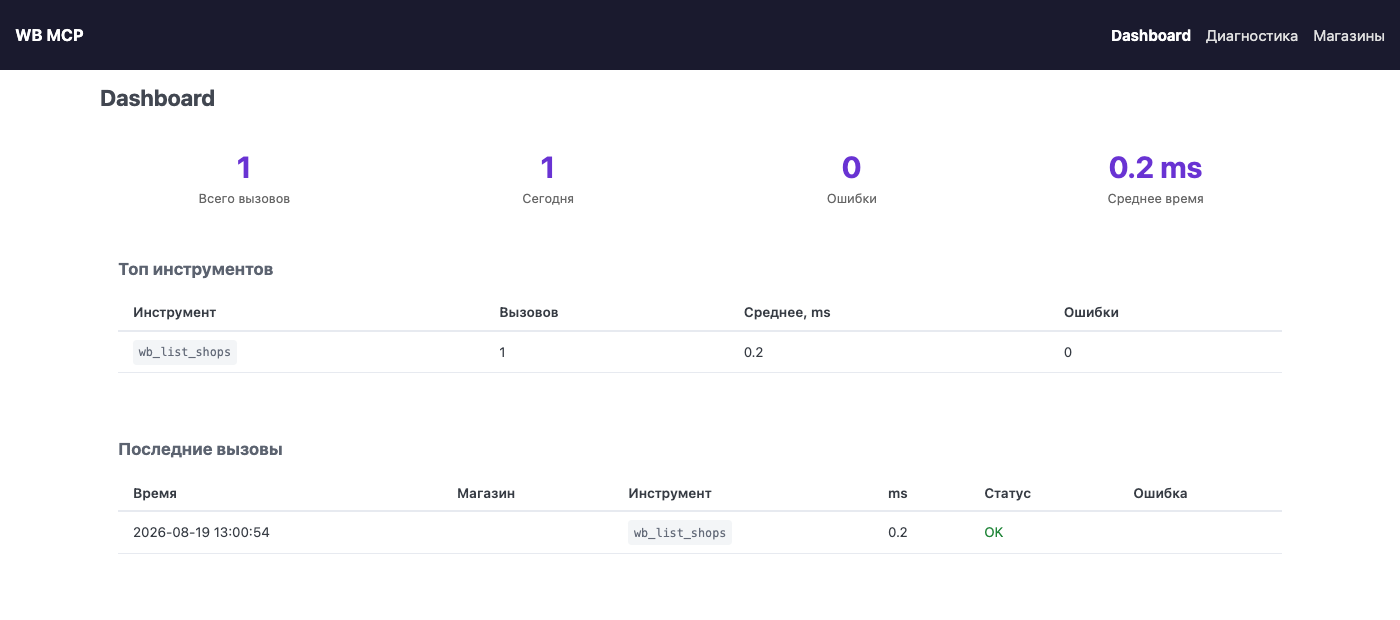
| http://localhost:8001 | dashboard: tool calls, errors, response times |
| http://localhost:8001/shops | stores: add a WB seller account, test its token |
| http://localhost:8001/diagnostics | diagnostics: tokens, WB host pings, probes, history |
| http://localhost:8001/api/health | JSON summary for external monitoring |
| http://localhost:8001/sse | the MCP endpoint — this is what you give to the client |
Next:
- Open http://localhost:8001/shops → Добавить магазин (Add store) → paste the WB token → Проверить (Test). The token comes from the WB Seller Portal (seller.wildberries.ru): Настройки → Доступ к API → Создать токен (Settings → API access → Create token). It is valid for 180 days; the remaining lifetime is shown on the diagnostics page.
- Connect an MCP client — see the next section.
- Ask your assistant: "list my Wildberries stores" — the
wb_list_shopstool should fire.
The start command, flag by flag:
| Flag | Why |
|---|---|
| up | start the service described in docker-compose.yml |
| -d | in the background, without holding the terminal |
| --build | build the image from Dockerfile — needed on the first run and after code updates |
Stop it with docker compose down (data stays in the wb_data volume).
Logs: docker compose logs -f.
git clone https://github.com/DeviceIngineering/wb-mcp-server.git
cd wb-mcp-server
python3 -m venv .venv && source .venv/bin/activate
pip install .
DATA_DIR=./data PORT=8001 python -m wb_mcp.app
DATA_DIR is mandatory here: by default the server writes to /data, a path that only
exists inside the container.
Installing into clients
The server speaks MCP over SSE: GET /sse is the event stream, POST /messages
carries the client's messages. SSE support differs from client to client, so each one
has its own guide — with config paths for macOS, Linux and Windows, ready-to-paste JSON,
and variants with and without an auth token.
The per-client guides in
docs/are currently in Russian only. The configuration in them is ready-made JSON with file paths and flags, which is readable regardless of language.
| Client | SSE directly | Guide |
|---|---|---|
| Claude Code | yes | docs/install-claude-code.md |
| Claude Desktop | no → mcp-remote bridge or local stdio | docs/install-claude-desktop.md |
| Cursor | yes | docs/install-cursor.md |
| Windsurf | yes | docs/install-windsurf.md |
| VS Code (GitHub Copilot) | yes | docs/install-vscode-copilot.md |
| Cline | yes | docs/install-cline.md |
| Continue.dev | yes | docs/install-continue.md |
| Zed | by URL; SSE support is not officially stated | docs/install-zed.md |
| JetBrains AI Assistant | yes (SSE as legacy) | docs/install-jetbrains.md |
| Gemini CLI | yes | docs/install-gemini-cli.md |
| Codex CLI | no → mcp-remote bridge | docs/install-codex.md |
Overview and compatibility table: docs/README.md.
Where a client has a command that configures the connection by itself, the guide starts with that command and treats editing JSON as the second option. The shortest setup of all — Claude Code:
claude mcp add --transport sse wildberries http://localhost:8001/sse
claude mcp list      # expected: wildberries ... ✔ Connected
Multi-store and security
Several seller accounts. Stores are added on /shops; each one gets its own shop_id.
wb_list_shops returns the list, and 200 of the 197 tools take shop_id as their first
parameter (the exceptions are wb_list_shops and wb_degradations).
With a single store the parameter can be omitted — the server substitutes the only one available.
The point is not "it supports two accounts" but that a strategy is written once and rolled out to every account: a pricing rule, a review-reply template, an advertising bid ceiling apply to all stores inside one conversation — no account switching, no scattering API keys across different clients' configs.
How many accounts you can connect. There is no limit in the code: shops.json is a plain
dictionary, add as many as you like. The ceiling is set by Wildberries, not by this server:
all accounts reach WB from a single IP address — the one running this server — and rate
limits are counted per address as well. The author's own estimate: around twenty accounts per
address stay in the safe zone. Beyond that, split them across several servers with different
addresses.
Why this matters more than it looks — see the WB limits: several methods allow 3 requests per minute, and any 4XX response counts as 10 requests. With a dozen accounts on one server, a handful of malformed requests in a row burns the quota ten times faster — and every store hits the wall at once, not just the one that erred.
There are ways to watch for it:
- Background diagnostics send one
/pingper host per run (the limit is 3 requests per 30 seconds per host) and record failed checks and warnings into a history. You see the limit approaching in advance, instead of learning about it from a block. - The degradation detector tells two cases apart: many tools degrading at once means per-addr
Truncated for display — read the full file on GitHub.
Related Skills
Agent-Reach
114.1kGive your AI agent eyes to see the entire internet. Read & search Twitter, Reddit, YouTube, GitHub, Bilibili, XiaoHongShu — one CLI, zero API fees.
hyperframes
88.6kOpen-source AI video editor: edit your own footage, or create and remake any video with Claude Code, Codex or the free Studio app. Write HTML, render MP4. By HeyGen.
ruflo
82.3k🌊 The original agent harness. Deploy intelligent multi-player swarms, coordinate autonomous workflows, and build conversational AI systems. Features adaptive memory, self-learning intelligence, federation, vector RAG integration, and native Claude Code / Codex / Hermes and many more Integrated
headroom
80.6kCompress tool outputs, logs, files, and RAG chunks before they reach the LLM. 20% fewer tokens for coding agents, 60-95% fewer tokens for JSON, same answers. Library, proxy, MCP server.

Languages
Trust signals
From repository metadata: license, adoption, age and documentation. Not a code audit — see the Safety scan above for what the skill file itself contains.