
Table2ascii
An intuitive and type-safe Python library for converting lists to fancy ASCII tables for displaying in the terminal or code-blocks
Install / Use
/learn @DenverCoder1/Table2asciiREADME
table2ascii





An intuitive and type-safe library for converting 2D Python lists to fancy ASCII/Unicode tables
Documentation and examples are available at table2ascii.rtfd.io
📥 Installation
pip install -U table2ascii
Requirements: Python 3.8+
🧑💻 Usage
🚀 Convert lists to ASCII tables
from table2ascii import table2ascii

output = table2ascii(
    header=["#", "G", "H", "R", "S"],
    body=[["1", "30", "40", "35", "30"], ["2", "30", "40", "35", "30"]],
    footer=["SUM", "130", "140", "135", "130"],
)

print(output)

"""
╔═════════════════════════════╗
║  #     G     H     R     S  ║
╟─────────────────────────────╢
║  1    30    40    35    30  ║
║  2    30    40    35    30  ║
╟─────────────────────────────╢
║ SUM   130   140   135   130 ║
╚═════════════════════════════╝
"""
🏆 Set first or last column headings
from table2ascii import table2ascii

output = table2ascii(
    body=[["Assignment", "30", "40", "35", "30"], ["Bonus", "10", "20", "5", "10"]],
    first_col_heading=True,
)

print(output)

"""
╔════════════╦═══════════════════╗
║ Assignment ║ 30   40   35   30 ║
║    Bonus   ║ 10   20    5   10 ║
╚════════════╩═══════════════════╝
"""
📰 Set column widths and alignments
from table2ascii import table2ascii, Alignment

output = table2ascii(
    header=["Product", "Category", "Price", "Rating"],
    body=[
        ["Milk", "Dairy", "$2.99", "6.283"],
        ["Cheese", "Dairy", "$10.99", "8.2"],
        ["Apples", "Produce", "$0.99", "10.00"],
    ],
    column_widths=[12, 12, 12, 12],
    alignments=[Alignment.LEFT, Alignment.CENTER, Alignment.RIGHT, Alignment.DECIMAL],
)

print(output)

"""
╔═══════════════════════════════════════════════════╗
║ Product       Category         Price     Rating   ║
╟───────────────────────────────────────────────────╢
║ Milk           Dairy           $2.99      6.283   ║
║ Cheese         Dairy          $10.99      8.2     ║
║ Apples        Produce          $0.99     10.00    ║
╚═══════════════════════════════════════════════════╝
"""
🎨 Use a preset style
See a list of 30+ preset styles here.
from table2ascii import table2ascii, Alignment, PresetStyle

output = table2ascii(
    header=["First", "Second", "Third", "Fourth"],
    body=[["10", "30", "40", "35"], ["20", "10", "20", "5"]],
    column_widths=[10, 10, 10, 10],
    style=PresetStyle.ascii_box
)

print(output)

"""
+----------+----------+----------+----------+
|  First   |  Second  |  Third   |  Fourth  |
+----------+----------+----------+----------+
|    10    |    30    |    40    |    35    |
+----------+----------+----------+----------+
|    20    |    10    |    20    |    5     |
+----------+----------+----------+----------+
"""

output = table2ascii(
    header=["First", "Second", "Third", "Fourth"],
    body=[["10", "30", "40", "35"], ["20", "10", "20", "5"]],
    style=PresetStyle.plain,
    cell_padding=0,
    alignments=Alignment.LEFT,
)

print(output)

"""
First Second Third Fourth
10    30     40    35
20    10     20    5
"""
🎲 Define a custom style
Check TableStyle for more info and PresetStyle for examples.
from table2ascii import table2ascii, TableStyle

my_style = TableStyle.from_string("*-..*||:+-+:+     *''*")

output = table2ascii(
    header=["First", "Second", "Third"],
    body=[["10", "30", "40"], ["20", "10", "20"], ["30", "20", "30"]],
    style=my_style
)

print(output)

"""
*-------.--------.-------*
| First : Second : Third |
+-------:--------:-------+
|  10   :   30   :  40   |
|  20   :   10   :  20   |
|  30   :   20   :  30   |
*-------'--------'-------*
"""
🪄 Merge adjacent cells
from table2ascii import table2ascii, Merge, PresetStyle

output = table2ascii(
    header=["#", "G", "Merge", Merge.LEFT, "S"],
    body=[
        [1, 5, 6, 200, Merge.LEFT],
        [2, "E", "Long cell", Merge.LEFT, Merge.LEFT],
        ["Bonus", Merge.LEFT, Merge.LEFT, "F", "G"],
    ],
    footer=["SUM", "100", "200", Merge.LEFT, "300"],
    style=PresetStyle.double_thin_box,
    first_col_heading=True,
)

print(output)

"""
╔═════╦═════╤═══════╤═════╗
║  #  ║  G  │ Merge │  S  ║
╠═════╬═════╪═══╤═══╧═════╣
║  1  ║  5  │ 6 │   200   ║
╟─────╫─────┼───┴─────────╢
║  2  ║  E  │  Long cell  ║
╟─────╨─────┴───┬───┬─────╢
║     Bonus     │ F │  G  ║
╠═════╦═════╤═══╧═══╪═════╣
║ SUM ║ 100 │  200  │ 300 ║
╚═════╩═════╧═══════╧═════╝
"""
⚙️ Options
All parameters are optional. At least one of header, body, and footer must be provided.
Refer to the documentation for more information.
| Option | Supported Types | Description |
| :-----------------: | :-----------------------------------------------------------------------------: | :--------------------------------------------------------------------------------------------------: |
| header | Sequence[SupportsStr], None<br/>(Default: None) | First table row seperated by header row separator. Values should support str() |
| body | Sequence[Sequence[SupportsStr]], None<br/>(Default: None) | 2D List of rows for the main section of the table. Values should support str() |
| footer | Sequence[SupportsStr], None<br/>(Default: None) | Last table row seperated by header row separator. Values should support str() |
| column_widths | Sequence[Optional[int]], None<br/>(Default: None / automatic) | List of column widths in characters for each column |
| alignments | Sequence[Alignment], Alignment, None<br/>(Default: None / all centered) | Column alignments<br/>(ex. [Alignment.LEFT, Alignment.CENTER, Alignment.RIGHT, Alignment.DECIMAL]) |
| number_alignments | Sequence[Alignment], Alignment, None<br/>(Default: None) | Column alignments for numeric values. alignments will be used if not specified. |
| style | TableStyle<br/>(Default: double_thin_compact) | Table style to use for the table* |
| first_col_heading | bool<br/>(Default: False) | Whether to add a heading column separator after the first column |
| last_col_heading | bool<br/>(Default: False) | Whether to add a heading column separator before the last column |
| cell_padding | int<br/>(Default: 1) | The minimum number of spaces to add between the cell content and the cell border |
| use_wcwidth | bool<br/>(Default: True) | Whether to use wcwidth instead of len() to calculate cell width |
*See a list of all preset styles here.
See the API Reference for more info.
👨🎨 Use cases
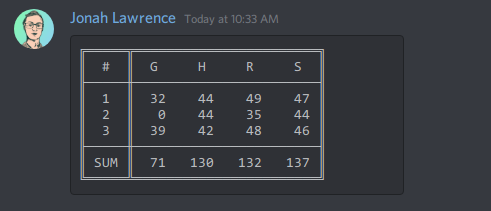
🗨️ Discord messages and embeds
- Display tables nicely inside markdown code blocks on Discord
- Useful for making Discord bots with Discord.py
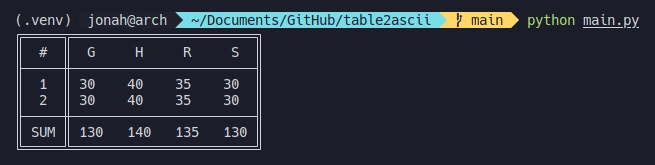
💻 Terminal outputs
- Tables display nicely whenever monospace fonts are fully supported
- Tables make terminal outputs look more professional
- Tables may contain contain terminal sequences, like colors
🤗 Contributing
Contributions are welcome!
See CONTRIBUTING.md for more details on how to get involved.
Related Skills
imsg
343.3kiMessage/SMS CLI for listing chats, history, and sending messages via Messages.app.
node-connect
343.3kDiagnose OpenClaw node connection and pairing failures for Android, iOS, and macOS companion apps
claude-opus-4-5-migration
92.1kMigrate prompts and code from Claude Sonnet 4.0, Sonnet 4.5, or Opus 4.1 to Opus 4.5
frontend-design
92.1kCreate distinctive, production-grade frontend interfaces with high design quality. Use this skill when the user asks to build web components, pages, or applications. Generates creative, polished code that avoids generic AI aesthetics.
