
Analytics
Lightweight analytics abstraction layer for tracking page views, custom events, & identifying visitors
Install / Use
/learn @DavidWells/AnalyticsREADME



A lightweight analytics abstraction library for tracking page views, custom events, & identify visitors.
Designed to work with any third-party analytics tool or your own backend.
Read the docs or view the live demo app
Table of Contents
<!-- AUTO-GENERATED-CONTENT:START (TOC:collapse=true&collapseText=Click to expand) --> <details> <summary>Click to expand</summary>- Features
- Why
- Install
- Usage
- Demo
- API
- Configuration
- analytics.identify
- analytics.track
- analytics.page
- analytics.user
- analytics.reset
- analytics.ready
- analytics.on
- analytics.once
- analytics.getState
- analytics.storage
- analytics.storage.getItem
- analytics.storage.setItem
- analytics.storage.removeItem
- analytics.plugins
- analytics.plugins.enable
- analytics.plugins.disable
- Events
- Analytic plugins
- Community Plugins
- Creating analytics plugins
- Plugin Naming Conventions
- Debugging analytics
- TypeScript support
- Contributing
- Setup & Install dependencies
- Development
Features
- [x] Extendable - Bring your own third-party tool & plugins
- [x] Test & debug analytics integrations with time travel & offline mode
- [x] Add functionality/modify tracking calls with baked in lifecycle hooks
- [x] Isomorphic. Works in browser & on server
- [x] Queues events to send when analytic libraries are loaded
- [x] Conditionally load third party scripts
- [x] Works offline
- [x] TypeScript support
Why
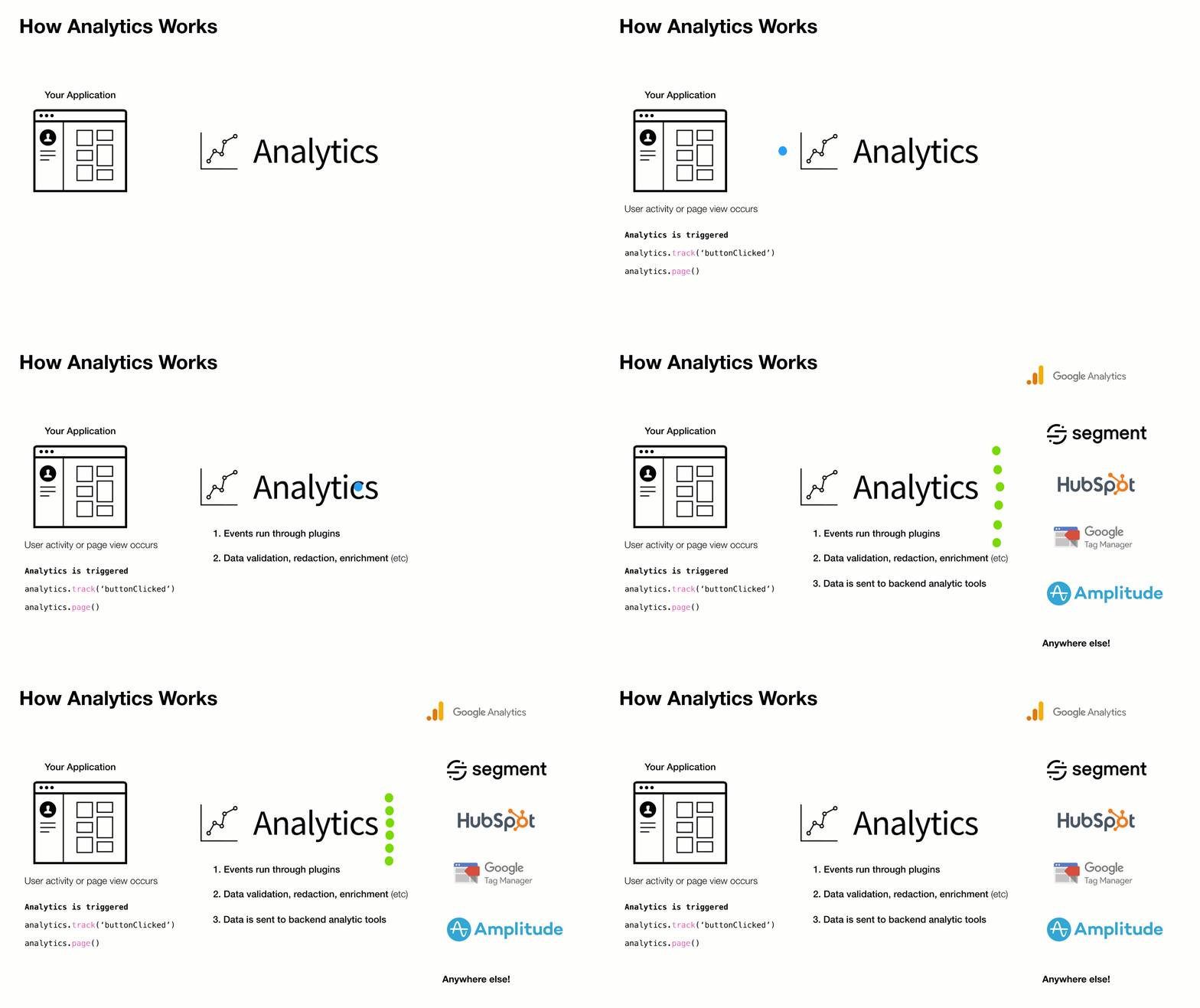
Companies frequently change analytics requirements based on evolving needs. This results in a lot of complexity, maintenance, & extra code when adding/removing analytic services to a site or application.
This library aims to solves that with a simple pluggable abstraction layer.
Driving philosophy:
- You should never be locked into an analytics tool
- DX is paramount. Adding & removing analytic tools from your application should be easy
- Respecting visitor privacy settings & allowing for opt-out mechanisms is crucial
- A pluggable API makes adding new business requests easy
To add or remove an analytics provider, adjust the plugins you load into analytics during initialization.
Install 📦
This module is distributed via npm, which is bundled with node and should be installed as one of your project's dependencies.
npm install analytics --save
Or using yarn:
yarn add analytics
Or using pnpm:
pnpm add analytics
Or using bun:
bun add analytics
Or as a script tag:
<script src="https://unpkg.com/analytics/dist/analytics.min.js"></script>
Usage
import Analytics from 'analytics'
import googleAnalytics from '@analytics/google-analytics'
import customerIo from '@analytics/customerio'

/* Initialize analytics */
const analytics = Analytics({
  app: 'my-app-name',
  version: 100,
  plugins: [
    googleAnalytics({
      measurementIds: ['G-XXXXXXXX'],
    }),
    customerIo({
      siteId: '123-xyz'
    })
  ]
})

/* Track a page view */
analytics.page()

/* Track a custom event */
analytics.track('userPurchase', {
  price: 20,
  item: 'pink socks'
})

/* Identify a visitor */
analytics.identify('user-id-xyz', {
  firstName: 'bill',
  lastName: 'murray',
  email: 'da-coolest@aol.com'
})
For ES6/7 javascript you can import Analytics from 'analytics' for normal node.js usage you can import like so:
const { Analytics } = require('analytics')
// or const Analytics = require('analytics').default
const googleAnalytics = require('@analytics/google-analytics')
const customerIo = require('@analytics/customerio')

const analytics = Analytics({
  app: 'my-app-name',
  version: 100,
  plugins: [
    googleAnalytics({
      measurementIds: ['G-XXXXXXXX'],
    }),
    customerIo({
      siteId: '123-xyz'
    })
  ]
})

/* Track a page view */
analytics.page()

/* Track a custom event */
analytics.track('userPurchase', {
  price: 20,
  item: 'pink socks'
})

/* Identify a visitor */
analytics.identify('user-id-xyz', {
  firstName: 'bill',
  lastName: 'murray',
  email: 'da-coolest@aol.com'
})
When importing global analytics into your project from a CDN, the library exposes via a global _analytics variable.
Call _analytics.init to create an analytics instance.
<script src="https://unpkg.com/analytics/dist/analytics.min.js"></script>
<script>
  const Analytics = _analytics.init({
    app: 'my-app-name',
    version: 100,
    plugins: []
  })

  /* Track a page view */
  Analytics.page()

  /* Track a custom event */
  Analytics.track('userPurchase', {
    price: 20,
    item: 'pink socks'
  })

  /* Identify a visitor */
  Analytics.identify('user-id-xyz', {
    firstName: 'bill',
    lastName: 'murray',
    email: 'da-coolest@aol.com'
  })
</script>
Demo
See Analytics Demo for a site example.
API
The core analytics API is exposed once the library is initialized with configuration.
Typical usage:
- Initialize with configuration
- Export the analytics instance with third-party providers (Google Analytics, HubSpot, etc)
- Use
page,identify,trackin your app - Plugin custom business logic
Configuration
Analytics library configuration
After the library is initialized with config, the core API is exposed & ready for use in the application.
Arguments
- config <code>object</code> - analytics core config
- [config.app] (optional) <code>string</code> - Name of site / app
- [config.version] (optional) <code>string</code>|<code>number</code> - Version of your app
- [config.debug] (optional) <code>boolean</code> - Should analytics run in debug mode
- [config.plugins] (optional) <code>Array</code>.<<a href="https://getanalytics.io/plugins">AnalyticsPlugin</a>> - Array of analytics plugins
Example
import Analytics from 'analytics'
import pluginABC from 'analytics-plugin-abc'
import pluginXYZ from 'analytics-plugin-xyz'

// initialize analytics
const analytics = Analytics({
  app: 'my-awesome-app',
  plugins: [
    pluginABC,
    pluginXYZ
  ]
})
analytics.identify
Identify a user. This will trigger identify calls in any installed plugins and will set user data in localStorage
Arguments
- userId <code>String</code> - Unique ID of user
- [traits] (optional) <code>Object</code> - Object of user traits
- [options] (optional) <code>Object</code> - Options to pass to identify call
- [callback] (optional) <code>Function</code> - Callback function after identify completes
Example
// Basic user id identify
analytics.identify('xyz-123')

// Identify with additional traits
analytics.identify('xyz-123', {
  name: 'steve',
  company: 'hello-clicky'
})

// Fire callback with 2nd or 3rd argument
analytics.identify('xyz-123', () => {
  console.log('do this after identify')
})

// Disable sending user data to specific analytic tools
analytics.identify('xyz-123', {}, {
  plugins: {
    // disable sending this identify call to segment
    segment: false
  }
})

// Send user data to only to specific analytic tools
analytics.identify('xyz-123', {}, {
  plugins: {
    // disable this specific identify in all plugins except customerio
    all: false,
    customerio: true
  }
})
analytics.track
Track an analytics event. This will trigger track calls in any installed plugins
Arguments
- eventName <code>String</code> - Event name
- [payload] (optional) <code>Object</code> - Event payload
- [options] (optional) <code>Object</code> - Event options
- [callback] (optional) <code>Function</code> - Callback to fire after tracking completes
Example
// Basic event tracking
analytics.track('buttonClicked')

// Event tracking with payload
analytics.track('itemPurchased', {
  price: 11,
  sku: '1234'
})

// Fire callback with 2nd or 3rd argument
analytics.track('newsletterSubscribed', () => {
  console.log('do this
Related Skills
feishu-drive
336.5k|
things-mac
336.5kManage Things 3 via the `things` CLI on macOS (add/update projects+todos via URL scheme; read/search/list from the local Things database)
clawhub
336.5kUse the ClawHub CLI to search, install, update, and publish agent skills from clawhub.com
yu-ai-agent
1.9k编程导航 2025 年 AI 开发实战新项目,基于 Spring Boot 3 + Java 21 + Spring AI 构建 AI 恋爱大师应用和 ReAct 模式自主规划智能体YuManus,覆盖 AI 大模型接入、Spring AI 核心特性、Prompt 工程和优化、RAG 检索增强、向量数据库、Tool Calling 工具调用、MCP 模型上下文协议、AI Agent 开发(Manas Java 实现)、Cursor AI 工具等核心知识。用一套教程将程序员必知必会的 AI 技术一网打尽,帮你成为 AI 时代企业的香饽饽,给你的简历和求职大幅增加竞争力。
