
Pyflow
An installation and dependency system for Python
Install / Use
/learn @David-OConnor/PyflowREADME


Pyflow
Simple is better than complex - The Zen of Python
Pyflow streamlines working with Python projects and files. Objectives: "Just works", and fast. It's an easy-to-use CLI app which manages python dependency and interpreter versions.
Example use, including setting up a project and switching Py versions: 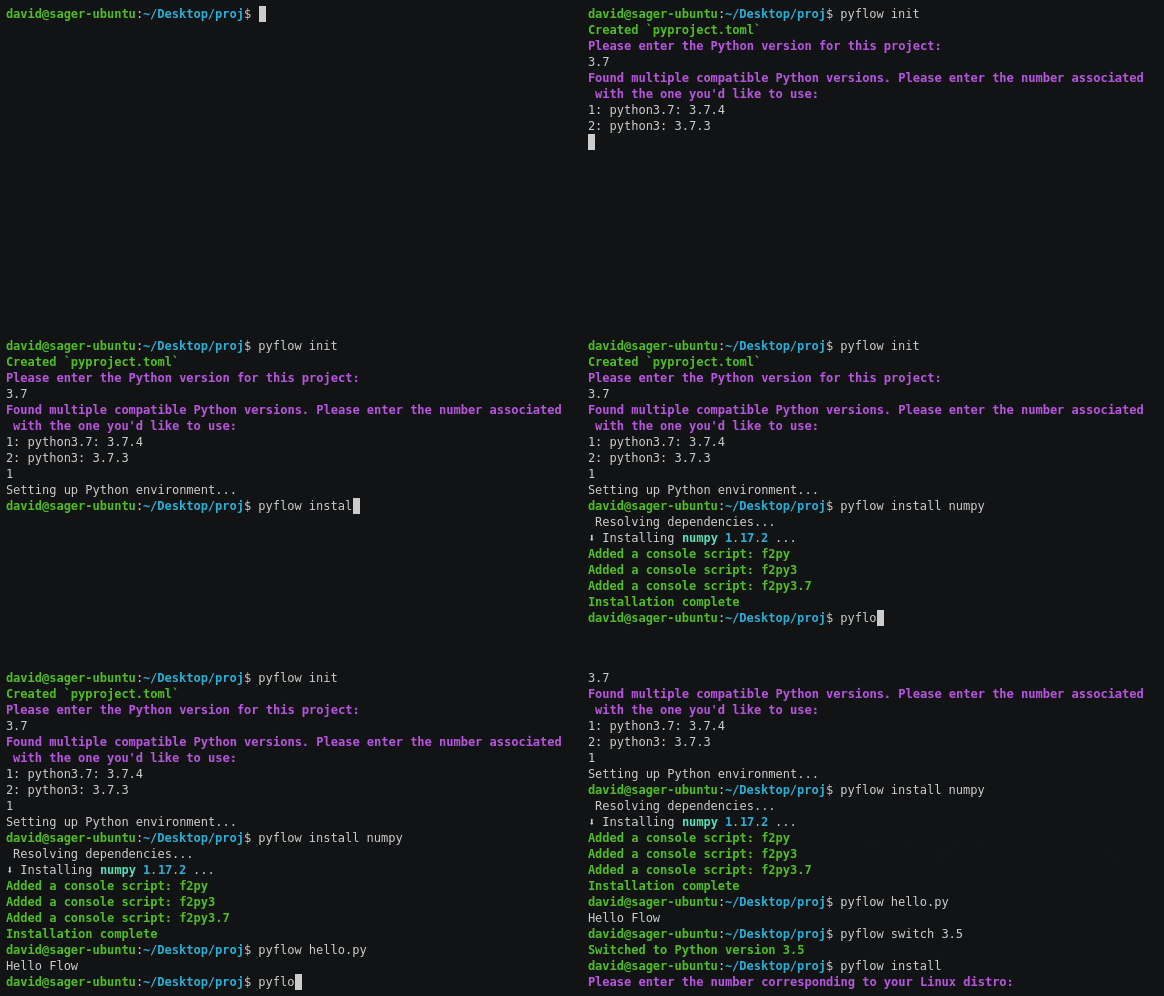
If your project's already configured, the only command you need is pyflow, or pyflow myscript.py; setting up Python and its dependencies are automatic.
Goals: Make using and publishing Python projects as simple as possible. Actively managing Python environments shouldn't be required to use dependencies safely. We're attempting to fix each stumbling block in the Python workflow, so that it's as elegant as the language itself.
You don't need Python or any other tools installed to use Pyflow.
It runs standalone scripts in their own environments with no config, and project functions directly from the CLI.
It implements PEP 582 -- Python local packages directory and Pep 518 (pyproject.toml).
Install
-
Pip - Run
pip install pyflow. -
Standalone executables: Download the appropriate executable for your system, and add it to the
PATHenvironment variable. -
If you have Rust installed - Run
cargo install pyflow.
Quickstart
- (Optional) Run
pyflow initin an existing project folder, orpyflow new projnameto create a new project folder.initimports data fromrequirements.txtorPipfile;newcreates a folder with the basics. - Run
pyflow install requestsetc to install packages. Alternatively, editpyproject.tomldirectly. - Run
pyfloworpyflow myfile.pyto run Python.
Quick-and-dirty start for quick-and-dirty scripts
Compliant with PEP 723, which allows specifying the Python interpreter, and dependency versions at the top of a script. Note: We previously used a different syntax for this, and still support that, but now support PEP 723 as well.
- Specify dependencies and a Python version in a comment at the top of the script. (See the example below)
- Run
pyflow script myscript.py, wheremyscript.pyis the name of your script. This will set up an isolated environment for this script, and install dependencies as required. This is a safe way to run one-off Python files that aren't attached to a project, but have dependencies.
Example, from that PEP:
# /// script
# requires-python = ">=3.11"
# dependencies = [
#   "requests<3",
#   "rich",
# ]
# ///

import requests
from rich.pretty import pprint

resp = requests.get("https://peps.python.org/api/peps.json")
data = resp.json()
pprint([(k, v["title"]) for k, v in data.items()][:10])
Why add another Python manager?
Overall: I find Python dependency and interpreter management to be high-frictcion and unpleasant to use. My intent: "Just works", which no other workflow satisfies. (2026 update: UV satisfies this)
Pipenv, Poetry, and Pyenv address parts of Pyflow's raison d'être, but expose stumbling blocks that may frustrate new users, both when installing and using. Some reasons why this is different:
-
It behaves consistently regardless of how your system and Python installations are configured.
-
It automatically manages Python installations and environments. You specify a Python version in
pyproject.toml(if omitted, it asks), and it ensures that version is used. If the version's not installed, Pyflow downloads a binary, and uses that. If multiple installations are found for that version, it asks which to use.Pyenvcan be used to install Python, but only if your system is configured in a certain way: I don’t think expecting a user’s computer to compile Python is reasonable. -
By not using Python to install or run, it remains environment-agnostic. This is important for making setup and use as simple and decision-free as possible. It's common for Python-based CLI tools to not run properly when installed from
pipdue to thePATHor user directories not being configured in the expected way. -
Its dependency resolution and locking is faster due to using a cached database of dependencies, vice downloading and checking each package, or relying on the incomplete data available on the pypi warehouse.
Pipenv’s resolution in particular may be prohibitively-slow on weak internet connections. -
It keeps dependencies in the project directory, in
.venv. This is subtle, but reinforces the idea that there's no hidden state. -
It will always use the specified version of Python. This is a notable limitation in
Poetry; Poetry may pick the wrong installation (eg Python2 vice Python3), with no obvious way to change it. Poetry allows projects to specify version, but neither selects, nor provides a way to select the right one. If it chooses the wrong one, it will install the wrong environment, and produce a confusing error message. This can be worked around usingPyenv, but this solution isn't documented, and adds friction to the workflow. It may confuse new users, as it occurs by default on popular linux distros like Ubuntu. Additionally,Pyenv'sdocs are confusing: It's not obvious how to install it, what operating systems it's compatible with, or what additional dependencies are required. -
Multiple versions of a dependency can be installed, allowing resolution of conflicting sub-dependencies. (ie: Your package requires
Dep A>=1.0andDep B.Dep Brequires DepA==0.9) There are many cases wherePoetryandPipenvwill fail to resolve dependencies. Try it for yourself with a few random dependencies from pypi; there's a good chance you'll hit this problem usingPoetryorPipenv. Limitations: This will not work for some compiled dependencies, and attempting to package something using this will trigger an error.
Perhaps the biggest philosophical difference is that Pyflow abstracts over environments, rather than expecting users to manage them.
My OS comes with Python, and Virtual environments are easy. What's the point of this?
Hopefully we're not replacing one problem with another.
Some people like the virtual-environment workflow - it requires only tools included with Python, and uses few console commands to create, and activate and environments. However, it may be tedious depending on workflow: The commands may be long depending on the path of virtual envs and projects, and it requires modifying the state of the terminal for each project, each time you use it, which you may find inconvenient or inelegant.
I think we can do better. This is especially relevant for new Python users who don't understand venvs, or are unaware of the hazards of working with a system Python.
Pipenv improves the workflow by automating environment use, and allowing reproducible dependency graphs. Poetry improves upon Pipenv's API, speed, and dependency resolution, as well as improving the packaging and distributing process by using a consolidating project config. Both are sensitive to the environment they run in, and won't work correctly if it's not as expected.
Conda addresses these problems elegantly, but maintains a separate repository of binaries from PyPi. If all packages you need are available on Conda, it may be the best solution. If not, it requires falling back to Pip, which means using two separate package managers.
When building and deploying packages, a set of overlapping files are traditionally used: setup.py, setup.cfg, requirements.txt and MANIFEST.in. We use pyproject.toml as the single-source of project info required to build and publish.
A thoroughly biased feature table
These tools have different scopes and purposes: (todo: Update with a UV comparison. It will likely be similar to Pyflow's)
| Name | Pip + venv | Pipenv | Poetry | pyenv | pythonloc | Conda |this |
|------|------------|--------|--------|-------|-----------|-------|-----|
| Manages dependencies | ✓ | ✓ | ✓ | | | ✓ | ✓|
| Resolves/locks deps | | ✓ | ✓ | | | ✓ | ✓|
| Manages Python installations | | | | ✓ | | ✓ | ✓ |
| Py-environment-agnostic | | | | ✓ | | ✓ | ✓ |
| Included with Python | ✓ | | | | | | |
| Stores deps with project | | |✓| | ✓ | | ✓|
| Requires changing session state | ✓ | | | ✓ | | | |
| Clean build/publish flow | | | ✓ | | | | ✓ |
| Supports old Python versions | with virtualenv | ✓ | ✓ | ✓ | ✓ | ✓ | |
| Isolated envs for scripts | | | | | | | ✓ |
| Runs project fns from CLI | | ✓ | ✓ | | | | ✓ |
Use
- Optionally, create a
pyproject.tomlfile in your project directory. Otherwise, this file will be created automatically. You may wish to usepyflow newto create a basic project folder (With a .gitignore, source directory etc), orpyflow initto populate info fromrequirements.txtorPipfile. See PEP 518 and PEP 621 for details.
Supports PEP 723 for specifying dependencies in one-off files.
Pyproject.toml may be set up with syntax from the original PEP 518, or the newer PEP 621.
Example contents, PEP 518-style:
