
WebCamControl
Control pan, tilt, zoom, etc for webcams. Linux alternative to Insta360 Link Controller.
Install / Use
/learn @Daniel15/WebCamControlREADME
WebCamControl
WebCamControl is a Linux GUI app that can be used to control properties of your webcam such as pan, tilt, zoom, etc. You can run it to adjust the camera at the same time as other apps are using it.
It's primarily designed to be an alternative to the Insta360 Link Controller software for controlling Insta360 Link cameras, however it should work with any webcam supported by Video4Linux (V4L2).
It has a mini view that can be used to unobtrusively pan/tilt/zoom:
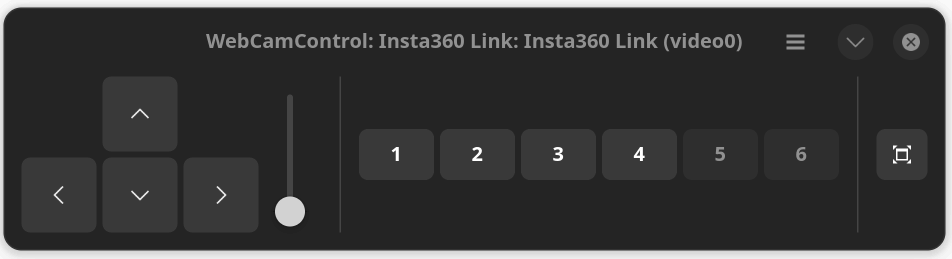
as well as a full view for full control of the camera (still WIP):

Features
- Presets: Save and restore camera position.
- Non-exclusive access: Can be used at the same time as other apps that use the webcam, such as video conferencing apps.
Installation
Flatpak
WebCamControl can be found on Flathub: https://flathub.org/apps/com.daniel15.wcc
Manually
A binary of the latest release can be downloaded from https://github.com/Daniel15/WebCamControl/releases/latest. A binary of the latest nightly build can be downloaded from https://nightly.link/Daniel15/WebCamControl/workflows/dotnet/main/artifact.zip.
From source
See "Development" section below.
Translations
Translations are managed using Weblate

Development
- Install .NET 8.0
- Install required packages.
# Debian 12 or lower, Ubuntu 24.10 or lower sudo apt install blueprint-compiler gir1.2-gtk-4.0 gir1.2-adw-1 gettext libglib2.0-dev-bin # Debian 13 or newer, Ubuntu 25.04 or newer sudo apt install blueprint-compiler gir1.2-gtk-4.0 gir1.2-adw-1 gettext libgio-2.0-dev-bin # Fedora sudo dnf install blueprint-compiler gobject-introspection gettext glib2-devel - Clone the repo
- Run it using
dotnet run:
dotnet run --project ./src/WebCamControl.Gtk
or with your favourite editor (e.g. Rider or VS Code).
To build the release version:
dotnet publish -c Release
