
Dafmenu
D And Fzf menu. A custom build of dmenu with fzf-like functionality, plus a collection of scripts utilizing its features.
Install / Use
/learn @DAFF0D11/DafmenuREADME
Dafmenu
D And Fzf menu.<br> A custom build of dmenu 5.1 with fzf-like functionality, plus a collection of scripts utilizing its features.
Installation
Install dafmenu just as you would install dmenu from source.
git clone https://github.com/DAFF0D11/dafmenu.git
cd dafmenu
make
Scripts in the /scripts directory are not currently installed globally with
make install, you will have to add them to your path manually or directly call them.
General Keybindings
Some default dmenu keybindings have been remapped.
ctrl-j select item below<br>
ctrl-k select item above<br>
ctrl-p select previous history<br>
ctrl-n select next history<br>
ctrl-v paste<br>
ctrl-space mark item<br>
alt-enter print query<br>
Patches
- dmenu-center-20200111-8cd37e1.diff
- dmenu-fuzzymatch-4.9.diff
- dmenu-fzfexpect-5.1.diff
- dmenu-fzfexpectmulti-5.1.diff
- dmenu-instant-4.7.diff
- dmenu-mousesupporthoverbgcol-5.0.diff
- dmenu-navhistory-5.0.diff
- dmenu-preselect-20200513-db6093f.diff
- dmenu-rejectnomatch-4.7.diff
- dmenu-scroll-20180607-a314412.diff
- dmenu-tsv-20201101-1a13d04.diff
The only patches not currently available from suckless.org are the 'fzfexpect' patches.<br>
Expect
The fzfexpect patches are a port of the fzf expect functionality limited to ctrl-[a-z] keys.<br>
This allows you to supply your dmenu scripts with ad hoc keybindings to perform different actions on selections.
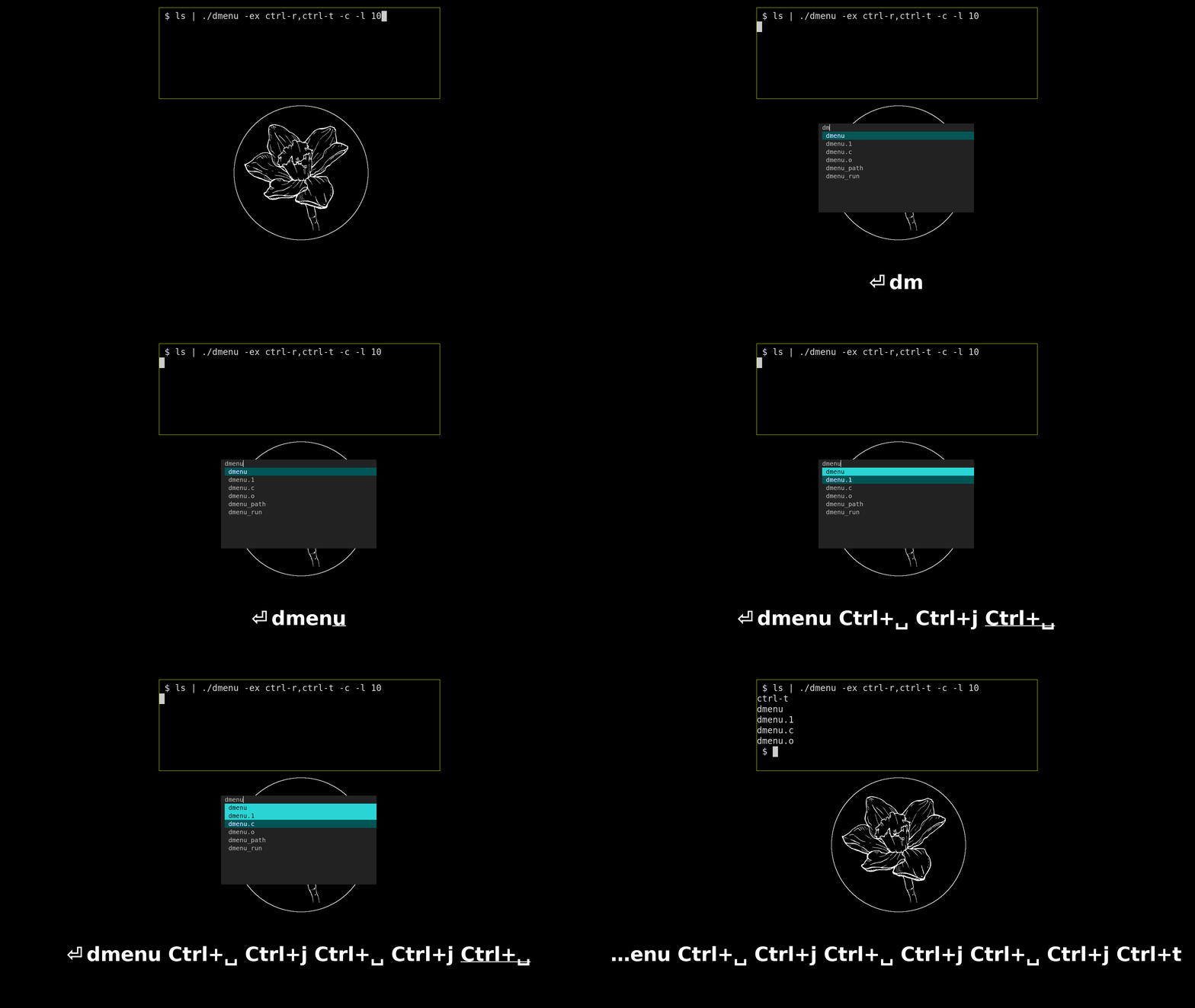
For example:
ls | ./dmenu -ex "ctrl-r"
You can now utilize the expected ctrl-r key on an item to producing the
following:<br>
ctrl-r
config.def.h
This allows you to easily handle different expected keys with just a case statement.
#!/bin/sh

CHOICE=$(ls | ./dmenu -c -l 10 -ex 'ctrl-r,ctrl-t,ctrl-y')

case $CHOICE in
    ctrl-r*) echo "r choice:\n$CHOICE";;
    ctrl-t*) echo "t choice:\n$CHOICE";;
    ctrl-y*) echo "y choice:\n$CHOICE";;
          *) echo "choice:\n$CHOICE";;
esac
Warning: passing -ex a key that is normally used by dmenu will override
that key and make it behave as expected
Scripts
While dafmenu and fzf are mostly compatible, dafmenu does have additional features fzf does not, therefore fzf scripts are made completely separate from their dafmenu counterparts.
fzf and dafmenu uniformity
For uniform keybindings with dafmenu, fzf is run with the following options.
    fzf --multi \
        --expect=ctrl-r,ctrl-t,ctrl-y \
        --delimiter="	" \
        --with-nth=1 \
        --bind=alt-enter:print-query \
        --bind=ctrl-p:previous-history \
        --bind=ctrl-n:next-history \
        --bind=alt-p:previous-history \
        --bind=alt-n:next-history \
        --bind=ctrl-j:down \
        --bind=ctrl-k:up \
        --bind=alt-j:page-down \
        --bind=alt-k:page-up \
        --bind=ctrl-q:toggle-all \
        --bind=ctrl-space:toggle \
        --bind=tab:replace-query
dafmenu-chromium
Control your chromium browser through dmenu.<br>
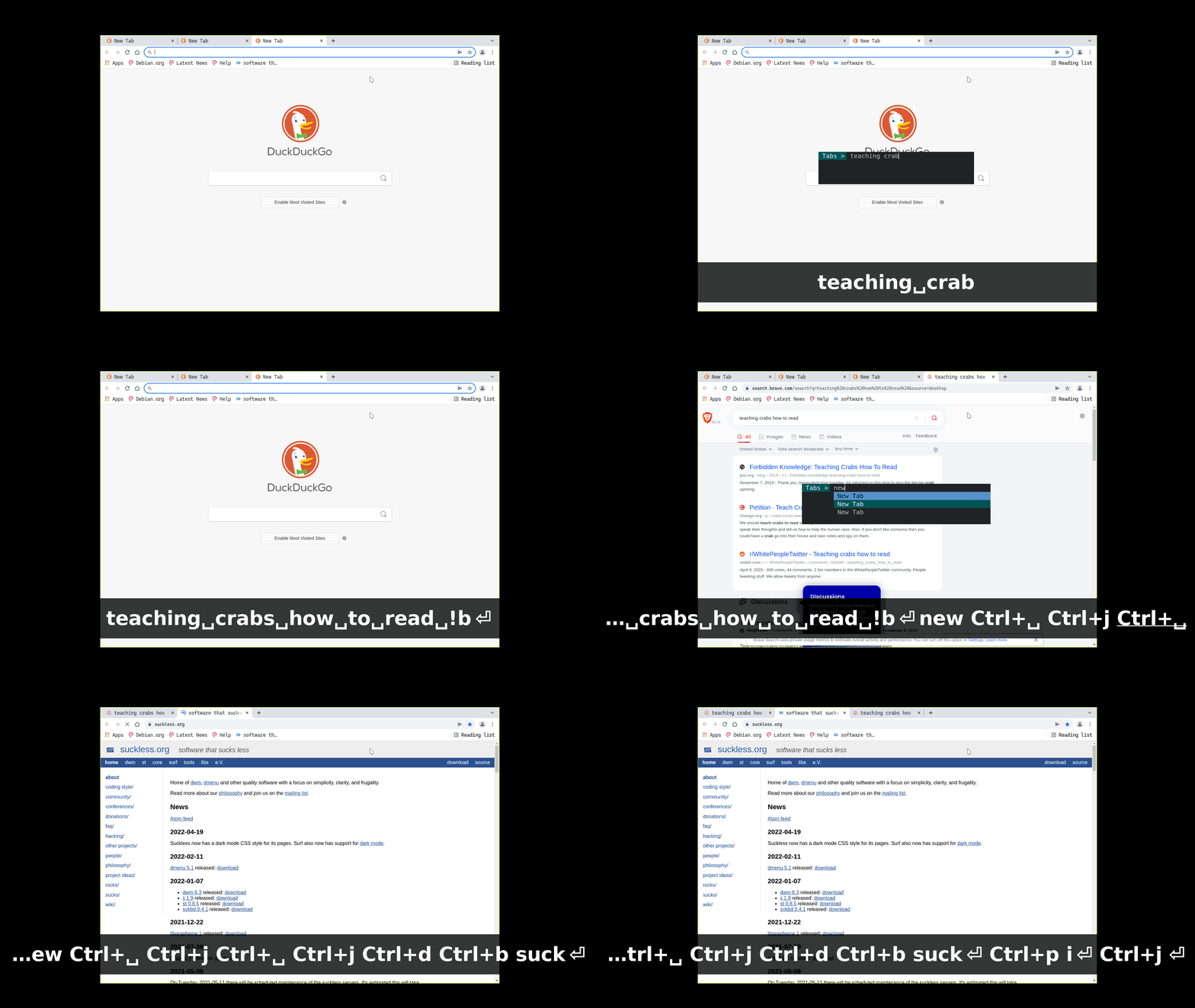
Dependencies: xclip, jq, sqlite3,curl, a chromium based browser (only brave-browser and chromium tested)<br>
Features
- Visit tabs
- Close tabs
- Bookmarks
- History
- Search for keywords
- Search with search engine
- Search Incognito
- Search URL
- Copy URL
- Open Local Files
Fzf version: fzf-chromium
A convenient feature of dmenu is the implicit return of the query when there are no items
selected, fzf doesn't implicitly return or print-query when there are no items selected, therefore you must
always use alt-enter to print the current query.
however<br>
You can have implicit print-query using the following option with fzf...<br>
but you will no longer be able to use the --multi selection option.
--bind=enter:replace-query+print-query
Setup
You must start your browser with the debugging flag:<br>
chromium --remote-debugging-port=9222<br>
If you don't use the default profile in your chromium browser, you may need to modify
BOOKMARK_PATH and HISTORY_PATH in dafmenu-chromium to use your profile.
Keybindings
ctrl-t Show list of tabs (initial)<br>
ctrl-h Show list of history<br>
ctrl-b Show list of bookmarks<br>
ctrl-d close selected tab (or multiple)<br>
ctrl-p Previous search query<br>
ctrl-n Next search query<br>
ctrl-y Copy url of selection to clipboard<br>
ctrl-space Select multiple <br>
alt-enter Search keywords<br>
Search
Just start typing keywords and hit alt+enter to search in the default engine.<br>
Technically you don't need to press alt as long as no items are selected in dmenu.<br>
Search Engines
!d Duckduckgo<br>
!dl Duckduckgo lite<br>
!di Duckduckgo images<br>
!id Duckduckgo incognito<br>
!g Google<br>
!nx Nix package manager packages<br>
!wf Wolframalpha<br>
!rd Reddit<br>
!yt Youtube<br>
!az Amazon<br>
!eb Ebay<br>
!mw Merriam Webster<br>
Search with !bangs.<br>
puppies in !d flowers
Search incognito.<br>
!id teaching crabs how to read
Prefix search with // for a URL or local file.<br>
// https://suckless.org
Warning
Running your browser with the remote debugging flag could open up security vulnerabilities.<br> Read more about the remote debugging protocol and its security implications here: https://chromedevtools.github.io/devtools-protocol/<br>
If you dont like the idea of always running your browser with debug flag all the time, you could try dafmenu-search as a more limited version of dafmenu-chromium that does not requiring the debug flag.
firefox
Sadly firefox (nightly.101.0a1) does not fully implement the Chrome Development Protocol.
Specifically the response from localhost:9222/json/list/ is missing the title
for tabs, while localhost:9222/json/close/ and localhost:9222/json/activate/
routes are not implemented at all.
firefox resources for CDP
webdriver remote protocol<br> remote protocol docs
Dafmenu-mpv-music-shuffler
A simple music shuffler using MPV back end.
Most music players are far too complicated for my needs.<br> I like to listen to a single directory of songs on shuffle and choose a 'set' of them to play next.<br>
The script assumes your Music directory is only 1 directory deep.
 ── Music
    ├── directory-1-of-songs
    │   ├── song1.mp3
    │   └── song2.mp3
    └── directory-2-of-songs
        ├── song1.mp3
        └── song2.mp3
Its highly recommended to set up playerctl with mpv-mpris to control the mpv instance.
Dependencies: mpv<br>
Recommended: mpv-mpris playerctl
Features
- Choose directory of music
- Play all songs in directory on shuffle
- Choose one ore more songs to play next
- Fuzzy search songs in current directory
Fzf version: fzf-mpv-music-shuffler
The only notable difference is with the dafmenu version is preselecting the current playing song. Fzf does not have the ability to preselect items. fzf issue:395
Setup
- Change $MUSIC to point at your music directory<br>
Keybindings
ctrl-l List playlist<br>
ctrl-h Choose song(s)<br>
ctrl-space Multi select songs to play next<br>
Inspired by and borrowed from: slakkenhuis/scripts
Dafmenu-tmux
Control tmux with dmenu.
Dependencies: tmux<br>
Recommended: wmctrl<br>
Features
- Switch to (pane,window,session)
- Close (panes,windows,sessions)
- Swap (panes,windows)
- Grab (panes,windows)
Setup
Using wmctrl to focus a Tmux window automatically on switch, you need to set its title in your .tmux.conf, and in the script.
In .tmux.conf
set-option -g set-titles-string 'TMUX'
In dafmenu/scripts/dafmenu-tmux.
TMUX_TITLE="TMUX"
Keybindings
ctrl-p List all panes(initial)<br>
ctrl-w List all windows <br>
ctrl-s List all sessions<br>
ctrl-g Grab panes/windows<br>
ctrl-x Swap pane/window<br>
ctrl-d Close panes/windows/sessions<br>
Dafmenu-emacs
Control Emacs with dmenu.
Dependencies: emacs<br>
Recommended: wmctrl<br>
Features
- Switch to buffer
- close buffer(s)
- View buffers
- View file buffers
- View hidden buffers
- View log buffers
- View magit buffers
Setup
Emacs must be run in daemon mode.
emacs --daemon
You should set your $EDITOR variable to emacsclient to connect to the daemon.
export EDITOR="emacsclient -a ''"
Connect to the Emacs server with your preferred client
Launch GUI Emacs emacsclient -c <br>
Terminal emacs emacsclient -nw <br>
To automatically switch to your Emacs window on selection, you may need to set its title in the script, as well as your Emacs configuration.<br
