
MasterMemory
Source Generator based Embedded Typed Readonly In-Memory Document Database for .NET and Unity.
Install / Use
/learn @Cysharp/MasterMemoryREADME


MasterMemory
Source Generator based Embedded Typed Readonly In-Memory Document Database for .NET and Unity.
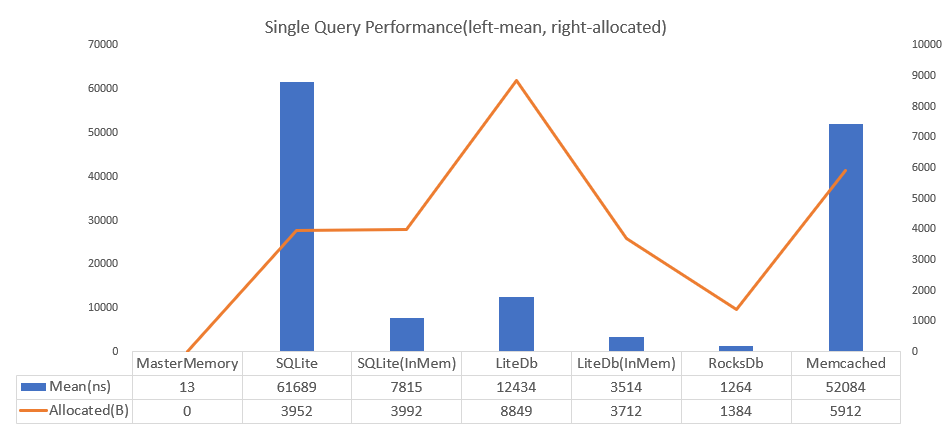
4700 times faster than SQLite and achieves zero allocation per query. Also the DB size is small. When SQLite is 3560kb then MasterMemory is only 222kb.
Source Generator automatically generates a typed database structure from schemas (classes), which ensures that all queries are type-safe with full autocompletion support.

This ensures both optimal performance and excellent usability.
<!-- START doctoc generated TOC please keep comment here to allow auto update --> <!-- DON'T EDIT THIS SECTION, INSTEAD RE-RUN doctoc TO UPDATE -->Table of Contents
- Concept
- Getting Started(.NET)
- Getting Started(Unity)
- DataTable configuration
- MemoryDatabase/RangeView
- Extend Table
- ImmutableBuilder
- Validator
- Metadata
- Inheritance
- Optimization
- MasterMemoryGeneratorOptions
- v2 -> v3 migration
- License
Concept
- Memory Efficient, Only use underlying data memory and do aggressively string interning.
- Performance, Similar as dictionary lookup.
- TypeSafe, 100% Type safe by Source Generator.
- Fast load speed, MasterMemory save data by MessagePack for C#, a fastest C# serializer so load speed is blazing fast.
- Flexible Search, Supports multiple key, multiple result, range/closest query.
- Validator, You can define custom data validation by C#.
- Metadata, To make custom importer/exporter, get the all database metadata.
These features are suitable for master data management(write-once, read-heavy) on embedded application, data analysis, game, etc. MasterMemory has better performance than any other database solutions. PalDB developed by LinkedIn has a similar concept(embeddable write-once key-value store), but the implementation and performance characteristics are completely different.
Getting Started(.NET)
Install the MasterMemory library(Runtime, Source Generator(Analyzer) via NuGet.
dotnet add package MasterMemory
Prepare the example table definition like following.
public enum Gender
{
    Male, Female, Unknown
}

// table definition marked by MemoryTableAttribute.
// database-table must be serializable by MessagePack-CSsharp
[MemoryTable("person"), MessagePackObject(true)]
public record Person
{
    // index definition by attributes.
    [PrimaryKey]
    public required int PersonId { get; init; }

    // secondary index can add multiple(discriminated by index-number).
    [SecondaryKey(0), NonUnique]
    [SecondaryKey(1, keyOrder: 1), NonUnique]
    public required int Age { get; init; }

    [SecondaryKey(2), NonUnique]
    [SecondaryKey(1, keyOrder: 0), NonUnique]
    public required Gender Gender { get; init; }

    public required string Name { get; init; }
}
Data in MasterMemory is readonly, so it is recommended to use an immutable structure. While both records and classes are supported, records might be preferable as they generate more readable ToString methods.
MasterMemory's Source Generator detects types marked with the MemoryTable attribute and automatically generates types like the following:
Finally, you can regsiter and query by these files.
using ...; // Your project default namespace

// to create database, use DatabaseBuilder and Append method.
var builder = new DatabaseBuilder();
builder.Append(new Person[]
{
    new (){ PersonId = 0, Age = 13, Gender = Gender.Male,   Name = "Dana Terry" },
    new (){ PersonId = 1, Age = 17, Gender = Gender.Male,   Name = "Kirk Obrien" },
    new (){ PersonId = 2, Age = 31, Gender = Gender.Male,   Name = "Wm Banks" },
    new (){ PersonId = 3, Age = 44, Gender = Gender.Male,   Name = "Karl Benson" },
    new (){ PersonId = 4, Age = 23, Gender = Gender.Male,   Name = "Jared Holland" },
    new (){ PersonId = 5, Age = 27, Gender = Gender.Female, Name = "Jeanne Phelps" },
    new (){ PersonId = 6, Age = 25, Gender = Gender.Female, Name = "Willie Rose" },
    new (){ PersonId = 7, Age = 11, Gender = Gender.Female, Name = "Shari Gutierrez" },
    new (){ PersonId = 8, Age = 63, Gender = Gender.Female, Name = "Lori Wilson" },
    new (){ PersonId = 9, Age = 34, Gender = Gender.Female, Name = "Lena Ramsey" },
});

// build database binary(you can also use `WriteToStream` for save to file).
byte[] data = builder.Build();

// -----------------------

// for query phase, create MemoryDatabase.
// (MemoryDatabase is recommended to store in singleton container(static field/DI)).
var db = new MemoryDatabase(data);

// .PersonTable.FindByPersonId is fully typed by code-generation.
Person person = db.PersonTable.FindByPersonId(5);

// Multiple key is also typed(***And * **), Return value is multiple if key is marked with `NonUnique`.
RangeView<Person> result = db.PersonTable.FindByGenderAndAge((Gender.Female, 23));

// Get nearest value(choose lower(default) or higher).
RangeView<Person> age1 = db.PersonTable.FindClosestByAge(31);

// Get range(min-max inclusive).
RangeView<Person> age2 = db.PersonTable.FindRangeByAge(20, 29);
All table(marked by MemoryTableAttribute) and methods(created by PrimaryKeyAttribute or SecondaryKeyAttribute) are typed.
You can invoke all indexed query by IntelliSense.
Getting Started(Unity)
The minimum supported Unity version will be 2022.3.12f1, as it is necessary to support C# Incremental Source Generator(Compiler Version, 4.3.0).
Since this library is provided via NuGet, install NuGetForUnity, then navigate to Open Window from NuGet -> Manage NuGet Packages, Search "MasterMemory" and Press Install.
First, it is recommended to define assembly attributes in any cs file to enable the use of init.
// Optional: Unity can't load default namespace to Source Generator
// If not specified, 'MasterMemory' will be used by default,
// but you can use this attribute if you want to specify a different namespace.
[assembly: MasterMemoryGeneratorOptions(Namespace = "MyProj")]

// Optional: If you want to use init keyword, copy-and-paste this.
namespace System.Runtime.CompilerServices
{
    internal sealed class IsExternalInit { }
}
Everything else is the same as the standard .NET version. While the required keyword can't be used since it's from C# 11, using init alone is sufficient to guarantee immutability.
public enum Gender
{
    Male, Female, Unknown
}

// table definition marked by MemoryTableAttribute.
// database-table must be serializable by MessagePack-CSsharp
[MemoryTable("person"), MessagePackObject(true)]
public record Person
{
    // index definition by attributes.
    [PrimaryKey]
    public int PersonId { get; init; }

    // secondary index can add multiple(discriminated by index-number).
    [SecondaryKey(0), NonUnique]
    [SecondaryKey(1, keyOrder: 1), NonUnique]
    public int Age { get; init; }

    [SecondaryKey(2), NonUnique]
    [SecondaryKey(1, keyOrder: 0), NonUnique]
    public Gender Gender { get; init; }

    public string Name { get; init; }
}
Also, for use with IL2CPP, you need to add the generated MasterMemoryResolver to MessagePack's Resolver. If you need other generated Resolvers, such as those from MagicOnion, please add and compose them here.
public static class Initializer
{
    [RuntimeInitializeOnLoadMethod(RuntimeInitializeLoadType.BeforeSceneLoad)]
    public static void SetupMessagePackResolver()
    {
        // Create CompositeResolver
        StaticCompositeResolver.Instance.Register(new[]{
            MasterMemoryResolver.Instance, // set MasterMemory generated resolver
            StandardResolver.Instance      // set default MessagePack resolver
        });

        // Create options with resolver
        var options = MessagePackSerializerOptions.Standard.WithResolver(StaticCompositeResolver.Instance);

        // Optional: as default.
        MessagePackSerializer.DefaultOptions = options;
    }
}
DataTable configuration
Element type of datatable must be marked by [MemoryTable(tableName)], datatable is generated from marked type. string tableName is saved in database binary, you can rename class name if tableName is same.
[PrimaryKey(keyOrder = 0)], [SecondaryKey(indexNo, keyOrder)], [NonUnique] can add to public property, [PrimaryKey] must use in MemoryTable, [SecondaryKey] is option.
Both PrimaryKey and SecondaryKey can add to multiple properties, it will be generated ***And***And***.... keyOrder is order of column names, default is zero(sequential in which they appear).
[MemoryTable("sample"), MessagePackObject(true)]
public class Sample
{
    [PrimaryK
