
LimitSwap
LimitSwap is fully functional DeFi Trading Bot. No fees. You just need to hold LIMIT Utility token in your wallet to use.
Install / Use
/learn @CryptoGnome/LimitSwapREADME
LimitSwap
LimitSwap is a trading bot for UniSwap & Many Other DEXs. It has the ability to scan multiple pairs on uniswap and grab the price in realtime and make automated trading decisions based on the users settings [AKA: Limit Orders]
This bot was built as a learning project for me to learn how to use Web.py, Erc20, & improve my coding skills please use at your own risk! I have open sourced this project and am now longer pushing updates to this repo, there is a new version being maintained by a community memeber @tsarbuig in the telegram
HOW TO INSTALL LimitSwap
There are 3 ways to install LimitSwap :
1. Run The Python Code Locally [this is most ideal and can work on any OS]
Here is a tutorial step-by-step:
-
[x] Download last LimitSwap code on the "Code" page https://github.com/CryptoGnome/LimitSwap by clicking on Code > Download Zip :
<img src="https://user-images.githubusercontent.com/70858574/145568534-e22c2887-d761-4fba-8dd0-f765b4300a6c.png" width="300"> -
[x] Unzip file
-
[x] Install Python on your computer : https://www.python.org/downloads/
PLEASE ADD IT TO PATH BY CHECKING THIS OPTION:
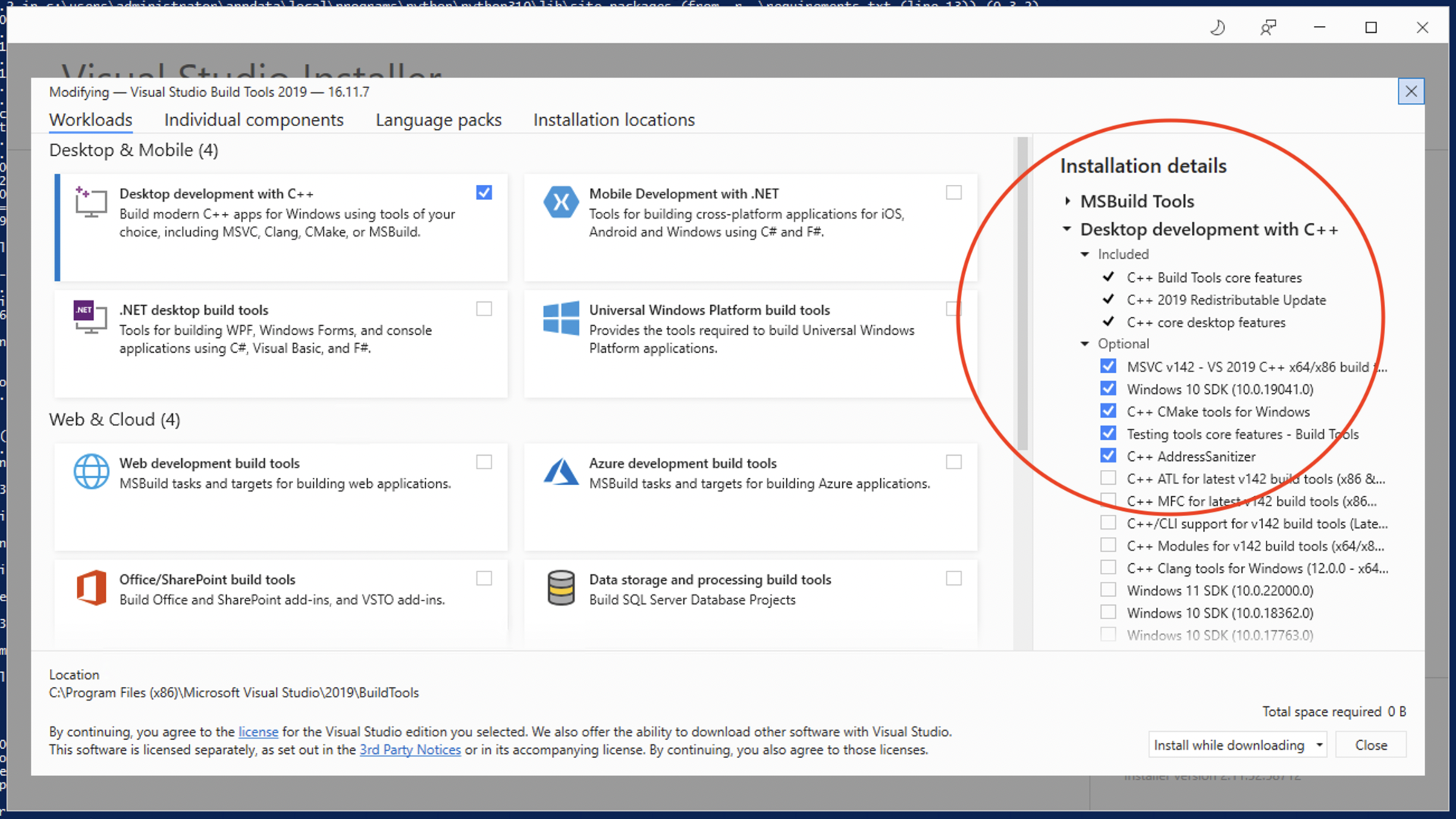
<img src="https://user-images.githubusercontent.com/70858574/145738124-e724c843-82d5-410d-b0b4-d7a9dda92258.png" width="500">- [x] Install Visual Studio : https://visualstudio.microsoft.com/fr/thank-you-downloading-visual-studio/?sku=Community&rel=17
Please install the default package and all those options :
-
[x] Open Windows Powershell (or Mac Terminal on MacOs)
-
[X] Run this command to locate LimitSwap folder :
Get-ChildItem -Filter LimitSwap.py -Recurse -ErrorAction SilentlyContinue -Force
- [x] It should look like this:
- [X] Copy the Directory
(on my computer it's : C:\Users\Administrator\Desktop\LimitSwap-master but adapt it to your own result obtained above !!)
- [X] Paste the Directory after the "cd" command to navigate through the bot folder
(on my computer it's : cd C:\Users\Administrator\Desktop\LimitSwap-master but adapt it to your own result obtained above !!)
- [x] Run command:
pip install -r requirements.txt--> this will install all the packages needed to run LimitSwap
✅ ✅ ✅ And it's done! ✅ ✅ ✅
- [x] Simply double-click on "LimitSwap.py" and it will run, since you've installed Python 👍👍
Pros and cons
🟢 : you are sure of the code that is running on your computer
🔴 : little bit complicated
2. Download the pre-compiled package [This can lag behind current version]
That we provide on the Release page : it's a .exe file that you can run on your computer. https://github.com/CryptoGnome/LimitSwap/releases
- [x] Download last Zip file, for instance :
- [x] Unzip it
- [x] Open "tokens.json - Shortcut" and configure it for your needs
- [x] Open "Start LimitSwap.cmd" --> it will configure your settings.json
✅ ✅ ✅ And it's done! ✅ ✅ ✅
Pros and cons
🟢 : very easy to setup
🔴 : it's pre-compiled, so you cannot check the Source Code
3. With Docker
Requirements
MacOS and Windows users require Docker for Desktop https://www.docker.com/products/docker-desktop
Ubuntu Linux require Docker installed sudo apt-get install docker.io
Usage
Navigate into the bot directory and build the Docker image by executing the following command:
docker build -t limit_swap_v4 .
(For MacOS and Linux) Still within the main directory you can run Docker via:
docker run --rm --name limit-swap_v4 -it -v $(pwd)/settings.json:/app/settings.json -v $(pwd)/tokens.json:/app/tokens.json limit_swap_v4
(For Windows with Powershell)
docker run --rm --name limit-swap_v4 -it -v $PWD/settings.json:/app/settings.json -v $PWD/tokens.json:/app/tokens.json limit_swap_v4
If you wish to run the container in the background please include -d for detached.
The streaming container logs can be visualised with docker logs -f limit_swap_v4
To stop the bot docker stop limit_swap_v4
Pros and cons
🟢 : easy to setup if you know Docker
🔴 : needs Docker
Developers 🔧
Want to help contribute to LimitSwap, reach out on telegram all you need to do is make changes or fix bugs and we will pay developer bounties in $LIMIT for helping make the bot batter!
Links & Socials
WiKi
https://limitswapv3.gitbook.io/limitswap/
Website:
https://www.limitswap.com/
Twitter:
https://twitter.com/LimitSwap
Telegram:
https://t.me/LimitSwap
