
QuickActionView
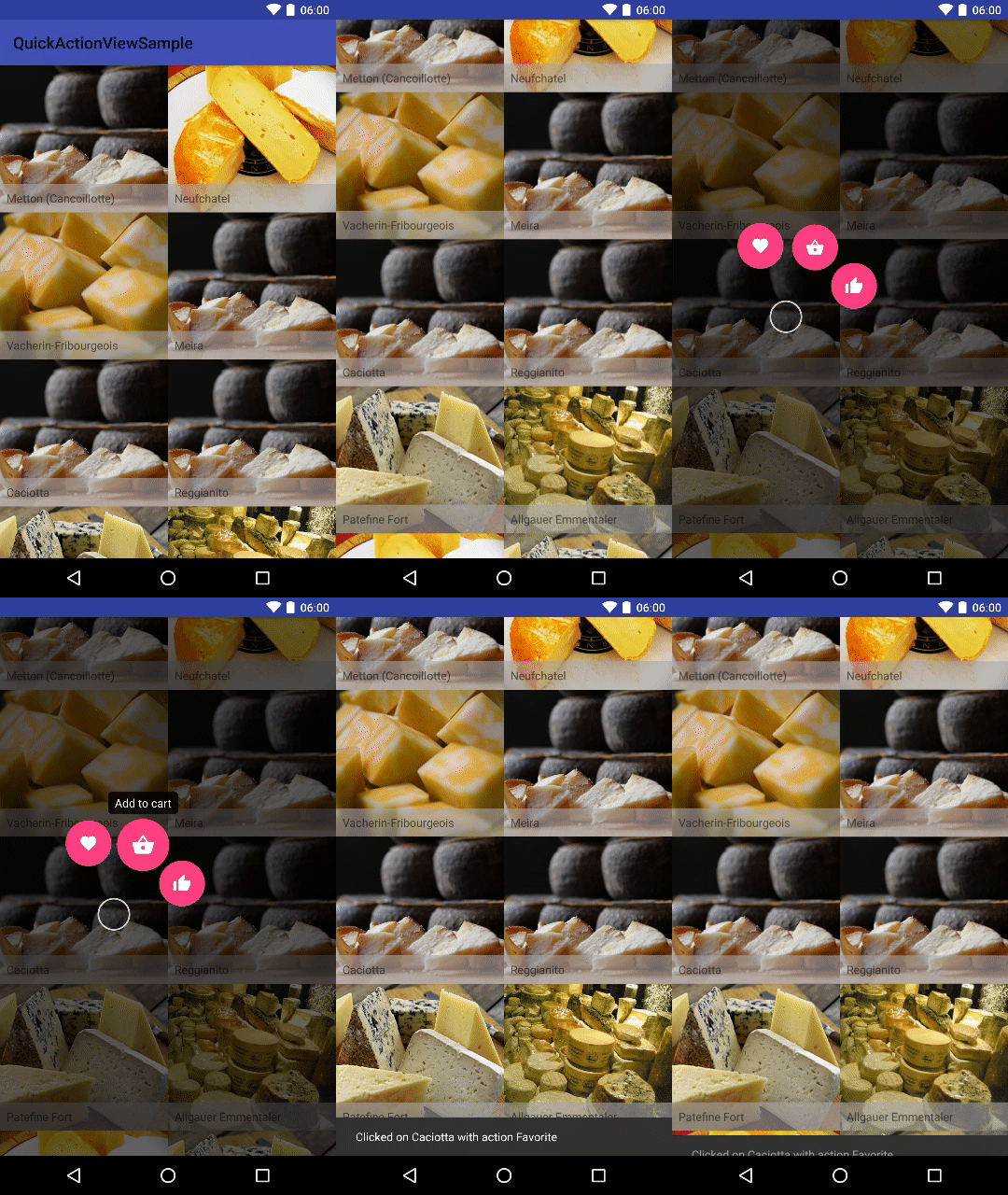
View that shows quick actions when long pressed, inspired by Pinterest
Install / Use
/learn @Commit451/QuickActionViewREADME
QuickActionView
View that shows quick actions when long pressed, inspired by Pinterest


Gradle Dependency
Add the library to your project build.gradle:
dependencies {
    implementation("com.commit451:quickactionview:latest.release.here")
}
Basic Usage
See the sample app for usage within a normal layout, as well as within a list using RecyclerView. In the most basic usage:
View view = findViewById(R.id.your_view);
QuickActionView.make(this)
      .addActions(R.menu.actions)
      .register(view);
You can also create Actions at runtime:
Drawable icon = ContextCompat.getDrawable(this, R.drawable.ic_favorite_24dp);
String title = getString(R.string.action_favorite);
Action action = new Action(1337, icon, title);
QuickActionView.make(this)
        .addAction(action)
        //more configuring
        .register(view);
Configuring the QuickActionView
QuickActionView can be customized globally, or on a per Action basis.
QuickActionView.make(this)
                .addActions(R.menu.actions)
                .setOnActionSelectedListener(mQuickActionListener)
                .setBackgroundColor(Color.RED)
                .setTextColor(Color.BLUE)
                .setTextSize(30)
                .setScrimColor(Color.parseColor("#99FFFFFF"))
                //etc
                .register(view);
Configuring Action Items
Use the QuickActionConfig builder to create custom configurations for each action item you create.
//Give one of the quick actions custom colors
Action.Config actionConfig = new Action.Config()
        .setBackgroundColor(Color.BLUE)
        .setTextColor(Color.MAGENTA);

QuickActionView.make(this)
        .addActions(R.menu.actions)
        //the custom Action.Cofig will only apply to the addToCart action
        .setActionConfig(actionConfig, R.id.action_add_to_cart)
        .register(findViewById(R.id.custom_parent));
Customizing Animations
You can even customize the animation performed when the actions come into view and go out of view. FadeAnimator PopAnimator and SlideFromCenterAnimator are three pre-built animators, and all you need to do to create your own is implement ActionsInAnimator, ActionsOutAnimator
and call setActionsInAnimator and setActionsOutAnimator respectively.
Listening for Events
You can hook into the interesting events a QuickActionView has:
QuickActionView.make(this)
      .addActions(R.menu.actions)
      .setOnActionSelectedListener(mQuickActionListener)
      .setOnShowListener(mQuickActionShowListener)
      .setOnDismissListener(mQuickActionDismissListener)
      .setOnActionHoverChangedListener(mOnActionHoverChangedListener)
      .register(view);
See the sample for more detail.
License
Copyright 2020 Commit 451

Licensed under the Apache License, Version 2.0 (the "License");
you may not use this file except in compliance with the License.
You may obtain a copy of the License at

   http://www.apache.org/licenses/LICENSE-2.0

Unless required by applicable law or agreed to in writing, software
distributed under the License is distributed on an "AS IS" BASIS,
WITHOUT WARRANTIES OR CONDITIONS OF ANY KIND, either express or implied.
See the License for the specific language governing permissions and
limitations under the License.
