
PDF4Teachers
PDF editing software for teachers, focused on productivity. PDF4Teachers keeps recorded previous annotations, and offers features like marking scale, PDF conversion, vectorial drawing...
Install / Use
/learn @ClementGre/PDF4TeachersREADME









Shortcuts : Before opening new issue, see :





Presentation
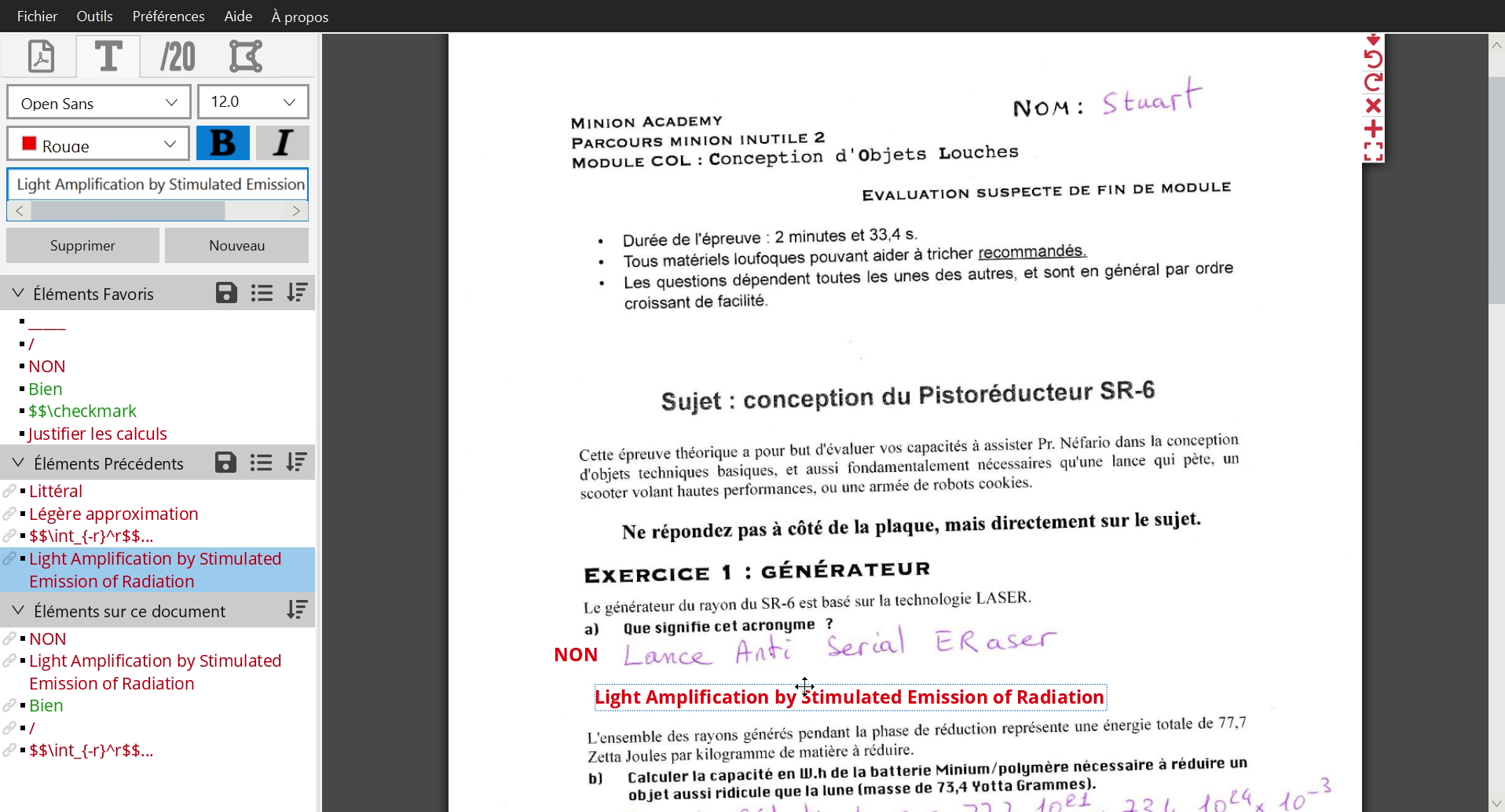
PDF4Teachers is specifically designed for teachers. It allows you to annotate assessments returned in PDF with excellent productivity.
PDF4Teachers provides tools for editing PDF files productively while annotating/correcting assessments. It memorizes all previously added annotations and offers quick insertion of them. PDF4Teachers also supports the definition of a grade scale (numerical or competency-based grading). Grades can then be exported as a .csv spreadsheet.
PDF4Teachers can also perform batch conversion of images to PDF to convert multiple documents at the same time. A lot of other PDF tools are also available, including booklet assembler/disassembler, PDF merge and split, move and rotate pages, and more.
PDF4Teachers supports freeform drawing, vector SVG path elements, images, LaTeX and LibreOffice Math equations.
PDF4Teachers saves any edits made to a PDF file as a separate layer, so the original PDF remains intact (except for any changes made with PDF tools). You can export the edited document as a new PDF file within the app.
Preview
Features
Conversion and PDF Tools
- Convert a selection of images to a single PDF.
- Convert a directory containing subdirectories with images to a set of PDFs, with one PDF per subdirectory and one page per image.
- Rotate, move, and delete PDF pages. Multiple pages can be selected at once in PDF edit mode.
- Insert pages from another PDF or from images into an existing PDF.
- Export a PDF page to an image with a custom resolution.
- Split a PDF into multiple PDFs based on automatically detected pages by color or based on user selection. Users can define names for the resulting PDFs and import names from a file.
- Create a booklet from a PDF or disassemble a booklet into a PDF with various options and support for two-page copies.
- Add margins to pages or crop pages, with options for different margins on each side of the page.
- Crop pages based on a mouse selection.
Text elements
- Memorizes all added text elements in a previous and favorite text list, allowing quick insertion.
- Writing an element highlights similar elements in the list, which can be selected with the keyboard.
- Supports LaTeX and LibreOffice Math equations using the $$ or && delimiter or defining them as default writing mode.
- Favorite and previous texts can be saved and loaded in an element list.
- Textual elements can be written on multiple lines and wrapped to a maximum width.
- Supports custom fonts, including system-installed fonts.
Numerical grading
- Ability to define a custom grade scale and copy it to other documents of the same assessment, with the ability to memorize grades position on document.
- Ability to define custom grade size, color, font, and showing option for each level of grade.
- Automatically numerates questions and calculates parent grades.
- Export of grades to a .csv spreadsheet, including comments, a set of documents in the same spreadsheet, or a set of documents in different csv files.
- Ability to quickly insert grades, with automatic prompts for the value of the next grade, shortcuts, and mouse grade definition.
Competency-based grading
- Support for competency-based grading with custom levels of competencies (images, colors, text, etc.).
- Ability to define different competencies for each assessment, which are evaluated using the different levels of achievement.
- Competency table generated on the output PDF.
- Support for importing/exporting competency spreadsheets from the software SACoche.
- Export of results to a .csv spreadsheet.
Vector elements, freeform drawing and images
- Support for vector elements, including SVG path elements, with custom colors and thicknesses.
- Lists for previously added and favorite vector elements.
- Options for vector elements that make it easier to use highlighters, arrows, underlines, and more.
- Support for freeform drawing with custom colors and thicknesses.
- Automatic page switching and element splitting for freeform drawing based on time, length, or mouse movements to prevent elements from being too long.
- Support for images with custom sizes and positions. Images are not stored in the edit, and a reference to the original image is kept.
- Image gallery and favorite images list.
- Predefined vector elements including icons, shapes, arrows and more.
Interface
- Pretty and intuitive interface, with a dark theme and support for OS theme sync.
- Full support for undo/redo operations.
- Support for copy/paste elements between PDFs and between applications.
- Available languages : English, French, Italian, add your language !
Contribute
Translate the app, website or documentation
All translations can be done on Weblate.
Otherwise, you can also translate the app by yourself, by editing the files in the src/main/resources/translations
folder.
See pdf4teachers.org/Contribute for more informations.
Contribute to the code
PDF4Teachers has now achieved all the main goals of the project, but is still maintained and improved. If you want to contribute, you will need a lot of time to deep dive into the code (see <a href="#code-organization">Code organization</a>), you can then open a pull request.
As detailed in the <a href="#dependencies">Dependencies</a> section, PDF4Teachers uses gradlew and the source code can
be run with gradlew run with the JDK 21 in your JAVA_HOME environment variable.
See ClementGre/PDF4Teachers-Website for the PDF4Teachers' website repository.
Dependencies
The application was developed with JavaFX framework, in Java SE 21.
Java dependencies
- JavaFX 22 : The java API to create windows (GUI), and all the interfaces with the user.
- Apache PDFBOX 3.0.2 : used for all the interactions with PDFs: it generates images from PDF file, add it add the texts/images of the editing on the PDF document while exporting. Commons Logging, * Font BOX*, JAI ImageIO and jbig2-imageio, are dependencies of
