
Green
Green is a clean, colorful, fast python test runner.
Install / Use
/learn @CleanCut/GreenREADME
Green




A clean, colorful, fast python test runner.
Features
- Clean - Low redundancy in output. Result statistics for each test is vertically aligned.
- Colorful - Terminal output makes good use of color when the terminal supports it.
- Fast - Tests run in independent processes. (One per processor by default. Does not play nicely with
gevent) - Powerful - Multi-target + auto-discovery.
- Traditional - Use the normal
unittestclasses and methods for your unit tests. - Descriptive - Multiple verbosity levels, from just dots to full docstring output.
- Convenient - Bash-completion and ZSH-completion of options and test targets.
- Thorough - Built-in integration with coverage.
- Embedded - Can be run with a setup command without in-site installation.
- Modern - Supports Python 3.8+. Additionally, PyPy is supported on a best-effort basis.
- Portable - macOS, Linux, and BSDs are fully supported. Windows is supported on a best-effort basis.
- Living - This project grows and changes. See the changelog
Community
- For questions, comments, or feature requests, please open a discussion
- For bug reports, please submit an issue to the GitHub issue tracker for Green.
- Submit a pull request with a bug fix or new feature.
- :sparkling_heart: Sponsor the maintainer to support this project
Training Course
There is a training course available if you would like professional training: Python Testing with Green.
<a href="https://www.udemy.com/python-testing-with-green/?couponCode=GREEN_GITHUB" rel="Python Testing with Green">  </a>
</a>
Screenshots
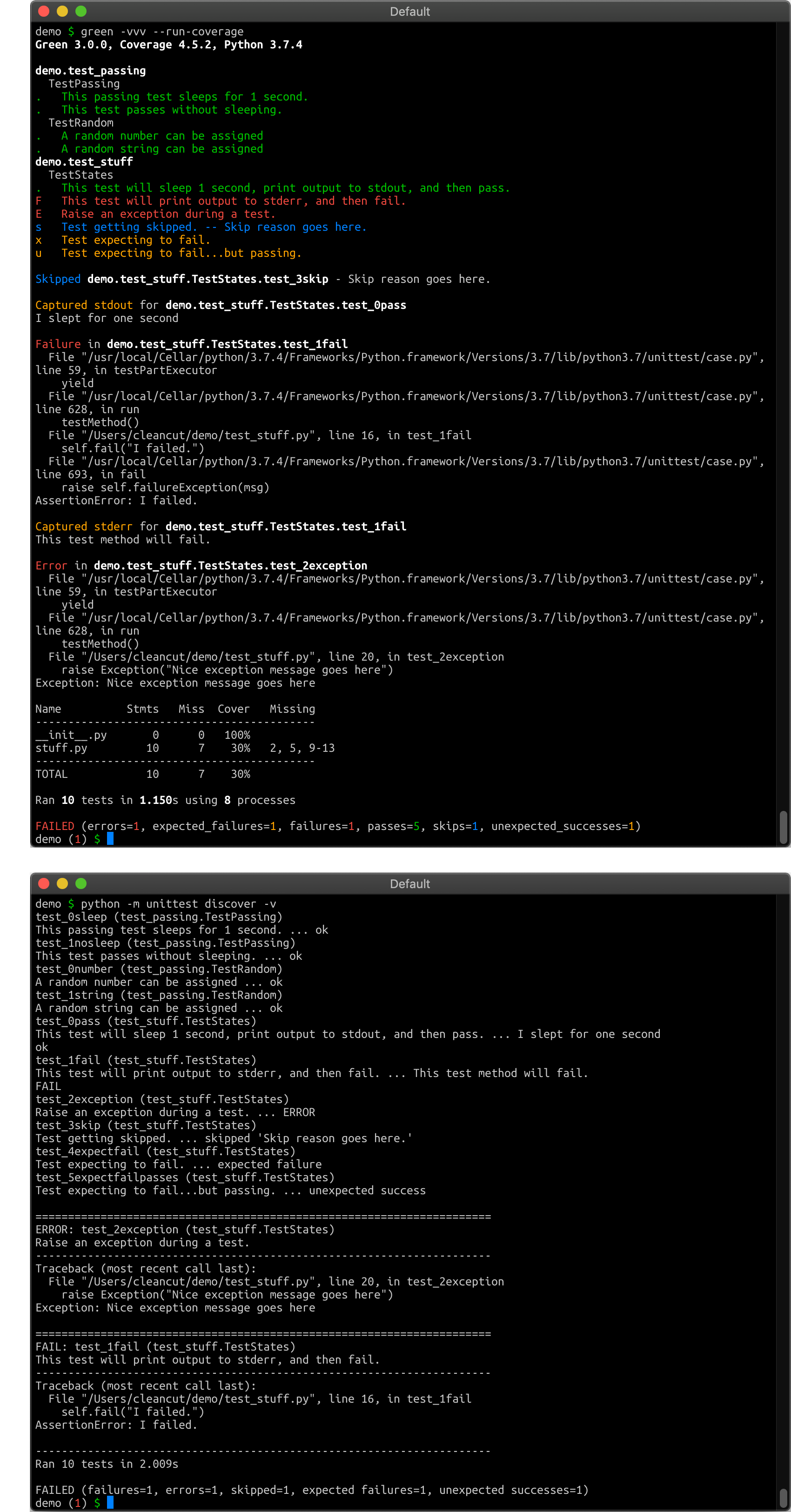
Top: With Green! Bottom: Without Green :-(
Quick Start
pip3 install green # To upgrade: "pip3 install --upgrade green"
Now run green...
# From inside your code directory
green

# From outside your code directory
green code_directory

# A specific file
green test_stuff.py

# A specific test inside a large package.
#
# Assuming you want to run TestClass.test_function inside
# package/test/test_module.py ...
green package.test.test_module.TestClass.test_function

# To see all examples of all the failures, errors, etc. that could occur:
green green.examples


# To run Green's own internal unit tests:
green green
For more help, see the complete command-line
options or run
green --help.
Config Files
Configuration settings are resolved in this order, with settings found later in the resolution chain overwriting earlier settings (last setting wins).
$HOME/.green- A config file specified by the environment variable
$GREEN_CONFIG setup.cfgin the current working directory of test run.greenin the current working directory of the test run- A config file specified by the command-line argument
--config FILE - Command-line arguments
Any arguments specified in more than one place will be overwritten by the
value of the LAST place the setting is seen. So, for example, if a setting
is turned on in ~/.green and turned off by a
command-line argument,
then the setting will be turned off.
Config file format syntax is option = value on separate lines. option is
the same as the long options, just without the double-dash (--verbose becomes
verbose).
Most values should be True or False. Accumulated values (verbose, debug)
should be specified as integers (-vv would be verbose = 2).
Example:
verbose       = 2
logging       = True
omit-patterns = myproj*,*prototype*
Troubleshooting
One easy way to avoid common importing problems is to navigate to the parent directory of the directory your python code is in. Then pass green the directory your code is in and let it autodiscover the tests (see the Tutorial below for tips on making your tests discoverable).
cd /parent/directory
green code_directory
Another way to address importing problems is to carefully set up your
PYTHONPATH environment variable to include the parent path of your code
directory. Then you should be able to just run green from inside your code
directory.
export PYTHONPATH=/parent/directory
cd /parent/directory/code_directory
green
Integration
Bash and Zsh
To enable Bash-completion and Zsh-completion of options and test targets when
you press Tab in your terminal, add the following line to the Bash or Zsh
config file of your choice (usually ~/.bashrc or ~/.zshrc)
which green >& /dev/null && source "$( green --completion-file )"
Coverage
Green has built-in integration support for the
coverage module. Add -r or
--run-coverage when you run green.
setup.py command
Green is available as a setup.py runner, invoked as any other setup command:
python setup.py green
This requires green to be present in the setup_requires section of
your setup.py file. To run green on a specific target, use the test_suite
argument (or leave blank to let green discover tests itself):
# setup.py
from setuptools import setup

setup(
    ...
    setup_requires = ['green'],
    # test_suite = "my_project.tests"
)
You can also add an alias to the setup.cfg file, so that python setup.py test actually runs green:
# setup.cfg

[aliases]
test = green
Django
Django can use green as the test runner for running tests.
- To just try it out, use the --testrunner option of
manage.py:
./manage.py test --testrunner=green.djangorunner.DjangoRunner
- Make it persistent by adding the following line to your
settings.py:
TEST_RUNNER="green.djangorunner.DjangoRunner"
- For verbosity, green adds an extra command-line option to
manage.pywhich you can pass the number ofv's you would have used on green.
./manage.py test --green-verbosity 3
- For all other non-default green configuration under Django, you will need to use green configuration files.
nose-parameterized
Green will run generated tests created by nose-parameterized. They have lots of examples of how to generate tests, so follow the link above if you're interested.
Unit Test Structure Tutorial
This tutorial covers:
- External structure of your project (directory and file layout)
- Skeleton of a real test module
- How to import stuff from your project into your test module
- Gotchas about naming...everything.
- Where to run green from and what the output could look like.
- DocTests
For more in-depth online training please check out Python Testing with Green:
- Layout your test packages and modules correctly
- Organize your tests effectively
- Learn the tools in the
unittestandmockmodules - Write meaningful tests that enable quick refactoring
- Learn the difference between unit and integration tests
- Use advanced tips and tricks to get the most out of your tests
- Improve code quality
- Refactor code without fear
- Have a better coding experience
- Be able to better help others
External Structure
This is what your project layout should look like with just one module in your package:
proj                  # 'proj' is the package
├── __init__.py
├── foo.py            # 'foo' (or proj.foo) is the only "real" module
└── test              # 'test' is a sub-package
    ├── __init__.py
    └── test_foo.py   # 'test_foo' is the only "test" module
Notes:
-
There is an
__init__.pyin every directory. Don't forget it. It can be an empty file, but it needs to exist. -
projitself is a directory that you will be storing somewhere. We'll pretend it's in/home/user -
The
testdirectory needs to start withtest. -
The test modules need to start with
test.
When your project starts adding code in sub-packages, you will need to make a
choice on where you put their tests. I prefer to create a test subdirectory
in each sub-package.
proj
├── __init__.py
├── foo.py
├── subpkg
│   ├── __init__.py
│   ├── bar.py
│   └── test              # test subdirectory in every sub-package
│       ├── __init__.py
│       └── test_bar.py
└── test
    ├── __init__.py
    └── test_foo.py
The other option is to start mirroring your subpackage layout from within a single test directory.
proj
├── __init__.py
├── foo.py
├── subpkg
│   ├── __init__.py
│   └── bar.py
└── test
    ├── __init__.py
    ├── s
Related Skills
gh-issues
333.3kFetch GitHub issues, spawn sub-agents to implement fixes and open PRs, then monitor and address PR review comments. Usage: /gh-issues [owner/repo] [--label bug] [--limit 5] [--milestone v1.0] [--assignee @me] [--fork user/repo] [--watch] [--interval 5] [--reviews-only] [--cron] [--dry-run] [--model glm-5] [--notify-channel -1002381931352]
node-connect
333.3kDiagnose OpenClaw node connection and pairing failures for Android, iOS, and macOS companion apps
claude-opus-4-5-migration
82.0kMigrate prompts and code from Claude Sonnet 4.0, Sonnet 4.5, or Opus 4.1 to Opus 4.5
frontend-design
82.0kCreate distinctive, production-grade frontend interfaces with high design quality. Use this skill when the user asks to build web components, pages, or applications. Generates creative, polished code that avoids generic AI aesthetics.
