
Dockbar
A macOS-like dock component made with WebComponents
Install / Use
/learn @CatsJuice/DockbarREADME
Install
-
NPM
npm install dockbar --save -
CDN
ESM(Example)
<head> <script type="module" src="https://unpkg.com/dockbar@latest/dockbar.js"></script> </head>IIFE(Example)
<head>
  <script src="https://unpkg.com/dockbar@latest/dockbar.iife.js"></script>
</head>
Go to Codepen for a quick try.
Usage
Basic usage
<body>
  <dock-wrapper>
    <dock-item>1</dock-item>
    <dock-item>2</dock-item>
    <dock-item>3</dock-item>
    <dock-item>4</dock-item>
  </dock-wrapper>
</body>
It is recommended to use a custom element inside dock-item, so that you can customize the content of dock-item.
<dock-wrapper>
  <dock-item>
    <div class="my-element"></div>
  </dock-item>
</dock-wrapper>
You may need to look at docs if you are using a framework like Vue.js or React.
Custom Style
Apply class to dock-wrapper and dock-item and customize your own style.
For more, see Configuration.
Problems
There are some problems yet to be solved:
- [ ] SSR compatibility
It does not work will in SSR framework like Nuxt.js. For now you have to render it inside
ClientOnly, and import component asynchronously. - [ ] Style asynchronous loading causes a flash on init
If you are not using by
iife, it may cause a flash on init, because the style is loaded asynchronously. For now you could resolve this by applying a style:<head> #dock { visibility: hidden; } #dock:defined { visibility: visible; } </head> <body> <dock-wrapper id="dock"> </dock-wrapper> </body>
Configuration
| Property | Type | Default | Description |
| ----------- | -------------------------------------- | ------------ | ---------------------------------------------------------------------------------------- |
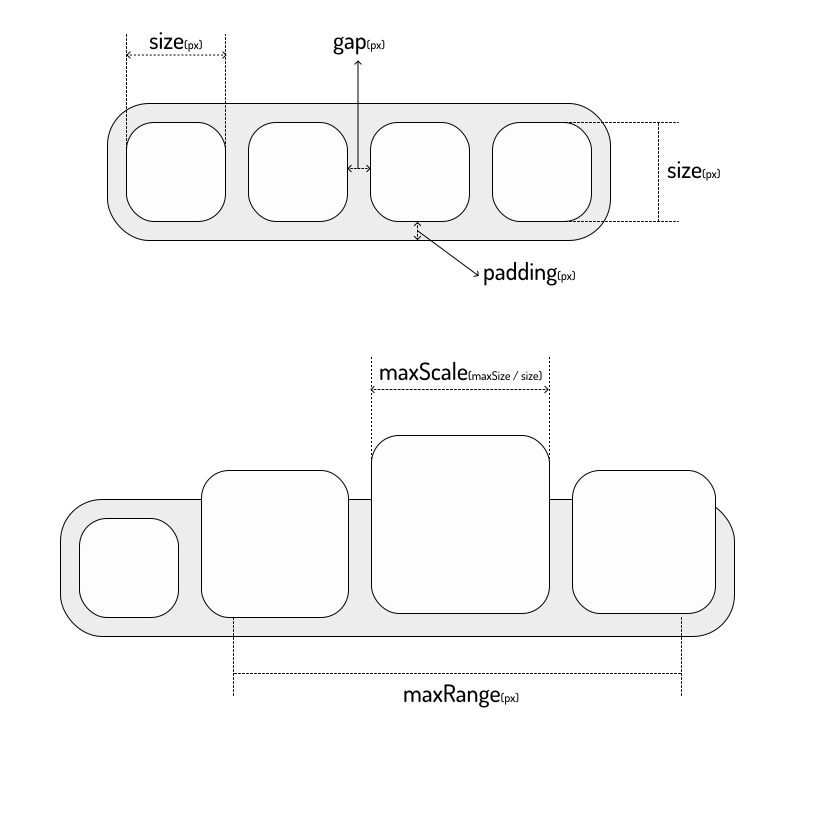
| size | number | 40 | The size of dock-item in px, see Sizes |
| padding | number | 8 | The padding of dock-wrapper in px, see Sizes |
| gap | number | 8 | The gap between dock-item in px, see Sizes |
| maxScale | number | 2 | The max scale of dock-item, see Sizes |
| maxRange | number | 200 | The max range of dock-item that will scale when mouseover in px, see Sizes |
| disabled | boolean | false | Disable the scale effect |
| direction | horizontal | vertical | horizontal | The direction of dock-items |
| position | top | bottom | left | right | bottom | The position of dock-wrapper, will affect the scale origin |
Sizes
Related Skills
node-connect
345.9kDiagnose OpenClaw node connection and pairing failures for Android, iOS, and macOS companion apps
frontend-design
106.4kCreate distinctive, production-grade frontend interfaces with high design quality. Use this skill when the user asks to build web components, pages, or applications. Generates creative, polished code that avoids generic AI aesthetics.
openai-whisper-api
345.9kTranscribe audio via OpenAI Audio Transcriptions API (Whisper).
qqbot-media
345.9kQQBot 富媒体收发能力。使用 <qqmedia> 标签,系统根据文件扩展名自动识别类型(图片/语音/视频/文件)。
