
BodyTracking
Real-time body reconstruction and recognition in virtual reality using HTC Vive Trackers and Controllers
Install / Use
/learn @CatCuddler/BodyTrackingREADME
Real-Time Body Reconstruction and Recognition in Virtual Reality using HTC Vive Trackers and Controllers
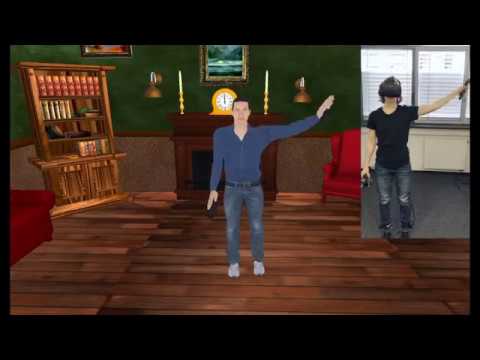
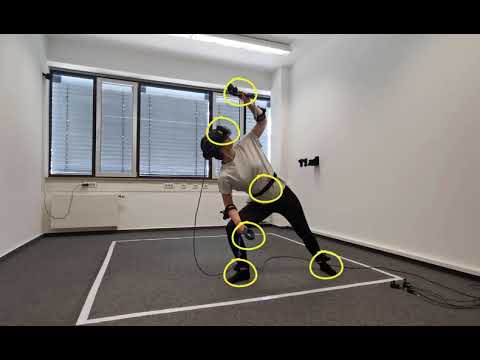
This project implements an Inverse Kinematics solver to animate the motions of the avatar as smoothly, rapidly, and as accurately as possible. Using a HTC Vive headset, two Vive Controllers, and five Vive Trackers, attached to the hands and feet, it is possible to create immersive VR experiences, where the user is able to perceive the avatar as her or his own body. The user can see her or his avatar from the first-person perspective and in a virtual mirror.
Furthermore, branches yoga and motion_recognition implement full-body motion recognition using Hidden Markov Models and other machine learning algorithms..
Requirements:
- node.js
- VisualStudio 2019 or Xcode
Clone the project:
- git clone --recursive git@github.com:CatCuddler/BodyTracking.git <br />
Compile:
- cd BodyTracking/BodyModel/Kore <br />
- node Kore/make --vr steamvr <br /> or <br />
- node Kore/make
Only for Mac Users:
Currently Metal does not work. Use Opengl: <br />
- node Kore/make -g opengl
Only for Windows Users:
If you dont use Visual Studio 2019, you can specify the used version: <br />
- node Kore/make -v vs20xx
Open the Project:
- Open VisualStudio or Xcode project in BodyModel/build. <br />
- Change to "Develop x86" mode in Visual Studio (Release doent work). <br />
- Change working directory in Xcode: Edit Scheme -> Use custom working directory -> choose Deployment directory.
Avatar Calibration
- Strap one Vive Tracker on your left foot and another one on your right foot (above ankles)
- Strap the third Vive tracker on your waist
- Strap the fourth and fifth tracker on the left and right forearm.
- Hold the Vive Controller in your hands ;)
- Start the project. You will see an avatar, standing in a T-Pose.
- Press the "grip button" to set the size of the avatar (you must look straight ahead).
- Go to where the avatar stands and put your feet and hands in the same position.
- Press the "menu button" to calibrate the avatar.
Videos:
Related Skills
node-connect
341.0kDiagnose OpenClaw node connection and pairing failures for Android, iOS, and macOS companion apps
frontend-design
84.4kCreate distinctive, production-grade frontend interfaces with high design quality. Use this skill when the user asks to build web components, pages, or applications. Generates creative, polished code that avoids generic AI aesthetics.
openai-whisper-api
341.0kTranscribe audio via OpenAI Audio Transcriptions API (Whisper).
commit-push-pr
84.4kCommit, push, and open a PR
