
AutonomousDrone
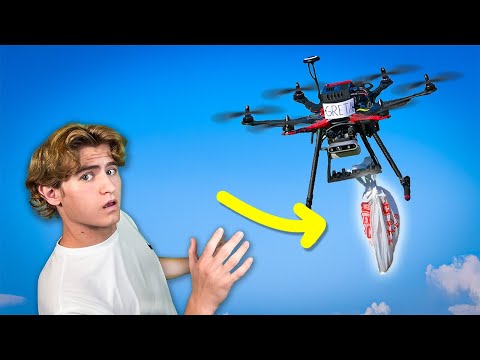
Autonomous drone system with obstacle avoidance, precision landing, edge-based object detection, and payload verification. Features Jetson Nano, Pixhawk, ROS, and DroneKit, with mobile app support and cellular connectivity for remote mission control.
Install / Use
/learn @Carson-Stark/AutonomousDroneREADME
Autonomous Drone Project
<img width="1920" height="1080" alt="1" src="https://github.com/user-attachments/assets/b5b19692-d7d6-4e2d-8c27-31f25cdca4c1" />Project Overview
This project implements an autonomous drone system integrating robotics, computer vision, and machine learning technologies. It features obstacle avoidance, precision landing using custom visual servoing, object detection deployed on edge devices, and payload verification with depth sensing. The system supports cellular connectivity for extended operational range and includes a custom mobile app for remote monitoring and mission control. Core hardware includes Jetson Nano and Pixhawk autopilot, with software components built on ROS, DroneKit, and TensorFlow Lite.
See this repo for the companion mobile app
Features
- Forward and downward obstacle avoidance and obstacle-aware path planning
- Object detection model trained on custom dataset and deployed on edge
- Custom visual servoing algorithm for reliable precision landing on a target
- Payload verification with downward depth camera
- Cellular connectivity enabling unlimited operable range
- Custom mobile app for remote monitoring and operation
- Summon drone or cue mission with GPS coordinates from mobile device
- Custom 3D printed gripper mechanism with servo actuation
- Safe landing detection with downward depth camera
Project Timeline
- Started: December 2022
- Completed: December 2024
YouTube Video
Follow the complete development journey from start to finish
I Spent Two Years Building and Autonomous Drone...
Flight Platform
Hardware
- Standard S500 Hexacopter Frame with 3D-printed mounts for companion computer and sensors
- Pixhawk Flight Controller for low-level stabilization, GPS navigation, and built-in flight functions like return-to-home and loiter, connected to companion computer via serial
- Jetson Nano companion computer for autonomous decision making
- Coral TPU for realtime object detection inference
- 6x Brushless Motors + ESCs
- TMotor Antigravity (high end)
- TMotor ESC (high end)
- QWinOut Motors
- QWinOut Escs
- Intel RealSense Depth Cameras (forward-facing for obstacle detection, downward-facing for landing validation)
- 4G LTE Modem for remote connectivity and telemetry streaming
- 3D-printed Gripper Mechanism powered by servo for bag pickup
- 9000mAh Lipo Battery powered all onboard electronics including the companion computer (with voltage regulator), provided 10+ minutes of flight time
Software
- ArduPilot Firmware (ArduCopter): Used after switching from PX4 for greater reliability and ease of integration
- DroneKit-Python SDK: Used for high-level drone control and automation sequences
- ROS Melodic: coordinated communication between various python nodes running simultaneously, originally used for mavros and Gazebo with PX4
- OpenCV: Powered all computer vision algorithms, from depth map generation to custom image-based target tracking
- TF-Lite: Trained EfficientDet-Lite model on a custom dataset collected from actual drone footage, optimized for aerial bag detection with Coral TPU acceleration
Installation
Prerequisites
Ensure you have the following prerequisites installed and configured before proceeding:
-
Ubuntu 18.04 or later (recommended for ROS compatibility)
-
ROS Melodic or Noetic installed (see ROS installation guide)
-
Python 3.6 or higher
-
Jetson Nano setup with required drivers and libraries (refer to NVIDIA Jetson setup documentation)
-
Intel RealSense SDK installed (see Intel RealSense SDK installation)
-
DroneKit-Python installed:
pip3 install dronekit -
TensorFlow Lite runtime installed for object detection:
pip3 install tflite-runtime -
Coral Edge TPU device attached for hardware-accelerated object detection.
-
Edge TPU runtime installed (libedgetpu). Follow the official Coral setup guide: https://coral.ai/docs/setup/
-
PyCoral Python library installed for interfacing with the Edge TPU:
pip3 install pycoral -
Other dependencies listed in
package.xmlandrequirements.txt(will be installed in later steps)
Software Setup
This project is a ROS package and should be installed into a ROS workspace alongside other packages.
-
Setup Intel RealSense camera and drivers:
- Download and install the RealSense ROS1 wrapper package into your workspace by following the instructions here: https://github.com/IntelRealSense/realsense-ros/tree/ros1-legacy
- Note:
depth_node.pyis a fork of this script, modified to accept ROS messages from the RealSense wrapper instead of usingpyrealsense2. - For detailed RealSense camera setup with ArduPilot, refer to: https://ardupilot.org/copter/docs/common-realsense-depth-camera.html (manual setup section)
-
Clone this repository into the
srcdirectory of your ROS workspace:cd ~/catkin_ws/src git clone https://github.com/Carson-Stark/AutonomousDrone.git cd .. -
Install ROS dependencies:
rosdep install --from-paths src --ignore-src -r -y -
Build the workspace:
catkin_make source devel/setup.bash -
Install Python dependencies:
pip3 install -r src/AutonomousDrone/requirements.txt -
Setup MavProxy for MAVLink communication.
pip3 install MAVProxy- Replace the placeholders in
start_telemetry_forwarding.shwith your actual device and IP addresses: - Replace
your_sudo_passwordwith your system sudo password. - Replace
/dev/your_serial_devicewith your actual serial device, e.g.,/dev/ttyTHS1. - Replace
<IP_ADDRESS_1>and<IP_ADDRESS_2>with the IP addresses of the devices you want to forward MAVLink data to.
- Replace the placeholders in
-
Setup
tcp_server.pywith your machines IP. Check out ZeroTier VPN to add your devices to a virtual LAN network.
Hardware Setup
- Connect the Pixhawk autopilot to your offboard system via Telemetry port and UART serial connection. See detailed instructions here for RaspberryPI: https://ardupilot.org/dev/docs/raspberry-pi-via-mavlink.html
- Connect the Coral TPU to your companion computer via USB for fast TFlite inference.
- Configure the autopilot using Mission Planner or QGroundControl.
- Calibrate sensors and set up flight parameters as per your drone hardware.
- Ensure stable internet connection with WiFi or cellular modem so the companion computer can accept TCP messages.
Usage
-
Power on drone and companion computer.
-
Run via ssh or setup to run automatically on boot:
roslaunch drone drone.launch -
Verify the camera, offboard, and tcp_server nodes are initialized and running
-
Send mission commands with the custom mobile app or via another TCP client.
Project Structure
Launch Files
launch/drone.launch: Launches the full autonomous drone stack including camera nodes, object detection, and flight control.launch/camera.launch: Launches camera and recording nodes only.
Scripts
scripts/offboard_node.py: Main offboard control node for autonomous flight commands.scripts/mission_definitions.py: Creates action sequences for a variety of preset mission types.scripts/camera_node.py: Records video by concatenating multiple Realsense camera sources.scripts/ObjectDetection.py: Runs the object detection model on camera frames.scripts/mission_utils.py: Utility functions for mission planning and execution.scripts/tcp_server.py: TCP server for communication with the mobile app.scripts/video_stream_node.py: Streams video feed to remote clients.scripts/start_cameras.sh: Shell script to start camera nodes.scripts/start_telemetry_fowarding.sh: Shell script to start telemetry forwarding.
Notes
offboard_node.pyutilizes DroneKit for high level control. See DroneKit documentation.- The TensorFlow Lite model file
efficientdet-lite-plastic_bag2_edgetpu.tfliteis included in thescripts/directory for plastic bag detection. If you wish to use a different model, replace this file.
Related Skills
openhue
349.9kControl Philips Hue lights and scenes via the OpenHue CLI.
sag
349.9kElevenLabs text-to-speech with mac-style say UX.
weather
349.9kGet current weather and forecasts via wttr.in or Open-Meteo
casdoor
13.3kAn open-source AI-first Identity and Access Management (IAM) /AI MCP & agent gateway and auth server with web UI supporting OpenClaw, MCP, OAuth, OIDC, SAML, CAS, LDAP, SCIM, WebAuthn, TOTP, MFA, Face ID, Google Workspace, Azure AD
