
diagrams-mcp
MCP server for generating cloud architecture diagrams, flowcharts, sequence diagrams, and more — powered by mingrammer/diagrams, Mermaid, and PlantUML.
Install / Use
claude mcp add ByteOverDev -- npx -y github:ByteOverDev/diagrams-mcpIf the server publishes to npm under a different name, use that package instead — check the repo README.
MCP Server
Model Context Protocol server
Quality Score
Category
Development & EngineeringSupported Platforms
Tags
Our assessment of diagrams-mcp
diagrams-mcp scores 81/100 on our quality scale, 1901st of 3,356 Development & Engineering skills we index.
Its MCP Server is 11 KB long, well organised into 26 sections with 24 code examples: a thorough specification that gives an agent plenty to work with.
It has 3 GitHub stars, so there is little community track record yet; judge it on its content.
Maintenance, license and trust
- The repository was last updated yesterday, so diagrams-mcp is actively maintained.
- Our last check on 2026-09-18 found the source still online.
- No license is declared. By default that means all rights are reserved: you can read it, but reusing or redistributing it is not clearly permitted. Ask the author before building on it commercially.
- Its trust signals score 80/100, with 2 cautions from licensing, adoption, age or documentation. These come from repository metadata, not a code audit — read the skill file before letting an agent act on it.
Safety scan
No issues foundOur scan of the whole file found no instruction hijacking, hidden characters, credential access, data exfiltration or destructive commands.
Automated pattern scan on 2026-09-29. It catches known dangerous patterns, not every risk — read a skill before letting an agent act on it.
diagrams-mcp compared with similar skills
All 4 of these similar skills score higher than diagrams-mcp; compare them before choosing.
| Skill | Score | Stars | Updated | Format |
|---|---|---|---|---|
| diagrams-mcp (this skill)by ByteOverDev | 81 | 3 | 1d ago | MCP Server |
| Agent-Reachby Panniantong | 100 | 86.0k | 13d ago | CLAUDE.md |
| headroomby headroomlabs-ai | 100 | 74.0k | today | CLAUDE.md |
| rufloby ruvnet | 100 | 73.4k | today | CLAUDE.md |
| CowAgentby zhayujie | 100 | 47.2k | today | CLAUDE.md |
Frequently asked questions
- How do I install diagrams-mcp?
- Run
claude mcp add ByteOverDev -- npx -y github:ByteOverDev/diagrams-mcp. The install tabs above show the steps for each supported agent. - Which AI agents does diagrams-mcp work with?
- It is written for Claude Code and Claude Desktop, as a MCP Server file. Other agents that read the same format can often use it too.
- Is diagrams-mcp safe to use?
- Our scan of the whole file found no instruction hijacking, hidden characters, credential access, data exfiltration or destructive commands. It declares no license and scores 80/100 on trust signals. Skills are instructions an agent will follow, so read the file before installing it and do not approve commands you do not understand.
- Is diagrams-mcp still maintained?
- The repository was last updated yesterday, so diagrams-mcp is actively maintained.
Skill content
View source on GitHubdiagrams-mcp-server


MCP server for generating cloud architecture diagrams, flowcharts, sequence diagrams, and more — powered by three rendering engines: mingrammer/diagrams, Mermaid, and PlantUML.
Getting Started
Hosted (Recommended)
Connect to the public hosted server — no installation required. All rendering engines and dependencies are pre-installed.
<details> <summary><strong>Claude Desktop</strong></summary>Add to your claude_desktop_config.json (Settings → Developer → Edit Config):
{
  "mcpServers": {
    "diagrams-mcp": {
      "url": "https://diagrams-mcp-production.up.railway.app/mcp"
    }
  }
}
Run:
claude mcp add diagrams-mcp https://diagrams-mcp-production.up.railway.app/mcp
Or add to your .mcp.json:
{
  "mcpServers": {
    "diagrams-mcp": {
      "url": "https://diagrams-mcp-production.up.railway.app/mcp"
    }
  }
}
Add to your .cursor/mcp.json:
{
  "mcpServers": {
    "diagrams-mcp": {
      "url": "https://diagrams-mcp-production.up.railway.app/mcp"
    }
  }
}
Add to your ~/.codeium/windsurf/mcp_config.json:
{
  "mcpServers": {
    "diagrams-mcp": {
      "serverUrl": "https://diagrams-mcp-production.up.railway.app/mcp"
    }
  }
}
Add to your .vscode/mcp.json:
{
  "servers": {
    "diagrams-mcp": {
      "type": "http",
      "url": "https://diagrams-mcp-production.up.railway.app/mcp"
    }
  }
}
Local Installation
Prerequisites
Graphviz is required for the default local/in-process rendering mode. Mermaid CLI and PlantUML are optional — install them only if you need those specific rendering engines locally.
| Dependency | Required for | Install |
|---|---|---|
| Graphviz | render_diagram (cloud architecture) | brew install graphviz |
| Mermaid CLI | render_mermaid (flowcharts, sequence, etc.) | npm install -g @mermaid-js/mermaid-cli |
| Java + PlantUML | render_plantuml (UML diagrams) | brew install openjdk + download plantuml.jar |
Note: The hosted server runs as a slim MCP facade plus a separate renderer service, and has all render dependencies pre-installed in the renderer. Local prerequisites only apply if you're running in-process rendering yourself.
Install the server
Via uvx (recommended):
uvx diagrams-mcp-server
Via pip:
pip install diagrams-mcp-server
From source:
pip install git+https://github.com/ByteOverDev/diagrams-mcp.git
Configure your MCP client
<details> <summary><strong>Claude Desktop</strong></summary>Add to your claude_desktop_config.json (Settings → Developer → Edit Config):
uvx (recommended):
{
  "mcpServers": {
    "diagrams-mcp": {
      "command": "uvx",
      "args": ["diagrams-mcp-server"]
    }
  }
}
pip:
{
  "mcpServers": {
    "diagrams-mcp": {
      "command": "diagrams-mcp-server"
    }
  }
}
Run:
claude mcp add diagrams-mcp -- uvx diagrams-mcp-server
Or add to your .mcp.json:
uvx (recommended):
{
  "mcpServers": {
    "diagrams-mcp": {
      "command": "uvx",
      "args": ["diagrams-mcp-server"]
    }
  }
}
pip:
{
  "mcpServers": {
    "diagrams-mcp": {
      "command": "diagrams-mcp-server"
    }
  }
}
Add to your .cursor/mcp.json:
uvx (recommended):
{
  "mcpServers": {
    "diagrams-mcp": {
      "command": "uvx",
      "args": ["diagrams-mcp-server"]
    }
  }
}
pip:
{
  "mcpServers": {
    "diagrams-mcp": {
      "command": "diagrams-mcp-server"
    }
  }
}
Add to your ~/.codeium/windsurf/mcp_config.json:
uvx (recommended):
{
  "mcpServers": {
    "diagrams-mcp": {
      "command": "uvx",
      "args": ["diagrams-mcp-server"]
    }
  }
}
pip:
{
  "mcpServers": {
    "diagrams-mcp": {
      "command": "diagrams-mcp-server"
    }
  }
}
Add to your .vscode/mcp.json:
uvx (recommended):
{
  "servers": {
    "diagrams-mcp": {
      "type": "stdio",
      "command": "uvx",
      "args": ["diagrams-mcp-server"]
    }
  }
}
pip:
{
  "servers": {
    "diagrams-mcp": {
      "type": "stdio",
      "command": "diagrams-mcp-server"
    }
  }
}
Available Tools
Discovery
list_providers()→list[str]— List all diagram providers (aws,gcp,k8s,azure,onprem, etc.)list_services(provider)→list[str]— List service categories within a provider (e.g.aws→compute,database,network)list_nodes(provider, service)→list[dict]— List node classes for a provider.service pair with import pathssearch_nodes(query)→list[dict]— Search for nodes by keyword across all providers (e.g. "postgres", "lambda")
Rendering
render_diagram(code)→Image(PNG) — Execute a Python script using mingrammer/diagrams in a sandboxed subprocess. Returns a rendered cloud architecture diagram.render_mermaid(definition)→Image(PNG/SVG) — Render a Mermaid diagram definition (flowcharts, sequence, class, ER, state, Gantt, and more).render_plantuml(definition)→Image(PNG) — Render a PlantUML diagram definition (sequence, class, component, activity, state, deployment).
Cross-Provider Equivalence
find_equivalent(node, target_provider?)→dict— Find equivalent services across cloud providers (e.g.EC2→ComputeEngineon GCP).list_categories()→list[dict]— List all 30 infrastructure role categories with mapped nodes across providers.
Resources
The server provides reference documentation accessible via MCP resource URIs:
| URI | Description |
|---|---|
| diagrams://reference/diagram | Diagram constructor parameters, defaults, and usage |
| diagrams://reference/edge | Edge operators, labels, styling, and chaining |
| diagrams://reference/cluster | Cluster nesting, styling, and graph attributes |
| diagrams://reference/mermaid | Mermaid syntax examples for 6 diagram types |
| diagrams://reference/plantuml | PlantUML syntax examples for 6 diagram types |
Examples
Cloud Architecture (mingrammer/diagrams)
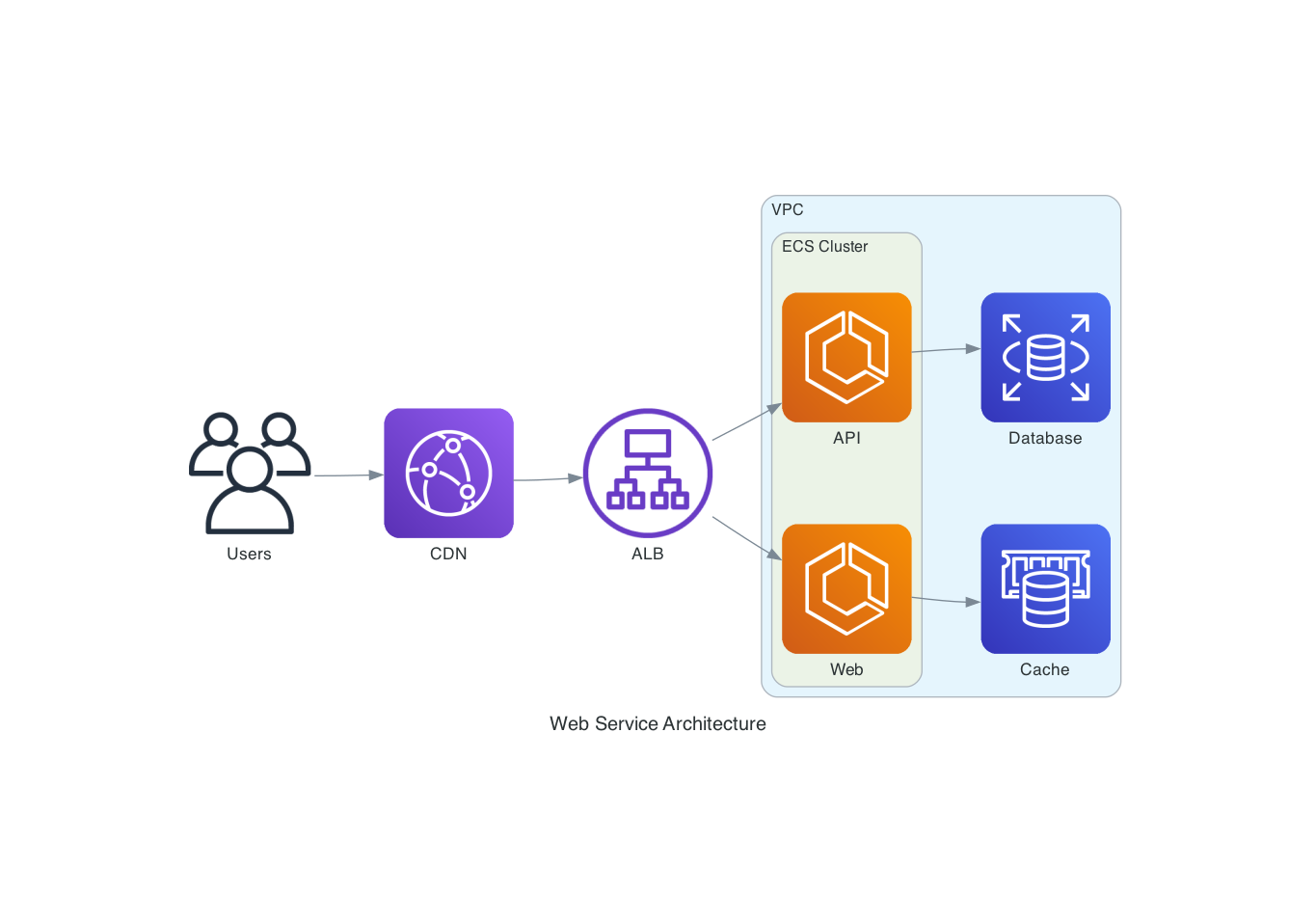
"Draw an AWS architecture with an ALB routing to two ECS services, backed by RDS and ElastiCache"
from diagrams import Diagram, Cluster
from diagrams.aws.network import ALB
from diagrams.aws.compute import ECS
from diagrams.aws.database import RDS, ElastiCache

with Diagram("ECS Service", direction="LR"):
    lb = ALB("ALB")

    with Cluster("ECS Cluster"):
        services = [ECS("Web"), ECS("API")]

    lb >> services
    services[0] >> ElastiCache("Cache")
    services[1] >> RDS("Database")
Flowchart (Mermaid)
"Create a flowchart showing a CI/CD pipeline"

Sequence Diagram (PlantUML)
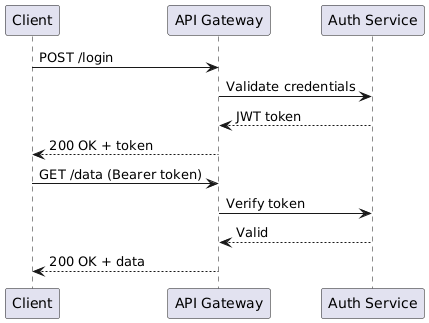
"Show the authentication flow between a client, API gateway, and auth service"
@startuml
Client -> "API Gateway": POST /login
"API Gateway" -> "Auth Service": Validate credentials
"Auth Service" --> "API Gateway": JWT token
"API Gateway" --> Client: 200 OK + token
Client -> "API Gateway": GET /data (Bearer token)
"API Gateway" -> "Auth Service": Verify token
"Auth Service" --> "API Gateway": Valid
"API Gateway" --> Client: 200 OK + data
@enduml
Development
# Clone and install
git clone https://github.com/ByteOverDev/diagrams-mcp.git
cd diagrams-mcp
pip install -e ".[dev]"

# Run tests
pytest

# Lint and format
ruff check .
ruff format .

# Run the MCP server locally (stdio mode)
diagrams-mcp-server
Split Facade/Renderer Mode
For hosted deployments, the MCP server can run as a lightweight facade that delegates render work to a separate renderer service. This keeps the always-on MCP process small while Graphviz, Chromium, Mermaid CLI, Java, and PlantUML live only in the renderer image.
# Terminal 1: renderer service
RENDERER_HOST=0.0.0.0 RENDERER_PORT=8001 diagrams-renderer-server

# Terminal 2: HTTP MCP facade delegating to the renderer
FASTMCP_TRANSPORT=http \
FASTMCP_HOST=0.0.0.0 \
FASTMCP_PORT=8000 \
DIAGRAMS_RENDERER_MODE=remote \
DIAGRAMS_RENDERER_URL=http://127.0.0.1:8001 \
diagrams-mcp-server
Docker/Railway examples are included:
| File | Purpose |
|---|---|
| Dockerfile.facade | Slim MCP facade image without renderer-only binaries |
| Dockerfile.renderer | Renderer image with Graphviz, Chromium, Mermaid CLI, Java, and PlantUML |
| railway.facade.toml | Example Railway facade service config |
| railway.renderer.toml | Example Railway renderer service config |
Key environment variables:
| Variable | Purpose |
|---|---|
| DIAGRAMS_RENDERER_MODE=remote | Makes the facade use the HTTP renderer service |
| DIAGRAMS_RENDERER_URL | Renderer base URL, for example http://diagrams-renderer.railway.internal:8080 |
| DIAGRAMS_IMAGE_STORE_DIR | Optional file-backed temporary image store directory |
| BASE_URL | Optional public base URL used when returning absolute download links |
Supported Providers
The render_diagram tool supports all providers from the mingrammer/diagrams library, including:
AWS, GCP, Azure, Kubernetes, On-Premise, AlibabaCloud, OCI, OpenStack, DigitalOcean, Elastic, Outscale, Generic, and Custom nodes.
Use list_providers() and search_nodes(query) to discover available nodes.
License
MIT
<!-- mcp-name: io.github.mskry/diagrams-mcp-server -->Related Skills
Agent-Reach
86.0kGive your AI agent eyes to see the entire internet. Read & search Twitter, Reddit, YouTube, GitHub, Bilibili, XiaoHongShu — one CLI, zero API fees.
headroom
74.0kCompress tool outputs, logs, files, and RAG chunks before they reach the LLM. 20% fewer tokens for coding agents, 60-95% fewer tokens for JSON, same answers. Library, proxy, MCP server.
ruflo
73.4k🌊 The original agent harness. Deploy intelligent multi-player swarms, coordinate autonomous workflows, and build conversational AI systems. Features adaptive memory, self-learning intelligence, federation, vector RAG integration, and native Claude Code / Codex / Hermes and many more Integrated
CowAgent
47.2kOpen-source super AI assistant & Agent Harness. Plans tasks, runs tools and skills, self-evolves with memory and knowledge. Multi-agent, multi-model, multi-channel. Lightweight, extensible, one-line install.

Languages
Trust signals
From repository metadata: license, adoption, age and documentation. Not a code audit — see the Safety scan above for what the skill file itself contains.