
buywhere-mcp
BuyWhere MCP server — search and compare products from Singapore, SEA, and US markets via Model Context Protocol. Cross-border e-commerce product catalog for AI agents. Free API key: https://buywhere.ai/api-keys
Install / Use
claude mcp add BuyWhere -- npx -y github:BuyWhere/buywhere-mcpIf the server publishes to npm under a different name, use that package instead — check the repo README.
MCP Server
Model Context Protocol server
Quality Score
Category
Development & EngineeringSupported Platforms
Skill content
View source on GitHubBuyWhere MCP Server — Product Search & Price Comparison for AI Agents
AI agents use BuyWhere to search products, compare prices, and discover deals across Singapore and US merchants in real time.
Install in 30 Seconds
export BUYWHERE_API_KEY=bw_live_xxxx
npx -y @buywhere/mcp-server
Use with Claude Desktop, Cursor, VS Code Copilot, Cline, Windsurf, OpenCode, Codex, Continue.dev, and any MCP-compatible client.
- npm: https://www.npmjs.com/package/@buywhere/mcp-server
- GitHub: https://github.com/BuyWhere/buywhere-mcp
- MCP Registry: https://registry.modelcontextprotocol.io/?q=io.github.BuyWhere%2Fbuywhere-mcp







AI Agents: Use This Package To
- Search products across Singapore, SEA, and US markets by keyword, category, or price range
- Compare prices across Lazada, Shopee, Amazon, and local retailers in a single query
- Find deals and track real-time pricing with multi-currency support
- Build shopping agents that recommend, compare, and link to products programmatically
- Discover product catalogs with structured taxonomy for any region
Build With BuyWhere Challenge — $5,000 in Prizes
Join the "Build With BuyWhere" AI Agent Developer Challenge! Use the BuyWhere MCP server to create AI agents that search, compare, and recommend products across Singapore, SEA, and US markets.
- Prize pool: $5,000 USD
- Deadline: June 30, 2026
- Challenge page: buywhere.ai/challenge
Product search API for AI agents via Model Context Protocol. Built for AI agent commerce, not store management.
Official MCP Registry listing: io.github.BuyWhere/buywhere-mcp
Works with Claude Desktop, Cursor, VS Code Copilot, Cline, Windsurf, OpenCode, Codex, Continue.dev, and any MCP-compatible client. Also supports Agent-to-Agent (A2A) protocol.
Demo
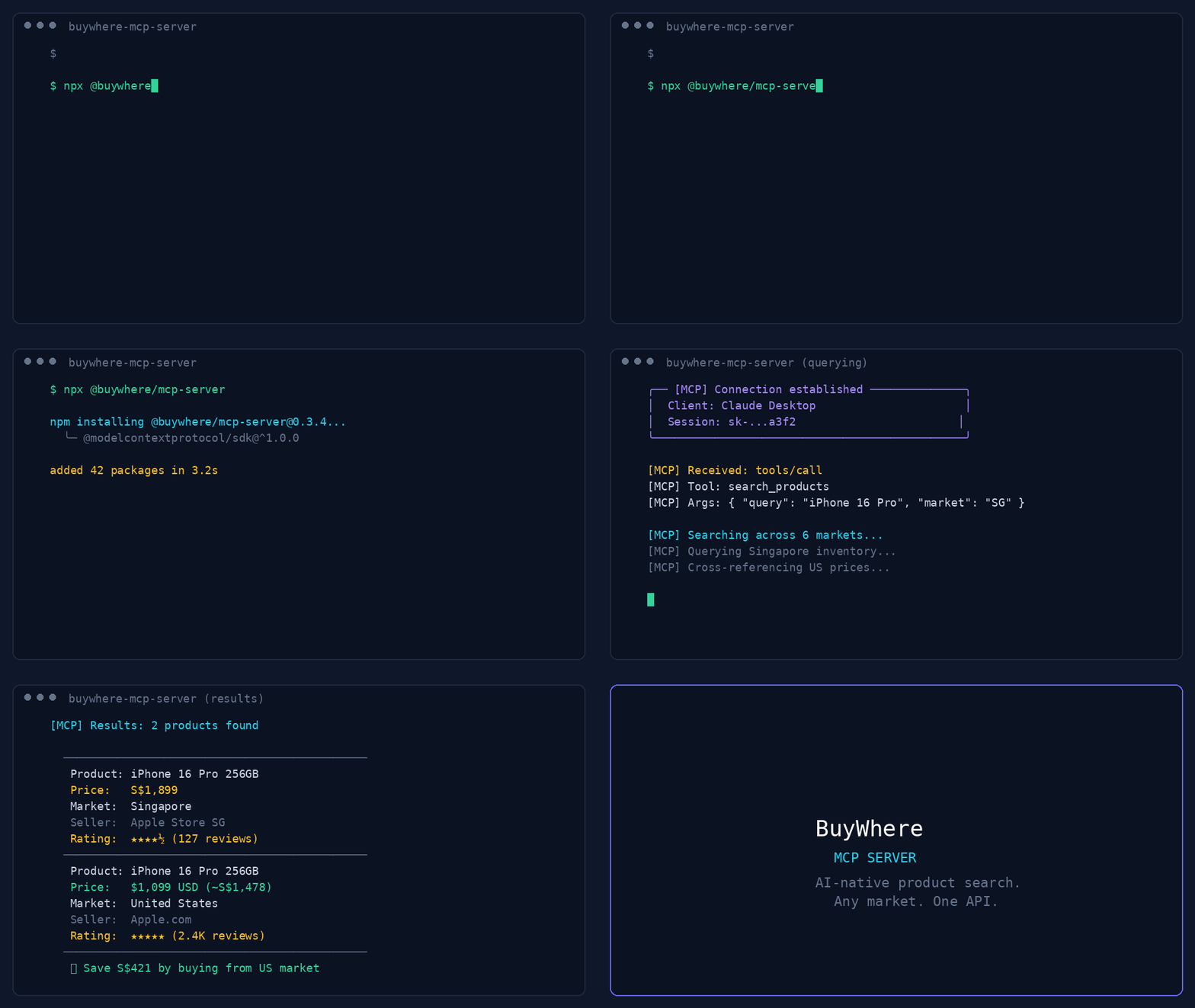
44-second demo: product search, deal discovery, price comparison, and multi-region support.
User:   "Find me wireless earbuds under $50 available in Singapore"
Agent:  [calls search_products → returns 5 matching products]

User:   "Compare the top 3"
Agent:  [calls compare_prices → side-by-side with best-value pick]
Quick Start
Get a key in 3 seconds — no signup, no email:
# 1. Register (one call, returns api_key instantly)
curl -X POST https://api.buywhere.ai/v1/auth/register \
  -H "Content-Type: application/json" \
  -d '{"agent_name":"your-agent"}'
# → {"api_key":"bw_...","tier":"unverified","rate_limit":{"rpm":20,"daily":1000}}

# 2. Use the key
export BUYWHERE_API_KEY=bw_...
npx -y @buywhere/mcp-server
Legacy email signup (60s, manual approval) → buywhere.ai/api-keys
Tutorials
- Part 1: MCP for Ecommerce — The Missing Infrastructure Layer for AI Agent Shopping — Architecture and why agents need a product catalog API
- Part 2: Build a Real Shopping Agent in 15 Minutes — Hands-on: set up MCP server, search products, compare prices, build a working agent
From the Blog
Read the BuyWhere Engineering Blog for deep dives on MCP architecture, agent commerce, and the ecosystem.
Also follow the BuyWhere Hashnode blog mirror for the same engineering content on Hashnode.
- MCP for Ecommerce 2026 — How AI agents search real products, compare prices across markets, and why MCP is the standard
- Building Production MCP Servers — Architecture, tool design patterns, and distribution from 0 to 1,700+ daily npm downloads
- MCP Server Ecosystem 2026 — Every MCP category mapped (4,800+ servers across 40+ domains)
- AI Agent Commerce: Missing Infrastructure — Why shopping is the last unbuilt layer of the agent-native economy
- Cross-Border Price Comparison Tutorial — Build a shopping agent in 10 minutes with BuyWhere MCP
Tools
| Tool | Description |
|------|-------------|
| search_products | Search catalog by keyword, category, price, region |
| get_product | Full product details by ID (prices, specs, images) |
| compare_prices | Side-by-side comparison of 2–5 products |
| get_price | Current prices across all merchants for one product |
| get_affiliate_link | Click-tracked affiliate URL for a product |
| get_catalog | Available product category taxonomy |
MCP Client Configuration
Framework quickstarts:
- CrewAI: API key · BuyWhere quickstart
- Mastra: API key · BuyWhere quickstart
Claude Desktop
Add to claude_desktop_config.json:
{
  "mcpServers": {
    "buywhere": {
      "command": "npx",
      "args": ["-y", "@buywhere/mcp-server"],
      "env": { "BUYWHERE_API_KEY": "bw_live_xxxx" }
    }
  }
}
Cursor / VS Code / Cline
Add to your MCP settings file:
{
  "mcpServers": {
    "buywhere": {
      "command": "npx",
      "args": ["-y", "@buywhere/mcp-server"],
      "env": { "BUYWHERE_API_KEY": "bw_live_xxxx" }
    }
  }
}
Windsurf
Add to ~/.windsurf/mcp.json:
{
  "mcpServers": {
    "buywhere": {
      "command": "npx",
      "args": ["-y", "@buywhere/mcp-server"],
      "env": { "BUYWHERE_API_KEY": "bw_live_xxxx" }
    }
  }
}
OpenCode / Codex
Add to opencode.json:
{
  "mcpServers": {
    "buywhere": {
      "command": "npx",
      "args": ["-y", "@buywhere/mcp-server"],
      "env": { "BUYWHERE_API_KEY": "bw_live_xxxx" }
    }
  }
}
Continue.dev (VS Code / JetBrains)
Add to ~/.continue/config.json:
{
  "experimental": {
    "mcpServers": {
      "buywhere": {
        "command": "npx",
        "args": ["-y", "@buywhere/mcp-server"],
        "env": { "BUYWHERE_API_KEY": "bw_live_xxxx" }
      }
    }
  }
}
Mastra
Mastra is a TypeScript-first AI agent framework with native MCP support.
npm install @mastra/core @mastra/mcp
import { Mastra } from '@mastra/core';
import { MastraMCPClient } from '@mastra/mcp';

const buywhere = new MastraMCPClient({
  name: 'buywhere',
  server: {
    url: new URL('https://api.buywhere.ai/mcp'),
    requestInit: {
      headers: { 'Authorization': `Bearer ${process.env.BUYWHERE_API_KEY}` },
    },
  },
});

const agent = new Mastra({
  agents: {
    shoppingAgent: {
      instructions: 'You are a shopping assistant. Use BuyWhere to find and compare products.',
      tools: await buywhere.tools(),
    },
  },
});

const result = await agent.agents.shoppingAgent.generate(
  'Find me the best deal on a Sony WH-1000XM5 in Singapore'
);
Full guide: BuyWhere + Mastra Integration
LangChain
Use BuyWhere tools in LangChain agents via the MCP adapter:
from langchain_mcp_adapters.client import MultiServerMCPClient
from langgraph.prebuilt import create_react_agent
from langchain_anthropic import ChatAnthropic

async def main():
    async with MultiServerMCPClient({
        "buywhere": {
            "url": "https://api.buywhere.ai/mcp",
            "transport": "streamable_http",
            "headers": {"Authorization": f"Bearer {BUYWHERE_API_KEY}"},
        }
    }) as client:
        tools = await client.get_tools()
        agent = create_react_agent(ChatAnthropic(model="claude-sonnet-4-5"), tools)
        result = await agent.ainvoke({"messages": [("user", "Find the cheapest Sony headphones in Singapore")]})
LlamaIndex
Connect BuyWhere via LlamaIndex MCP client:
from llama_index.tools.mcp import BasicMCPClient, McpToolSpec
from llama_index.agent.openai import OpenAIAgent

async def main():
    mcp_client = BasicMCPClient(
        command_or_url="https://api.buywhere.ai/mcp",
        headers={"Authorization": f"Bearer {BUYWHERE_API_KEY}"},
    )
    mcp_tool_spec = McpToolSpec(client=mcp_client)
    tools = mcp_tool_spec.to_tool_list()
    agent = OpenAIAgent.from_tools(tools)
    response = await agent.achat("Compare prices for iPhone 16 Pro across Singapore and US")
CrewAI
Use BuyWhere in a CrewAI agent with MCP tool integration:
from crewai import Agent, Task, Crew
from crewai_tools import MCPServerAdapter

buywhere_server = MCPServerAdapter(
    server_params={
        "url": "https://api.buywhere.ai/mcp",
        "headers": {"Authorization": f"Bearer {BUYWHERE_API_KEY}"},
        "transport": "streamable-http",
    }
)

shopping_agent = Agent(
    role="Shopping Research Analyst",
    goal="Find the best deals across Singapore and US markets",
    tools=[buywhere_server],
)

task = Task(
    description="Find the best price for Sony WH-1000XM5 headphones across all available markets",
    agent=shopping_agent,
    expected_output="Product comparison with prices and merchant links",
)

crew = Crew(agents=[shopping_agent], tasks=[task])
result = crew.kickoff()
Configuration
| Variable | Default | Description |
|----------|---------|-------------|
| BUYWHERE_API_KEY | (required) | API key (no signup: POST /v1/auth/register {"agent_name":"<name>"}) — returns instantly, no email verification |
| BUYWHERE_API_URL | https://api.buywhere.ai/mcp | Custom API base URL |
Install
# Run directly (no install)
npx -y @buywhere/mcp-server

# Install globally
npm install -g @buywhere/mcp-server
buywhere-mcp
Use Cases
- Shopping agents — build AI a
Truncated for display — read the full file on GitHub.
Related Skills
momen-cursurrules-prompt-file
40.6kCursor rules for building custom frontends with Momen.app as headless BaaS with GraphQL API, actionflows, AI agents, and Stripe integration.
semiotic-react-dataviz-cursorrules-prompt-file
40.6kCursor rules for Semiotic data visualization library with 30+ chart types, MCP server, and AI-assisted chart generation.
Agent-Reach
72.2kGive your AI agent eyes to see the entire internet. Read & search Twitter, Reddit, YouTube, GitHub, Bilibili, XiaoHongShu — one CLI, zero API fees.
ruflo
68.0k🌊 The original agent meta-harness. Deploy intelligent multi-player swarms, coordinate autonomous workflows, and build conversational AI systems. Features adaptive memory, self-learning intelligence, RAG integration, and native Claude Code / Codex / Hermes and many more Integrated
