
Ripgrep
ripgrep recursively searches directories for a regex pattern while respecting your gitignore
Install / Use
/learn @BurntSushi/RipgrepREADME
ripgrep (rg)
ripgrep is a line-oriented search tool that recursively searches the current
directory for a regex pattern. By default, ripgrep will respect gitignore rules
and automatically skip hidden files/directories and binary files. (To disable
all automatic filtering by default, use rg -uuu.) ripgrep has first class
support on Windows, macOS and Linux, with binary downloads available for every
release. ripgrep is similar to
other popular search tools like The Silver Searcher, ack and grep.



Dual-licensed under MIT or the UNLICENSE.
CHANGELOG
Please see the CHANGELOG for a release history.
Documentation quick links
- Installation
- User Guide
- Frequently Asked Questions
- Regex syntax
- Configuration files
- Shell completions
- Building
- Translations
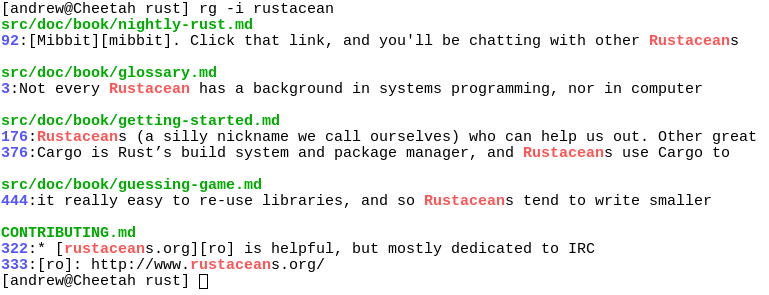
Screenshot of search results
Quick examples comparing tools
This example searches the entire
Linux kernel source tree
(after running make defconfig && make -j8) for [A-Z]+_SUSPEND, where
all matches must be words. Timings were collected on a system with an Intel
i9-12900K 5.2 GHz.
Please remember that a single benchmark is never enough! See my blog post on ripgrep for a very detailed comparison with more benchmarks and analysis.
| Tool | Command | Line count | Time |
| ---- | ------- | ---------- | ---- |
| ripgrep (Unicode) | rg -n -w '[A-Z]+_SUSPEND' | 536 | 0.082s (1.00x) |
| hypergrep | hgrep -n -w '[A-Z]+_SUSPEND' | 536 | 0.167s (2.04x) |
| git grep | git grep -P -n -w '[A-Z]+_SUSPEND' | 536 | 0.273s (3.34x) |
| The Silver Searcher | ag -w '[A-Z]+_SUSPEND' | 534 | 0.443s (5.43x) |
| ugrep | ugrep -r --ignore-files --no-hidden -I -w '[A-Z]+_SUSPEND' | 536 | 0.639s (7.82x) |
| git grep | LC_ALL=C git grep -E -n -w '[A-Z]+_SUSPEND' | 536 | 0.727s (8.91x) |
| git grep (Unicode) | LC_ALL=en_US.UTF-8 git grep -E -n -w '[A-Z]+_SUSPEND' | 536 | 2.670s (32.70x) |
| ack | ack -w '[A-Z]+_SUSPEND' | 2677 | 2.935s (35.94x) |
Here's another benchmark on the same corpus as above that disregards gitignore files and searches with a whitelist instead. The corpus is the same as in the previous benchmark, and the flags passed to each command ensure that they are doing equivalent work:
| Tool | Command | Line count | Time |
| ---- | ------- | ---------- | ---- |
| ripgrep | rg -uuu -tc -n -w '[A-Z]+_SUSPEND' | 447 | 0.063s (1.00x) |
| ugrep | ugrep -r -n --include='*.c' --include='*.h' -w '[A-Z]+_SUSPEND' | 447 | 0.607s (9.62x) |
| GNU grep | grep -E -r -n --include='*.c' --include='*.h' -w '[A-Z]+_SUSPEND' | 447 | 0.674s (10.69x) |
Now we'll move to searching on single large file. Here is a straight-up
comparison between ripgrep, ugrep and GNU grep on a file cached in memory
(~13GB, OpenSubtitles.raw.en.gz, decompressed):
| Tool | Command | Line count | Time |
| ---- | ------- | ---------- | ---- |
| ripgrep (Unicode) | rg -w 'Sherlock [A-Z]\w+' | 7882 | 1.042s (1.00x) |
| ugrep | ugrep -w 'Sherlock [A-Z]\w+' | 7882 | 1.339s (1.28x) |
| GNU grep (Unicode) | LC_ALL=en_US.UTF-8 egrep -w 'Sherlock [A-Z]\w+' | 7882 | 6.577s (6.31x) |
In the above benchmark, passing the -n flag (for showing line numbers)
increases the times to 1.664s for ripgrep and 9.484s for GNU grep. ugrep
times are unaffected by the presence or absence of -n.
Beware of performance cliffs though:
| Tool | Command | Line count | Time |
| ---- | ------- | ---------- | ---- |
| ripgrep (Unicode) | rg -w '[A-Z]\w+ Sherlock [A-Z]\w+' | 485 | 1.053s (1.00x) |
| GNU grep (Unicode) | LC_ALL=en_US.UTF-8 grep -E -w '[A-Z]\w+ Sherlock [A-Z]\w+' | 485 | 6.234s (5.92x) |
| ugrep | ugrep -w '[A-Z]\w+ Sherlock [A-Z]\w+' | 485 | 28.973s (27.51x) |
And performance can drop precipitously across the board when searching big files for patterns without any opportunities for literal optimizations:
| Tool | Command | Line count | Time |
| ---- | ------- | ---------- | ---- |
| ripgrep | rg '[A-Za-z]{30}' | 6749 | 15.569s (1.00x) |
| ugrep | ugrep -E '[A-Za-z]{30}' | 6749 | 21.857s (1.40x) |
| GNU grep | LC_ALL=C grep -E '[A-Za-z]{30}' | 6749 | 32.409s (2.08x) |
| GNU grep (Unicode) | LC_ALL=en_US.UTF-8 grep -E '[A-Za-z]{30}' | 6795 | 8m30s (32.74x) |
Finally, high match counts also tend to both tank performance and smooth out the differences between tools (because performance is dominated by how quickly one can handle a match and not the algorithm used to detect the match, generally speaking):
| Tool | Command | Line count | Time |
| ---- | ------- | ---------- | ---- |
| ripgrep | rg the | 83499915 | 6.948s (1.00x) |
| ugrep | ugrep the | 83499915 | 11.721s (1.69x) |
| GNU grep | LC_ALL=C grep the | 83499915 | 15.217s (2.19x) |
Why should I use ripgrep?
- It can replace many use cases served by other search tools because it contains most of their features and is generally faster. (See the FAQ for more details on whether ripgrep can truly replace grep.)
- Like other tools specialized to code search, ripgrep defaults to
recursive search and does automatic
filtering. Namely, ripgrep won't search files
ignored by your
.gitignore/.ignore/.rgignorefiles, it won't search hidden files and it won't search binary files. Automatic filtering can be disabled withrg -uuu. - ripgrep can search specific types of files.
For example,
rg -tpy foolimits your search to Python files andrg -Tjs fooexcludes JavaScript files from your search. ripgrep can be taught about new file types with custom matching rules. - ripgrep supports many features found in
grep, such as showing the context of search results, searching multiple patterns, highlighting matches with color and full Unicode support. Unlike GNU grep, ripgrep stays fast while supporting Unicode (which is always on). - ripgrep has optional support for switching its regex engine to use PCRE2.
Among other things, this makes it possible to use look-around and
backreferences in your patterns, which are not supported in ripgrep's default
regex engine. PCRE2 support can be enabled with
-P/--pcre2(use PCRE2 always) or--auto-hybrid-regex(use PCRE2 only if needed). An alternative syntax is provided via the--engine (default|pcre2|auto)option. - ripgrep has rudimentary support for replacements, which permit rewriting output based on what was matched.
- ripgrep supports searching files in text encodings
other than UTF-8, such as UTF-16, latin-1, GBK, EUC-JP, Shift_JIS and more.
(Some support for automatically detecting UTF-16 is provided. Other text
encodings must be specifically specified with the
-E/--encodingflag.) - ripgrep supports searching files compressed in a common format (brotli,
bzip2, gzip, lz4, lzma, xz, or zstandard) with the
-z/--search-zipflag. - ripgrep supports arbitrary input preprocessing filters which could be PDF text extraction, less supported decompression, decrypting, automatic encoding detection and so on.
- ripgrep can be configured via a configuration file.
In other words, use ripgrep if you like speed, filtering by default, fewer bugs and Unicode support.
Why shouldn't I use ripgrep?
Despite initially not wanting to add every feature under the sun to ripgrep, over time, ripgrep has grown support for most features found in other file searching tools. This includes searching for results spanning across multiple lines, and opt-in support for PCRE2, which provides look-around and backreference support.
At this point, the primary reasons not to use ripgrep probably consist of one or more of the following:
- You need a portable and ubiquitous tool. While ripgrep works on Windows, macOS and Linux, it is not ubiquitous and it does not conform to any standard such as POSIX. The best tool for this job is good old grep.
- There still exists some other feature (or bug) not listed in this README that you rely on that's in another tool that isn't in ripgrep.
- There is a performance edge case where ripgrep doesn't do well where another tool does do well. (Please file a bug report!)
- ripgr
Related Skills
himalaya
325.9kCLI to manage emails via IMAP/SMTP. Use `himalaya` to list, read, write, reply, forward, search, and organize emails from the terminal. Supports multiple accounts and message composition with MML (MIME Meta Language).
coding-agent
325.9kDelegate coding tasks to Codex, Claude Code, or Pi agents via background process
tavily
325.9kTavily web search, content extraction, and research tools.
prd
Raito Bitcoin ZK client web portal.
