
Erd
Translates a plain text description of a relational database schema to a graphical entity-relationship diagram.
Install / Use
/learn @BurntSushi/ErdREADME


This utility takes a plain text description of entities, their attributes and
the relationships between entities and produces a visual diagram modeling the
description. The visualization is produced by using Dot with GraphViz. There
are limited options for specifying color and font information. Also, erd can
output graphs in a variety of formats, including but not limited to: pdf, svg,
eps, png, jpg, plain text and dot.
Here's an example of the output produced by erd (click on it for a larger PNG
version):
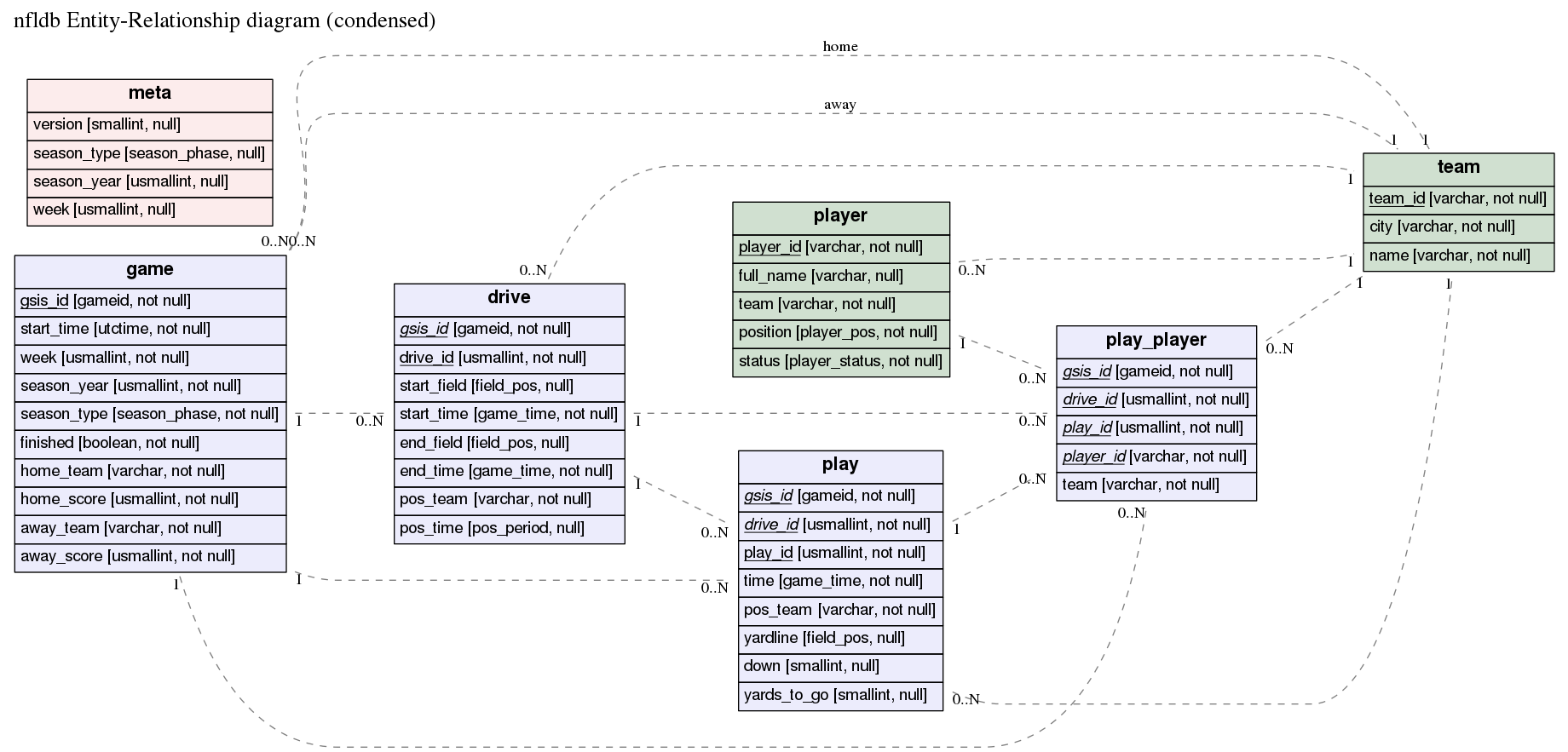
The corresponding er file is in the examples
directory.
Installation
erd requires GraphViz, and one of:
All of these are available for Windows, Mac and Linux.
MacPorts
erd is available in MacPorts as a one-shot install (GraphViz will be set up correctly for you):
port install erd
Docker
docker run -i ghcr.io/burntsushi/erd:latest < examples/nfldb.er >| out.pdf
Local Docker build
An example command to use erd in a docker container, once this repository is successfully cloned.
erdtag="0.2.1.0"; cd erd && docker build -t erd:$erdtag . && docker run -it erd:$erdtag "--help"
Where:
- you shall specify your erdtag, that will help identifying the docker image to be created;
- instead of using
--helpinvoke erd the way you need to i.e.:docker run -i erd:$erdtag "--dot-entity" < examples/nfldb.er > out.pdf
Stack
Install the Stack build tool, and build from source:
git clone git://github.com/BurntSushi/erd
cd erd
stack install
stack install will put the binary into Stack's standard binary
installation path. Unless you've overridden it, that's ~/.local/bin
on Unix and OS X, %APPDATA%\local\bin on Windows.
Haskell Platform
NB OSX users: for text formatting of keys (bold and italics) you may need to reinstall
graphvizwithpangosupport:
# OSX only
brew install graphviz
The issue 1636 explains what needs to be performed in details to find out whether pango support is enabled and how to make it happen in case it wasn't.
erd is on hackage, so you can install it with cabal (which is included with the Haskell platform):
cabal new-install erd
Alternatively, you can clone this repository and build from source:
git clone git://github.com/BurntSushi/erd
cd erd
cabal new-configure
cabal new-build
# binary is now under ./dist-newstyle/build/
Usage information is available with erd --help.
Building statically linked executable
In case one wishes to have a statically linked erd as a result, this is
possible to have by executing build-static_by-nix.sh: which requires the
nix package manager to be installed on the building
machine. NixOS itself is not a requirement.
Quick example
Before describing the ER file, let's try making an ER diagram from a small example:
$ curl 'https://raw.githubusercontent.com/BurntSushi/erd/master/examples/simple.er' > simple.er
$ cat simple.er
# Entities are declared in '[' ... ']'. All attributes after the entity header
# up until the end of the file (or the next entity declaration) correspond
# to this entity.
[Person]
*name
height
weight
`birth date`
+birth_place_id

[`Birth Place`]
*id
`birth city`
'birth state'
"birth country"

# Each relationship must be between exactly two entities, which need not
# be distinct. Each entity in the relationship has exactly one of four
# possible cardinalities:
#
# Cardinality    Syntax
# 0 or 1         ?
# exactly 1      1
# 0 or more      *
# 1 or more      +
Person *--1 `Birth Place`
$ erd -i simple.er -o simple.pdf
The PDF should now contain a graph that looks like this:
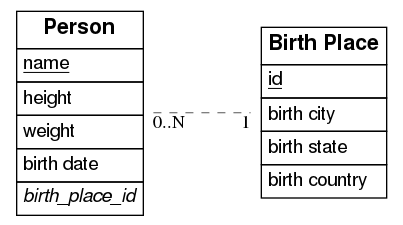
Available command-line options
| Short | Long | Description | |-------------|------------------------|--------------------------------------------------------------------------------------------------------------------------------------------------------------------------------| | -c[FILE] | --config[=FILE] | Configuration file. | | -i FILE | --input=FILE | When set, input will be read from the given file. Otherwise, stdin will be used. | | -o FILE | --output=FILE | When set, output will be written to the given file. Otherwise, stdout will be used. If given and if --fmt is omitted, then the format will be guessed from the file extension. | | -f FMT | --fmt=FMT | Force the output format to one of: bmp, dot, eps, gif, jpg, pdf, plain, png, ps, ps2, svg, tiff. | | -e EDGE | --edge=EDGE | Select one type of edge: compound, noedge, ortho, poly, spline. | | -d | --dot-entity | When set, output will consist of regular dot tables instead of HTML tables. Formatting will be disabled. | | -p PATTERN | --edge-pattern=PATTERN | Select one of the edge patterns: dashed, dotted, solid. | | -n NOTATION | --notation=NOTATION | Select a notation style for cardinalities of relations: ie, uml. | | -h | --help | Show this usage message. |
Formatting defined in configuration file
erd may be invoked using the -c or --config argument
-
without a provided configuration file it will try to read the file ~/.erd.yaml which is the path of the configuration file to store formatting settings of any resulted graph. In case the file ~/.erd.yaml does not exists
erdwill print the default content of this file to stdout which you can inspect and/or redirect appropriately, e.g.:erd -c -i ./examples/nfldb.er -o ./nfldb.pdf 1 > ~/.erd.yaml. -
with a provided configuration file erd will use that instead of ~/.erd.yaml. For instance:
erd -c./myconfig.yaml -i ./examples/nfldb.er -o ./nfldb.pdf.
The configuration file in commented sections do contain the supported formatting options, so you can use one of the listed ones.
The default content of the configuration file would be only shown when ~/.erd.yaml does not exist.
The er file format
The er format allows one to describe a relational schema in terms of its
entities (tables), attributes (columns) and relationships between entities (0
or 1, exactly 1, 0 or more and 1 or more).
Entities are declared inside [ and ]. For example, this declares the entity
Person with no attributes:
[Person]
Attributes for an entity are then listed after its corresponding entity's
declaration. Each attribute should be on its own line. The following adds the
name and height attributes to the Person entity:
[Person]
name
height
Entity names and attributes may contain spaces and mostly any character, except ASCII control characters like carriage return and line feed, if quoted with backticks, simple quotes or double quotes:
[`Birth Place`]
*id
`birth city`
'birth state'
"birth country"
Any number of attributes may be declared as a primary key for its entity by
prefixing the attribute with a *. Similarly, an attribute may be declared
as a foreign key by prefixing the attribute with a +:
[Person]
*name
+birth_place_id
An attribute may be both a primary key and a foreign key by prefixing the
name with a * and a + in any order. Note that primary keys are underlined
while foreign keys are italicized.
Relationships can also be declared anywhere in an ER file. Every relationship includes exactly two entities (the two entities may be the same, for self-relationships). Each entity in a relationship must have exactly one of four cardinalities:
Cardinality    Syntax
0 or 1         ?
exactly 1      1
0 or more      *
1 or more      +
So for example, the following defines a relationship between Person and
Birth Place that reads "every person has exactly one birth place":
Person *--1 `Birth Place`
And here's another example that can be read as, "every platinum album has one or more artists, but not every artist has a platinum album":
Artist +--? PlatinumAlbums
Fonts, col
Related Skills
feishu-drive
328.6k|
things-mac
328.6kManage Things 3 via the `things` CLI on macOS (add/update projects+todos via URL scheme; read/search/list from the local Things database)
clawhub
328.6kUse the ClawHub CLI to search, install, update, and publish agent skills from clawhub.com
asset_management
Amazon Q Developer Guidance for AMBP Quick Start for New Amazon Q Sessions 1. Project Overview AMBP (Asset Management Business Platform) is a modern web-based asset management system bu
