
TPL4J
Task Parallel Library for Java
Install / Use
/learn @BrunoMNDantas/TPL4JREADME
Gradle
implementation group: 'com.github.brunomndantas', name: 'tpl4j', version: '1.2.1'
Maven
<dependency>
    <groupId>com.github.brunomndantas</groupId>
    <artifactId>tpl4j</artifactId>
    <version>1.2.1</version>
</dependency>
- Usage
- Development
Usage
During this chapter you will have a guide oriented to examples on how to use TPL4J. If the functionality you are trying to implemnet is not supported out of the box, plase check the Development chapter and fell free to extend the library funcionality.
Hello World
Let's start with our good friend "Hello World". Our goal is to create a task which its job is to print the text "Hello World" on console. For that you can create an instance of Task and pass, as parameter, a lambda with the code.
new Task(() -> System.out.println("Hello World")).start();
If you are really anxious and ran this piece of code you probably realized that nothing happened.
What a crappy library! Not even the "Hello Word" works!
Let's see what happened.
You created a task and told to the task that it could start its job. When you invoke method start() the task will run our code on a different thread.
OH! Now I see it! We have to wait until the task finishes its job. How can we do it?
Ok, here you have some options but since this is a dummy example we will invoke the method getResult() which blocks the current thread until task finishes. Later on you will understand better this method and different ways of waiting for a task to finish.
Ok, it's time. You can call method getResult() and run our Hello World. Your code should look like:
Task<?> task = new Task<>(() -> System.out.println("Hello World"));
task.start();
task.getResult();
If everything went smoothly, your console should have something like:
Hello World
Pretty simple, right? You can simplify this example by using the utilirary class TaskFactory.
TaskFactory
  .createAndStart(() -> System.out.println("Hello World"))
  .getResult();
Task
Task class represents a task which will be executed asynchronously and produces an output. The main constructor of Task has the following interface:
public Task(
  String taskId,
  IAction<T> action,
  ICancellationToken cancellationToken,
  IScheduler scheduler,
  Option... options) { }
This constructor has the following parameters:
taskId: String with id of task. This property is helpfull when we need to analise the log. During the task life cycle it is logged the state transitions associated with the task's id.action: represents the action to be executed. You can see here all types of action supported.cancellationToken: the token through which you can send a cancel request. You can find more about cancellation here.scheduler: entity responsible to schedule theaction. You can find more about schedule here.options: options to configure task's execution. You can see all options existent here.
All the parameters of Task constructor, with exception of action, are optional. For this reason Task class has overloads of this constructor receiving all combinations of different parameters.
Life Cycle
On the image bellow you an see the different states of a task's life cycle.
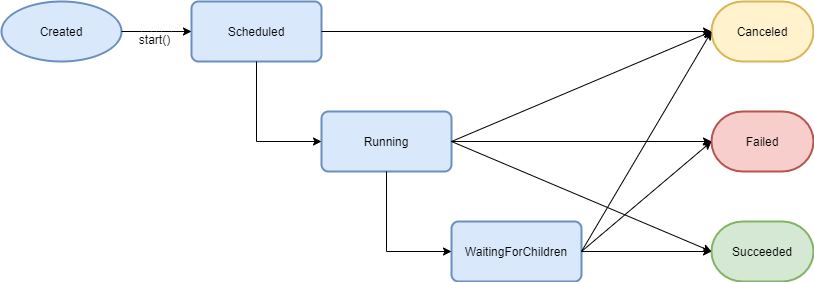
A task starts on Created state. The task will stay on this state until you invoke start() method which makes the task transit to Scheduled state.
When on Scheduled state, if the task has a cancel request it will transit synchronously to Canceled state otherwise the task will transit to Running state asynchronously.
When on Running state the task will execute the action supplied. From here it can transit to the following states:
WaitingForChildren: the task has children. See more about children here.Canceled: the action supplied ends withCancelledExceptionand has no childrenFailed: the action supplied ends withException(excludingCancelledException) and has no childrenSucceeded: the action ends successfully and has no children
When on WaitingForChildren the task will stay on this state until all its children finish. From here it can transit to the following states:
Failed: the action supplied ends withException(excludingCancelledException) or any of its children finished troughFailedstate.Canceled: the action supplied ends withCancelledExceptionor any of its children finished troughCanceledstate.Succeeded: the action and its children finish successfully
Action
IAction is the functional interface to define the action that a task will execute. This interface declares a method run which produces K and receives an instance of CancellationToken. Learn more about CancellationToken here .
Since sometimes we just want to execute some action which produces no result or we don't need to deal with CancellationToken, Task constructor has variants compatible with the following functional interfaces:
/*IAction*/
K run(CancellationToken cancellationToken) throws Exception;

/*IVoidAction*/
void run(CancellationToken cancellationToken) throws Exception;

/*IEmptyAction*/
K run() throws Exception;

/*IEmptyVoidAction*/
void run() throws Exception;
Result
In order to get the result produced by a task, you can invoke getResult() method. This method blocks the thread until the task finishes. If the task ends successfully the result will be returned, if ends with fail or cancel state the respective exception will be thrown.
Here follows an example of a successful task:
Task<String> task = TaskFactory.createAndStart(() -> "Paul");
System.out.println("Hello " + task.getResult() + "!");
Output:
Hello Paul!
Here follows an example of a failed task:
Task<String> task = TaskFactory.createAndStart(() -> { throw new Exception("Error"); });

try {
  System.out.println("Hello " + task.getResult() + "!");
} catch(Exception e) {
  System.out.println(e.getMessage());
}
Output:
Error
If you want to handle the the value/exception separatly, you have the methods getResultValue() and getResultException() which will return the respective result. Both these methods are not blocking, so you must to invoke them after the task finishes.
Here follows an example:
Task<String> task = TaskFactory.createAndStart(() -> "Paul");
System.out.println("Hello " + task.getResultValue() + "!");

task.getFinishedEvent().await();

System.out.println("Hello " + task.getResultValue() + "!");
Output:
Hello null!
Hello Paul!
Status
In order to check the task's status you can access it trought getStatus() method. This method returns an instance of Status.
Status class offers all life cycle events and the current state of a Task.
State
The enum State indicates the state in which the task is. State enum has the following values:
CREATED: task was created but not scheduled.SCHEDULED: task was scheduled and will be executed asynchronously.RUNNING: scheduler already took the task and is being executed.WAITING_FOR_CHILDREN: execution of task's action ended but is pendent until its children finish.SUCCEEDED: task succeeded.FAILED: task failed.CANCELED: task canceled.
Events
With an Event instance you can:
- wait for it:
await() - register a listener:
addListener(Runnable listener) - check if it fired:
hasFired()
On the following code we register an action on each event to log the different status of a task.
Task<?> task = new Task<>(() -> System.out.println("Task Action!"));

task.getSchedule
