
SetVRChatPriority
EasyAntiCheat stops us from changing the priority. Let's fix that!
Install / Use
/learn @BlueberryWolf/SetVRChatPriorityREADME
SetVRChatPriority
EasyAntiCheat prevents us from changing the priority. Let's fix that! The new VRChat update includes EasyAntiCheat, which prevents you from changing the priority of VRChat.exe through the task manager.
SetVRChatPriority is a program you run once before VRChat, and it permanently sets VRChat's priority on every startup!
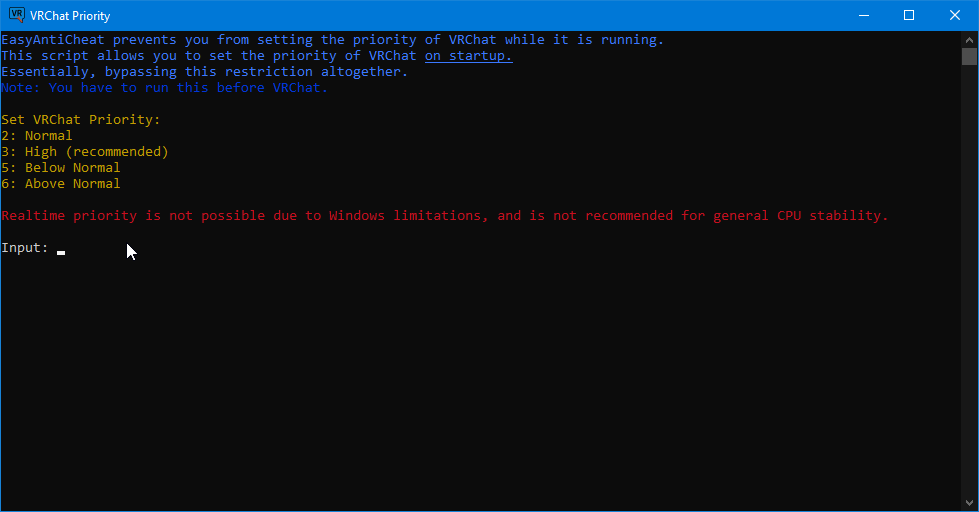
Simple Usage
Download the latest release.
Close VRChat, and open SetVRChatPriority.
Type 3, then press enter.
This is a one time fix, you don't need to run this every time you open VRChat. VRChat will now start up with high priority from now on.
Explanation
SetVRChatPriority sets a registry key HKLM\SOFTWARE\Microsoft\Windows NT\CurrentVersion\Image File Execution Options\VRChat.exe\PerfOptions\VRChat.exe\CpuPriorityClass to force VRChat.exe to start with a set priority.
SetVRChatPriority must be ran before VRChat is started.
Download
Latest Download: https://github.com/BlueberryWolf/SetVRChatPriority/releases/latest
