
Globalyze
Prettier for localization, automatically convert React and Next.js apps into multilingual applications FAST.
Install / Use
/learn @Bil0000/GlobalyzeREADME
Globalyze
OpenClaw for localization.
Automatically internationalize your React application.
Globalyze scans your codebase, extracts UI strings, generates semantic translation keys, rewrites components, and produces ready-to-use locale files.
Run one command:
globalyze globalize
And your app becomes multilingual.
Example
Before:
<button>Pay now</button>
Run:
globalyze globalize
After:
<button>{t("checkout.pay_button")}</button>
Globalyze also generates locale files automatically:
{
  "checkout.pay_button": "Pay now"
}
Quick Start
Install Globalyze:
bun add -g github:Bil0000/Globalyze
Configure environment variables in .env (see Environment Variables below) before initializing:
OPENAI_API_KEY=your_openai_key
GEMINI_API_KEY=your_gemini_key
LINGO_API_KEY=your_lingo_key
OPENAI_API_KEY_2=your_second_openai_key # Optional
GEMINI_API_KEY_2=your_second_gemini_key # Optional
Initialize your project:
globalyze init
Run the first-time migration:
globalyze globalize
Keep translations updated later:
globalyze sync
AI Skill
Globalyze includes an AI skill for agent workflows.
Install:
npx skills add Bil0000/Globalyze --skill globalyze
This enables Cursor / Codex / AI agents to use the CLI correctly.
How Globalyze Is Different
Traditional i18n libraries such as:
- react-i18next
- next-intl
- react-intl
handle runtime translations.
They expect developers to manually:
- extract UI strings
- add translation keys
- rewrite components
- maintain locale files
Globalyze automates this process.
Instead of manually converting your application, Globalyze automatically internationalizes the codebase using AST transforms.
You still use a runtime library for translations, but Globalyze handles the migration and lifecycle.
Developer Experience
Typical localization workflow:
- Find UI strings
- Create translation keys
- Rewrite components
- Create locale files
- Maintain translations
With Globalyze:
- Run
globalyze globalize - Add a language picker
That's it.
Core Capabilities
Globalyze provides automated internationalization using:
- AST-based source extraction from React code
- semantic translation key generation
- runtime adapter integration
- automatic locale file generation
- incremental sync workflows
- automated translation using Lingo.dev
Advanced Tooling
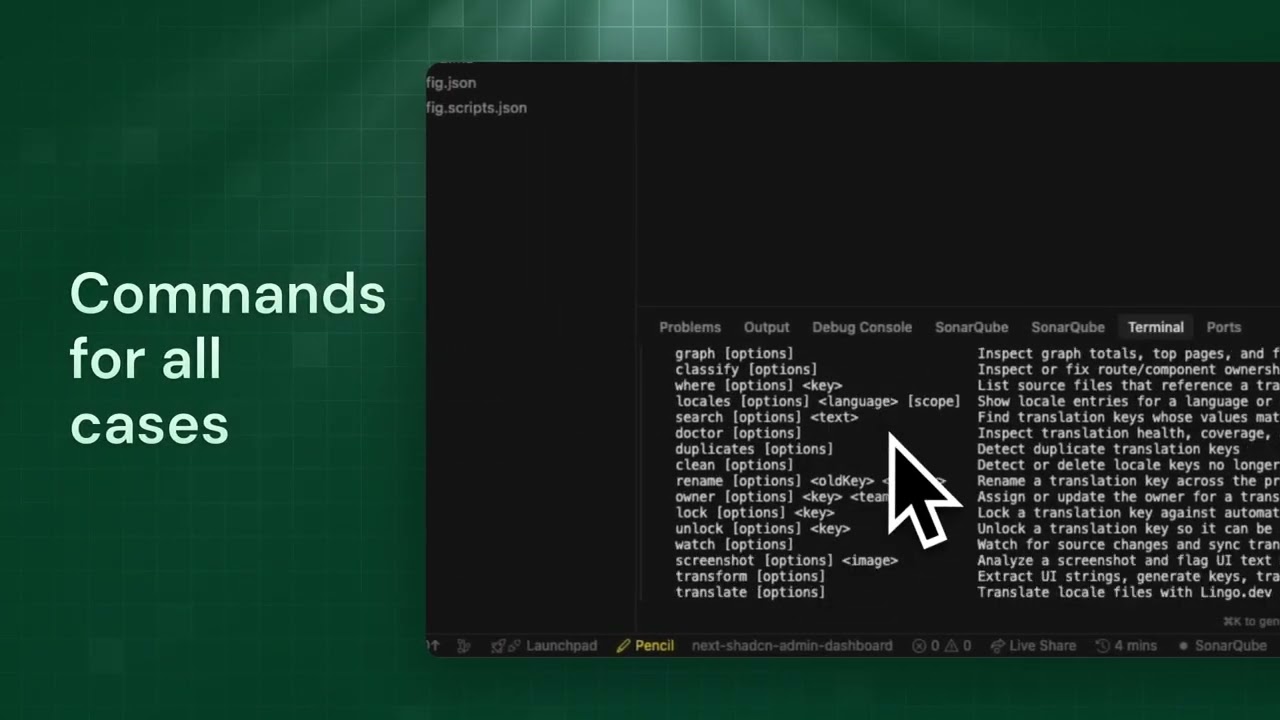
Globalyze also includes advanced localization tooling:
- translation graph inspection
- duplicate translation detection
- unused key cleanup
- ownership and governance controls
- OCR screenshot review for missing strings
- AI-assisted workflows
- project localization health analysis
Supported App Setups
Globalyze supports common React project structures:
- Next.js App Router
- Next.js Pages Router
- Vite React
- Remix
- TanStack Start
- React Router SPAs
- standard React entry-point apps
Runtime Adapters
Supported adapters:
genericcustomreact-i18nextnext-intlreact-intl
Adapters determine how runtime translation calls and providers are wired.
Installation Options
Recommended: Global CLI
bun add -g github:Bil0000/Globalyze
Verify installation:
globalyze --help
Update later:
globalyze update
Development Workflow
If you are developing Globalyze itself:
git clone https://github.com/Bil0000/Globalyze.git
cd globalyze
bun install
bun link
Environment Variables
Globalyze uses a .env file:
OPENAI_API_KEY=your_openai_key
OPENAI_API_KEY_2=your_second_openai_key
GEMINI_API_KEY=your_gemini_key
GEMINI_API_KEY_2=your_second_gemini_key
LINGO_API_KEY=your_lingo_key
AI Key Rotation
Globalyze supports multiple API keys.
Order used:
OPENAI_API_KEYOPENAI_API_KEY_2OPENAI_API_KEY_3- Gemini fallback keys
If all keys are rate-limited, Globalyze falls back to deterministic key generation.
Core Workflow
1. Initialize
globalyze init
This command:
- detects project languages
- selects runtime adapter
- configures locale structure
- optionally installs adapter dependencies
- optionally wires runtime providers
- generates language switcher helpers
- creates
globalyze.config.ts
2. Globalize the Project
globalyze globalize
This command:
- scans the codebase
- extracts UI strings
- generates translation keys
- rewrites components
- generates locale files
- translates target languages
- updates runtime manifests
- runs a post-migration audit
3. Keep Translations Updated
globalyze sync
This command:
- detects new UI strings
- updates locale files
- fills missing translations
- refreshes runtime artifacts
- updates translation graph
- runs a post-sync audit
Command Overview
| Command | Purpose |
|------|------|
init | configure project |
globalize | convert project to use translations |
sync | maintain translations |
watch | auto-sync during development |
analyze | localization health report |
audit | detect missed UI strings |
Automatic Runtime Setup
Globalyze can scaffold runtime integration automatically.
Depending on framework and adapter it may generate:
src/i18n.tssrc/i18n/useLocale.tssrc/i18n/runtime.tssrc/components/GlobalyzeLanguageSwitcher.tsxsrc/runtime/languageLabels.tssrc/lib/i18n/translations.generated.ts
If safe runtime wiring cannot be performed automatically, Globalyze generates:
globalyze.runtime.md
with manual instructions.
Automatic Language Switcher
Globalyze can generate:
GlobalyzeLanguageSwitcher- locale hooks
- language label helpers
- optional development floating switcher
Developers can place the switcher anywhere in the UI.
CI/CD
Globalyze includes a GitHub Action that runs on every pull request. You can copy it directly from this repo, it works out of the box on your project.
Setup
-
Copy the workflow file into your repo:
mkdir -p .github/workflows
curl -o .github/workflows/globalyze.yml https://raw.githubusercontent.com/Bil0000/Globalyze/main/.github/workflows/globalyze.yml
Or manually copy
.github/workflows/globalyze.ymlinto your project. -
Add repository secrets (Settings → Secrets and variables → Actions):
| Secret | Purpose | |--------|---------| |
GLOBALYZE_OPENAI_API_KEY| OpenAI API key for translation | |GLOBALYZE_GEMINI_API_KEY| Gemini API key (fallback) | |GLOBALYZE_LINGO_API_KEY| Lingo.dev API key for automated translation | -
Add a repository variable (Settings → Secrets and variables → Actions → Variables):
| Variable | Value | |----------|-------| |
GLOBALYZE_INSTALL_SOURCE|github:Bil0000/Globalyze|This tells the workflow where to install Globalyze from. If you use a fork or a different install source, set it accordingly.
What It Does
On every pull request, the workflow:
- Installs Globalyze and runs
globalyze syncto update locale files - Commits and pushes any translation changes back to the PR branch (so reviewers see up-to-date translations)
- Runs
globalyze scan --fail-on-findingsto check for hardcoded UI strings - Runs
globalyze sync --checkto verify locale coverage
If the scan finds hardcoded strings or coverage is missing, the workflow fails—keeping your localization in sync with CI.
Note: For pull requests from forks, the workflow cannot push commits. It will still run the sync and checks, but you'll need to run globalyze sync locally to apply fixes.
Performance
Globalyze is designed for large codebases:
- extraction caching
- bounded concurrency
- incremental sync workflows
- locale reuse
- generated artifact exclusion from scanning
The first globalize run is the heaviest operation.
Later sync runs are much faster.
License
MIT
Related Skills
bluebubbles
346.4kUse when you need to send or manage iMessages via BlueBubbles (recommended iMessage integration). Calls go through the generic message tool with channel="bluebubbles".
imsg
346.4kiMessage/SMS CLI for listing chats, history, and sending messages via Messages.app.
node-connect
346.4kDiagnose OpenClaw node connection and pairing failures for Android, iOS, and macOS companion apps
oracle
346.4kBest practices for using the oracle CLI (prompt + file bundling, engines, sessions, and file attachment patterns).
