
PCLink
Cross-platform desktop app for secure remote PC control and management, featuring a lightweight built-in WebUI and API for local or remote access.
Install / Use
/learn @BYTEDz/PCLinkREADME
PCLink Server
The secure backbone for your personal PC remote control ecosystem.




PCLink is a modern, web-first server designed for secure remote PC management. Featuring a high-performance FastAPI backend, a responsive Web UI, and an extensible plugin system.
Download Releases • Mobile App • Wiki Portal
</div>🚀 Quick Start
1. Install
Choose your platform to install the PCLink server:
- 🐧 Linux (Automated):
bash <(curl -fsSL https://raw.githubusercontent.com/BYTEDz/PCLink/main/install.sh) - 🪟 Windows: Download the
.exeinstaller. - 📦 Arch Linux: Available on the AUR (maintained by Mark Wagie). Install with
yay -S pclink. - ⚙️ Manual: Grab the
.debor.rpmpackages from the releases page.
2. Launch
Start the PCLink server on your machine:
pclink
3. Pair & Connect
- Open
https://localhost:38080/ui/in your desktop browser. - Open the PCLink Mobile App.
- Scan the QR code displayed on your Web UI and approve the connection.
[!NOTE] New to PCLink? Check out the comprehensive Getting Started Guide.
[!IMPORTANT] Antivirus Notice: PCLink integrates deeply with your system (remote input, screen capture, terminal access). This can occasionally trigger False Positive alerts (e.g.,
Wacatac.B!ml) from Windows Defender. Every release is verified via VirusTotal. This project is 100% Open Source and transparent.
🎨 Key Features
- 🌐 Web-First Management – Configure your server and manage paired devices entirely from your browser.
- 🛡️ Zero-Trust Security – Mandatory HTTPS, manual device approval, and cryptographically secure sessions.
- ⌨️ Peripheral Sync – Seamlessly control your remote keyboard, mouse, system volume, and media playback.
- 📂 Remote Explorer – Full-featured remote file browser and system process manager.
- 💻 Integrated Shell – WebSocket-powered terminal access for remote CLI management.
- 🧩 Extensible Architecture – Add capabilities via the built-in Extension System.
🏗️ Documentation Hub
Whether you're a user or a developer, we have you covered in our Project Wiki.
| 📚 User Guides | 🛠️ Development | ⚙️ Reference | | :------------------------------------------------------------------------------------------ | :------------------------------------------------------------------------------------- | :---------------------------------------------------------------------------- | | 📖 Getting Started | 🏗️ Build from Source | 🔌 API Endpoints | | 🌐 Web UI Guide | 🧩 Extension SDK | 🔒Security Model | | ⚠️ Troubleshooting | 🤝 Contributing | ⚡ Quick Commands |
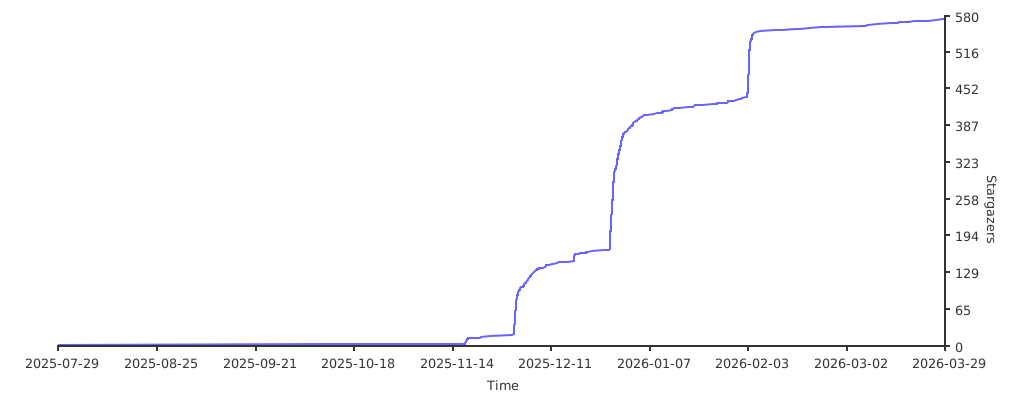
🌐 The Ecosystem & Activity
Join the wider PCLink ecosystem:
- 🏠 PCLink Server – The core backend service.
- 📱 PCLink Mobile – Companion app for Android.
- 📦 PCLink Extensions – Official repository for community extensions.


🤝 Support & Maintainers
<div align="center"> <a href="https://github.com/AzharZouhir"> <img src="https://github.com/AzharZouhir.png" width="100px" style="border-radius: 50%; border: 3px solid #3d76ab;" alt="Azhar Zouhir"/> </a>Azhar Zouhir Creator & Lead Developer Building the next generation of PC remote management.


🕊️ Free Palestine • 🇩🇿 Made with ❤️ in Algeria
</div>