
CppGameEngine3D
My first attempt at writing a from-scratch OpenGL game engine in C++
Install / Use
/learn @BGR360/CppGameEngine3DREADME
VERSION 2 CURRENTLY UNDER CONSTRUCTION!! :D
CppGameEngine3D
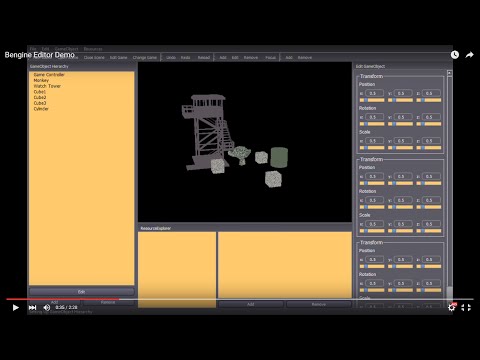
My first attempt at writing a from-scratch OpenGL game engine in C++, humbly called the "Bengine." The Qt GUI Framework is used extensively to provide OpenGL Widgets and make up the GUI for the Bengine Editor (learn more about the Bengine Editor here). The entire engine was programmed using Test-Driven Development strategies, utilizing the Google Test Framework to swiftly implement unit tests (learn more about the Bengine Tests here).
Demo Video
A demonstration of the latest capabilities of the engine and the editor:
Jump To:
- Overview
- The Core Engine
- Dynamic DLL
- OpenGL
- Math Library
- GameObject API
- Resource Management
- Rendering Engine
- RenderingEngine
- MeshRenderer
- Meshes
- Shaders and Uniform Variables
- Materials
- The Editor
- Qt Framework
- Data-Driven Design
- The Tests
- Google Test
- Believing in Test-Driven Development
Overview
After transitioning from a Windows to a Macbook, I aborted this C++ version of my game engine for a revamped Java version (see https://github.com/BGR360/JavaGameEngine3D). However, I then discovered that that was a silly decision and have stopped working on the Java version. I have not put any work into this engine for a while and will probably restart from scratch if I want to continue working on it.
Why do I do this?
When I tell people about this project, I often hear them say, "You know, you could always just download Unity or UDK and use that to make games... Why you gotta go and write your own?" So really, why the hell am I doing this?
I'm not making a game engine so that I can make games. Sure, once it's done, I'll be able to do that if I want, but that's not what it's about. It's about the learning experience and the sense of accomplishment that comes with being able to write something from scratch. Sure, it'll never ever be the most efficient or groundbreaking or innovative game engine, but it'll be mine. I think that's pretty damn cool.
Acknowledgements
I owe many thanks to Jamie King and Benny Bobaganoosh for their great tutorials and learning resources on C++, OpenGL, and Game Engine programming. These guys do great work and you should check them out.
Jamie King: YouTube -- Website
The Core Engine
The Core engine functionality was written entirely by me in standard C++11.
See Also: Core Engine Source Code
Dynamic DLL
The Engine is implemented as a DLL, which at times led to some annoying problems with DLL-boundaries and memory allocation, but was ultimately meant to make the engine more robust and easy to use.
OpenGL
Access to OpenGL function calls was provided by GLEW (OpenGL Extension Wrangler). A rendering context and surface upon which to render was provided by Qt's QOpenGLWidget class. Aside from this, all rendering code in my engine is pure OpenGL function calls, no high-level garbage.
See Also: Include folder
Homemade Math Library
One of the most important things required for a 3D game engine is a solid Vector and Matrix math library so that Matrix-Vector transformations in 3D space can be made easily. All of the common Vector and Matrix operations were coded by hand by me. I'm not going to say it was fun.
See Also: Math Library Source Code
GameObject API
The overall design of the Bengine external API is the GameObject. The GameObject API that I wrote is very similar to the structure of the Unity game engine.
Composition over Inheritance
Inheritance and polymorphism are great, but they certainly have their limitations, especially in the game world. For instance, you might define a class of objects that is Movable and one that is Static, and another class of objects that is Renderable. The problem is that a GameObject (for instance, a NonPlayerCharacter) may be Movable and Renderable. This leads to a diamond-shaped inheritance tree, which is a problem.
             GameObject
             /        \
            /          \
      Renderable      Movable
            \          /
             \        /
         NonPlayerCharacter
The solution is Composition. Instead of using multiple inheritance, a GameObject is comprised of multiple GameComponents which define its behavior. This leads to a much safer sort of inheritance tree:
                GameComponent                                   GameObject
              /               \                                     |
             /                 \                       +------------|-----------+
      PhysicalComponent       RenderableComponent      |   NonPlayerCharacter   |
       /            \                                  +------------------------+
      /              \                                 | - MovableComponent     |
StaticComponent   MovableComponent                     | - RenderableComponent  |
                                                       +------------------------+
In the Bengine, every GameObject has a list of GameComponents which can be dynamically assigned. The GameComponents define the GameObject's behavior at runtime by specifying a custom update() function. For example:
// Create GameObject and add Components
GameObject go;
go.addComponent(new MeshRenderer);
go.addComponent(new PhysicsComponent);

// Get Component and modify properties
MeshRenderer* renderingComp = go.getComponent<MeshRenderer>();
renderingComp.setMesh(aMesh);
renderingComp.setMaterial(aMaterial);
Parenting GameObjects
See Also: GameObject API
Resources
For any game to function well, there needs to be a centralized way to manage the assets (or Resources) in a scene. This is done through the ResourceManager class. In hindsight, the design of ResourceManager is pretty poor and hardly object-oriented, but it worked.
The ResourceManager stores all resource-like object (Images, Textures, Materials, Meshes, Shaders) in maps so that each resource is mapped to a name (a string). To obtain a reference to a resource in-game, call one of the get() functions with the name of the resource.
// Load resources
ResourceManager res;
res.loadMesh("res/meshes/monkey.obj", "monkey");
res.loadShader("res/shaders/basic_shader.vs", "basic_shader");
res.loadTexture("res/textures/bricks.jpg", "bricks", 0);

// Create a material
res.createMaterial("bricks", res.getShader("basic_shader"), res.getTexture("bricks"));

// Create a Monkey GameObject
GameObject monkey;
monkey.addComponent(
    new MeshRenderer(
        res.getMesh("monkey"),
        res.getMaterial("bricks")
    )
);
See Also: Resources Source Code
Rendering Engine
Designing the Rendering Engine was one of the most difficult parts of the whole project. I really struggled with finding my own way to make a robust object-oriented system. What I ended up with definitely worked but was far from elegant (at least in my eyes).
RenderingEngine
The RenderingEngine class is responsible for rendering the Game's current Scene. Each Scene has its own ResourceManager and root GameObject. The RenderingEngine traverses through the GameObject tree and calls render() on any GameObjects which have RenderingComponents.
The strange thing is that RenderingEngine inherits from Qt's QOpenGLWidget. This is what throws off much of the system's object-orientedness. I had to do this because of how Qt works with OpenGL. When using Qt, any calls to OpenGL functions must occur within the QOpenGLWidget's paintGL() function.
MeshRenderer
Any GameObject which can be rendered has a RenderingComponent. Currently, the only known RenderingComponent in the Bengine is the MeshRenderer. The MeshRenderer stores a pointer to a Mesh and a Material, which is all that it needs to properly render a mesh (because a Material has a pointer to a ShaderProgram).
Meshes
A Mesh is defined by a set of vertices, normals, and UV coordinates. Meshes are also indexed to help save space. Currently, only .obj files can be loaded to create Meshes. You can view the new-and-improved obj parsing algorithm here.
Shaders and Uniform Variables
The compilation and loading of GLSL Shaders in the Bengine is done through the Shader (.h .cpp) and ShaderProgram (.h .cpp) classes. Just like in OpenGL, a ShaderProgram is comprised of multiple Shaders at different stages (the Vertex Shader, Fragment Shader, Geometry Shader, etc.).
The system I created for shader uniform variables, I think, was a good one. The whole UniformVariable class (.h .inl [.cpp](GameEngine/src/rendering/UniformVari
Related Skills
qqbot-channel
343.1kQQ 频道管理技能。查询频道列表、子频道、成员、发帖、公告、日程等操作。使用 qqbot_channel_api 工具代理 QQ 开放平台 HTTP 接口,自动处理 Token 鉴权。当用户需要查看频道、管理子频道、查询成员、发布帖子/公告/日程时使用。
docs-writer
99.7k`docs-writer` skill instructions As an expert technical writer and editor for the Gemini CLI project, you produce accurate, clear, and consistent documentation. When asked to write, edit, or revie
model-usage
343.1kUse CodexBar CLI local cost usage to summarize per-model usage for Codex or Claude, including the current (most recent) model or a full model breakdown. Trigger when asked for model-level usage/cost data from codexbar, or when you need a scriptable per-model summary from codexbar cost JSON.
ddd
Guía de Principios DDD para el Proyecto > 📚 Documento Complementario : Este documento define los principios y reglas de DDD. Para ver templates de código, ejemplos detallados y guías paso
