
Web-Algebra
Suite of generic Linked Data/SPARQL as well as LinkedDataHub-specific MCP tools
Install / Use
claude mcp add AtomGraph -- npx -y github:AtomGraph/Web-AlgebraIf the server publishes to npm under a different name, use that package instead — check the repo README.
MCP Server
Model Context Protocol server
Quality Score
Category
Development & EngineeringSupported Platforms
Tags
Our assessment of Web-Algebra
Web-Algebra scores 83/100 on our quality scale, 3007th of 4,614 Development & Engineering skills we index.
Its MCP Server is 6.7 KB long, well organised into 17 sections with 9 code examples: a thorough specification that gives an agent plenty to work with.
It has 48 GitHub stars, so there is little community track record yet; judge it on its content.
Maintenance, license and trust
- The repository was last updated 3 days ago, so Web-Algebra is actively maintained.
- Our last check on 2026-10-21 found the source still online.
- It is released under the Apache-2.0 license, a permissive license that allows use, modification and commercial use with attribution.
- Its trust signals score 92/100, with 1 caution from licensing, adoption, age or documentation. These come from repository metadata, not a code audit — read the skill file before letting an agent act on it.
Safety scan
No issues foundOur scan of the whole file found no instruction hijacking, hidden characters, credential access, data exfiltration or destructive commands. An AI review of the same text found nothing harmful.
AI review by kimi-k2.7-code on 2026-09-24. Automated pattern scan on 2026-09-24. It catches known dangerous patterns, not every risk — read a skill before letting an agent act on it.
Web-Algebra compared with similar skills
All 4 of these similar skills score higher than Web-Algebra; compare them before choosing.
| Skill | Score | Stars | Updated | Format |
|---|---|---|---|---|
| Web-Algebra (this skill)by AtomGraph | 83 | 48 | 3d ago | MCP Server |
| taste-skillby Leonxlnx | 100 | 111.0k | 1d ago | CLAUDE.md |
| Agent-Reachby Panniantong | 100 | 109.5k | 1d ago | CLAUDE.md |
| headroomby headroomlabs-ai | 100 | 79.0k | today | CLAUDE.md |
| ai-job-searchby ai-job-search-dev | 100 | 70.0k | today | CLAUDE.md |
Frequently asked questions
- How do I install Web-Algebra?
- Run
claude mcp add AtomGraph -- npx -y github:AtomGraph/Web-Algebra. The install tabs above show the steps for each supported agent. - Which AI agents does Web-Algebra work with?
- It is written for Claude Code and Claude Desktop, as a MCP Server file. Other agents that read the same format can often use it too.
- Is Web-Algebra safe to use?
- Our scan of the whole file found no instruction hijacking, hidden characters, credential access, data exfiltration or destructive commands. An AI review of the same text found nothing harmful. It is Apache-2.0-licensed and scores 92/100 on trust signals. Skills are instructions an agent will follow, so read the file before installing it and do not approve commands you do not understand.
- Is Web-Algebra still maintained?
- The repository was last updated 3 days ago, so Web-Algebra is actively maintained.
Skill content
View source on GitHubWeb-Algebra
A composable RDF operations system that translates natural language instructions into JSON-formatted domain-specific language operations for loading, querying, and writing RDF Linked Data.
Overview
This system implements generic operations for RDF Linked Data and SPARQL management, as well as some LinkedDataHub-specific operations. Operations can be consumed in two ways:
- Executable JSON format: Operations are composed into JSON structures and executed by the provided execution engine
- Model Context Protocol (MCP): Operations are exposed as tools for AI agents to use interactively
Instead of agents executing semantic workflows step-by-step through individual MCP tool calls, Web-Algebra enables agents to compile entire workflows into optimized JSON "bytecode" that executes atomically - enabling complex multi-operation compositions.
Demo
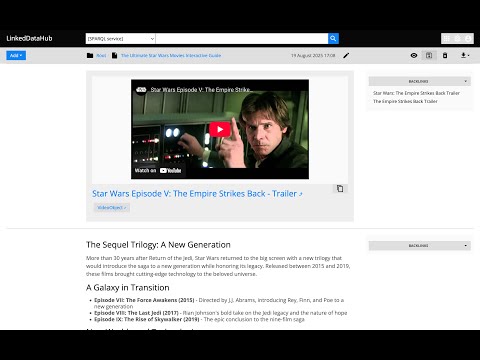
See WebAlgebra in action - translating natural language into RDF operations.
Architecture
The system is built around the Operation abstract base class that provides:
- Registry System: Auto-discovery of operations from
src/web_algebra/operations/ - JSON DSL: Operations use
@opkey withargsfor parameters, supporting nested operation calls - RDFLib Type System: Uses
URIRef,Literal,Graph, andResulttypes internally for proper RDF handling - Execution Engine: Both standalone execution and MCP server integration
- Context System: ForEach operations set row context for inner operations to access via
Value - URI Resolution: Proper semantic URI construction with
ResolveURIoperation
Key Components
- System Prompt: Complete operation definitions and JSON format specification
- Formal Semantics: Complete type system and operation catalog
- Operation Interface: Base class and JSON interpreter
- Operation Implementations: Directory containing all available operations
- JSON Examples: Sample operation compositions
Operations
The operations cover read-write Linked Data, SPARQL queries, URI manipulation, and LinkedDataHub-specific resource creation. Non-exhaustive list:
- Linked Data
GETPATCHPOSTPUT
- SPARQL
CONSTRUCTDESCRIBESELECTSubstituteValuesSPARQLString
- Schema
ExtractClassesExtractDatatypePropertiesExtractObjectPropertiesExtractOntology
- URI & String Operations
ResolveURIEncodeForURIConcatReplaceStrSTRUUIDURI
- Control Flow & Variables
ValueVariableForEachFilterBindingsCurrentExecuteMerge
- LinkedDataHub-specific
ldh-CreateContainerldh-CreateItemldh-Listldh-AddFileldh-AddGenericServiceldh-AddResultSetChartldh-AddSelectldh-AddViewldh-AddObjectBlockldh-AddXHTMLBlockldh-RemoveBlockldh-GeneratePortalldh-GenerateClassContainersldh-GenerateOntologyViews
Usage
Pre-requisites
- Install uv
-
uv venv
uv sync
Standalone
Natural language instruction
uv run python src/web_algebra/main.py
Then enter instruction, for example:
Select random 10 UK cities from DBpedia
See more examples
Currently requires OpenAI API access. OPENAI_API_KEY env value has to be set.
Execute JSON
uv run python src/web_algebra/main.py --from-json ./examples/united-kingdom-cities.json
See JSON examples.
With LinkedDataHub
- Run LinkedDataHub v5
- Execute
src/web_algebra/main.py, it expects the path to your LDH's owner certificate and its password as arguments. For example:
uv run python src/web_algebra/main.py --from-json ./examples/united-kingdom-cities.json \
  --cert_pem_path ../LinkedDataHub/ssl/owner/cert.pem \
  --cert_password **********
Here and throughout this guide, the client certificate/password arguments are only required for authentication with LinkedDataHub. You don't need them if you're not using LinkedDataHub with Web Algebra.
As MCP server
stdio transport
uv run python -m web_algebra
Streamable HTTP transport
uv run uvicorn web_algebra.server:app --reload
or with LinkedDataHub certificate credentials (change the path and password to yours):
CERT_PEM_PATH="/Users/Martynas.Jusevicius/WebRoot/LinkedDataHub/ssl/owner/cert.pem" CERT_PASSWORD="********" uv run uvicorn web_algebra.server:app --reload
MCP Inspector config
You can the inspector like this:
npx @modelcontextprotocol/inspector
and then open on the URL printed in its console output, for example:
http://localhost:6274/?MCP_PROXY_AUTH_TOKEN=b31e…[redacted]
The MCP_PROXY_AUTH_TOKEN is required. If the link does not appear, you need to copy the session token from the console and paste it into inspector's Proxy Session Token config.
Web Algebra's settings:
<dl> <dt>Transport Type</dt> <dd>Streamable HTTP</dd> <dt>URL</dt> <dd>http://127.0.0.1:8000/mcp</dd> </dl>Claude Desktop tool config
Add Web Algebra entry (that uses stdio transport) to the mcpServer configuration your claude_desktop_config.json file:
{
    "mcpServers": {
        "Web Algebra": {
            "command": "uv",
            "args": [
                "--directory",
                "/Users/Martynas.Jusevicius/WebRoot/Web-Algebra/src",
                "run",
                "--with",
                "mcp[cli]",
                "--with",
                "rdflib",
                "--with",
                "openai",
                "python",
                "-m",
                "web_algebra"
            ],
            "env": {
                "CERT_PEM_PATH": "/Users/Martynas.Jusevicius/WebRoot/LinkedDataHub/ssl/owner/cert.pem",
                "CERT_PASSWORD": "********"
            }
        }
    }
}
Leave the command as it is. Those uv run --with arguments are important, otherwise 3rd party packages cannot be found.
On my Mac, the path to uv has to be absolute, otherwise it doesn't work in Claude Desktop 🤷♂️.
CERT_PEM_PATH and CERT_PASSWORD env values are optional.
Related Skills
taste-skill
111.0kAgent skills that give coding agents taste: art direction, reference images and a browser check instead of generic AI pages
Agent-Reach
109.5kGive your AI agent eyes to see the entire internet. Read & search Twitter, Reddit, YouTube, GitHub, Bilibili, XiaoHongShu — one CLI, zero API fees.
headroom
79.0kCompress tool outputs, logs, files, and RAG chunks before they reach the LLM. 20% fewer tokens for coding agents, 60-95% fewer tokens for JSON, same answers. Library, proxy, MCP server.
ai-job-search
70.0kThe job search that runs on your machine. AI job application framework built on Claude Code: evaluate postings, tailor CVs, write cover letters, prep interviews. Fork it and own it.

Languages
Trust signals
From repository metadata: license, adoption, age and documentation. Not a code audit — see the Safety scan above for what the skill file itself contains.