
WebTable
A python package that takes tables from a web page and processes them to get high quality tables
Install / Use
/learn @AtomEcho/WebTableREADME
WebTable
a python package that takes tables from a web page and processes them to get high quality tables
使用本插件从网页中捕获表格,并对格式进行处理,获得清洗后的表格,而后选择输出或存储
使用方法
pip install webtable

from webtable.webtable import table_crawler

table_crawler(io="https://baike.baidu.com/item/小行星/68902")
注1:如果使用selenium获取网页数据,需要安装selenium driver,具体方式如下:
- 进入chromedriver,选择和自己chrome版本一致的chrome driver下载并解压
- 将chromedirver.exe分别复制到chrome安装目录(windows一般为C:\Program Files\Google\Chrome\Application)和python安装目录下
- 将C:\Program Files\Google\Chrome\Application(即上一步中的chrome安装目录)添加到系统的环境变量(Path)中
- 执行pip install selenium,即可正常使用
注2:如果使用pyppeteer获取网页数据,第一次使用时pyppeteer会自动安装所需内容
函数说明
table_crawler
table_crawler(io: str, table_name: str = 'table', option: str = 'stdout', output_file_path: str = './',
                  origin: bool = False,
                  json_orient: str = "columns", engine: str = 'requests', debug: bool = False, process_list=None,
                  max_empty_percentage: float = 0.3,
                  min_similarity: float = 0.7, min_columns: int = 1, min_rows: int = 1, if_tradition_to_simple: bool = False)
		  -> list[dataframe]
接受如下参数:
| 参数名 | 条件 | 类型 | 可选值 | 描述 | 默认参数 |
| ---- | ---- | ---- | ---- | ---- | ---- |
| io | 必需 | string | url, 或是html | 如:https://baike.baidu.com/item/复仇者联盟/391050 | 无 |
| table_name |可选 | string | 任意字符串 | 表格的存储名称 | "table" |
| output_file_path | 可选 | string | 路径 |输出文件的路径 | "./" |
| option | 可选 | string| 'stdout':标准输出流;'nooutput':无输出; <br>'csv':存入csv文件;<br>'excel':存入xlsx文件;<br>'json':存入JSON文件 | 表格的输出格式 |"stdout"|
| origin | 可选 | boolean | True:输出原始数据;<br>False:不输出原始数据 |是否输出原始数据|False|
| json_orient |可选| string| 'columns':列名作为json索引;<br>'index':行名作为json索引 | 若选择导出为JSON,设置索引字段 |'columns'|
| engine | 可选 | string|'requests':使用requests.get获取网页数据;<br/>'selenium':使用selenium获取网页数据(可以获取动态加载的网页数据);<br/>'pyppeteer':使用pyppeteer获取网页数据(可以获取动态加载的网页数据)|选择获取网页数据的方式|"requests"|
| debug | 可选|boolean | True: 打印调试信息;<br/>False:不打印调试信息 |是否打印调试信息|False|
| process_list | 可选 |list|'brackets_remove',<br>'change_df',<br>'empty_column_remove',<br>'muti_index_process',<br>'first_column_check',<br>'index_check'|处理表格过程中所经历的流程|None(None表示全选)|
| max_empty_percentage |可选|float| 0-1区间的实数值 |一列中能够接受的空值个数的最大百分比|0.3|
| min_similarity |可选|float | 0-1区间的实数值 |表示要使两个表格被合并成一个表格,二者的表头需要的最小相似程度|0.7|
| min_columns |可选|int | 正整数 |一个表格中应该含有的最少列数|1|
| min_rows |可选|int | 正整数 |一个表格中应该含有的最少行数|1|
| if_tradition_to_simple | 可选|boolean | True: 将繁体转化成简体;<br/>False:不将繁体转化成简体 |是否需要繁简转换|False|
|proxies| 可选 | string 或 list| 如:'http://username:password@127.0.0.1:7890'或'socks5://127.0.0.1:7890'| http或socks5代理,如果以list形式传入,将从其中随机选取一个作为代理ip | None|
处理表格时可选的流程如下(默认全选):
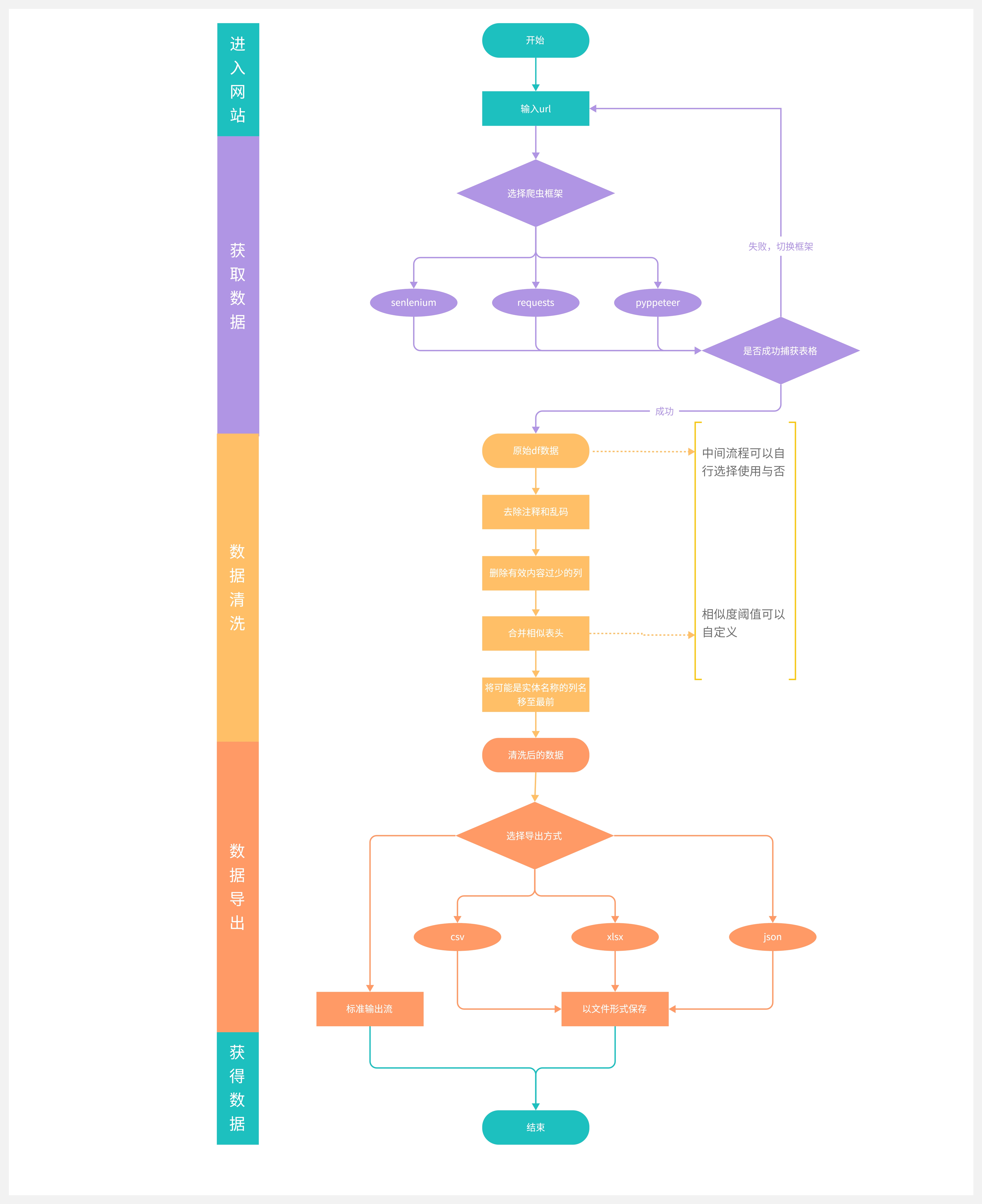
brackets_remove:去除大括号、中括号、尖括号中的内容change_df:若表头均为数字,则取第一行为表头empty_column_remove:删除有效内容过少(少于30%)的列和行,删除索引是数字或是与其他列相同的列,删除一列内容都相同的列和行muti_index_process:判断重复表头,并将两个重复的表头合并first_column_check:对第一行第一列的数据进行检验,若数据为数字或空值等不像是实体名称的格式,则将其后移,对上述操作内容重复,直至第一行第一列数据规范或是判定没有这样的规范数据为止index_check:对表头做校验,若是有含'名’等像是实体名称的表头,则将其前移,同时将时间等表头后移
流程示意图
欢迎加入我们的社区解锁更多玩法!
<table rules="none" align="center"> <tr> <td> <center> <img src="https://i0.hdslb.com/bfs/album/9b945871d2c82577efbcb965d40dc27f91f290f2.png" width="200" /> <br/> <font color="AAAAAA">AtomEcho公众号</font> </center> </td> <td> <center> <img src="https://i0.hdslb.com/bfs/album/388bc0008489b227015a1ae66ba04b0eed1cb143.png" width="200" /> <br/> <font color="AAAAAA">AtomEcho社区</font> </center> </td> </tr> </table>Related Skills
node-connect
349.9kDiagnose OpenClaw node connection and pairing failures for Android, iOS, and macOS companion apps
claude-opus-4-5-migration
109.8kMigrate prompts and code from Claude Sonnet 4.0, Sonnet 4.5, or Opus 4.1 to Opus 4.5
frontend-design
109.8kCreate distinctive, production-grade frontend interfaces with high design quality. Use this skill when the user asks to build web components, pages, or applications. Generates creative, polished code that avoids generic AI aesthetics.
model-usage
349.9kUse CodexBar CLI local cost usage to summarize per-model usage for Codex or Claude, including the current (most recent) model or a full model breakdown. Trigger when asked for model-level usage/cost data from codexbar, or when you need a scriptable per-model summary from codexbar cost JSON.
