ExtractNow
Utility that brings macOS-style double-click archive extraction to Windows.
Install / Use
/learn @Asteski/ExtractNowREADME
ExtractNow
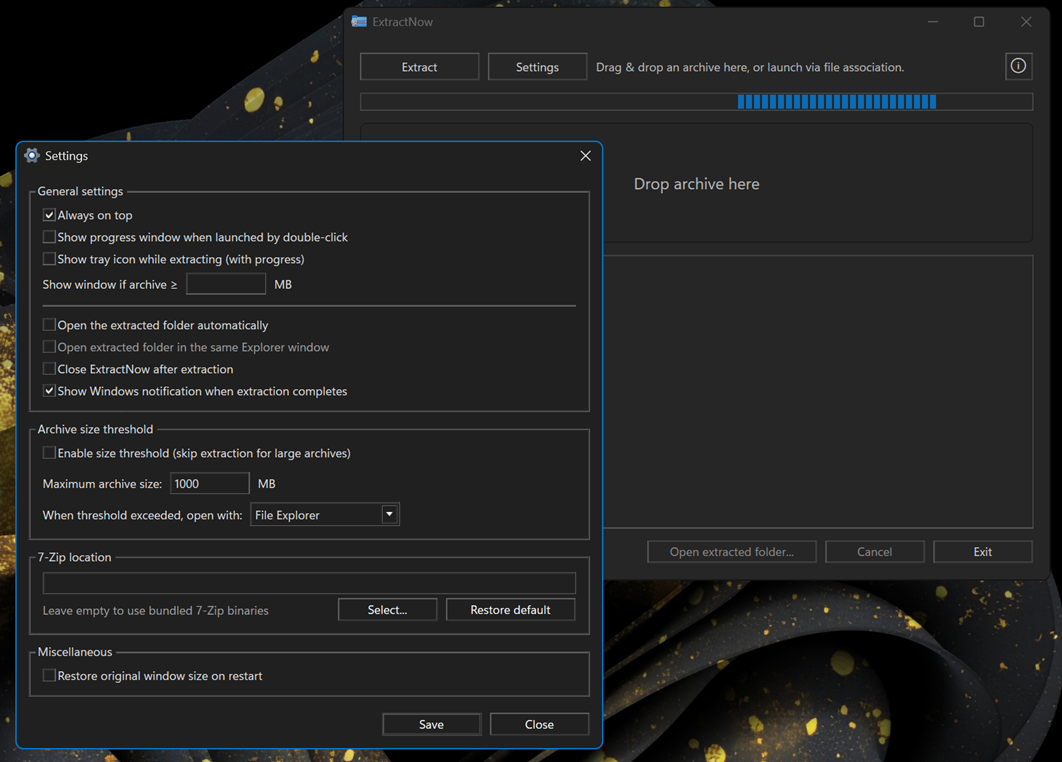
ExtractNow is an application that extracts archives instantly without displaying additional windows. It comes bundled with 7-Zip and provides self-contained builds for both Windows x86 and ARM.
Features
- Extract with double-click via file association or by drag & drop.
- Extracts to a sibling folder named after the archive (e.g.,
file.zip→file/). - Resizable main window with automatic size persistence (optional restore-to-default on restart).
- Progress with live log and confirmation prompt before cancel.
- Settings window:
- Choose bundled or custom 7-Zip path.
WIPEnable tray icon with live progress indicator during extraction.- Control window visibility on association launch and file size threshold.
- Optionally open extracted folder automatically on completion.
- Optionally close the app after successful extraction.
- Set threshold for archives size to be ignored by ExtractNow, and to be opened in alternative ways instead - either File Explorer or 7-Zip.
- Restore original window size on restart.
- "Open extracted folder…" button enabled after success.
- Always on top and Show notifications options.
- Keyboard shortcuts for quick access (Settings, Extract, Open Folder, Cancel, Exit).
Requirements
- Windows 10/11 (x64 or ARM64)
- No separate .NET install required (self-contained portable build)
Usage
- Run the app and drag & drop an archive or click Extract.
- To integrate with Explorer, use Settings to register per-user "Open with" for
.zip,.7z,.rar(no default handler changes).
Keyboard shortcuts
- ctrl + , → Settings
- ctrl + o → Select archive
- ctrl + e → Open extracted folder
- ctrl + c → Cancel extraction
- ctrl + w → Exit
- esc → Close About or Settings window
Bundled 7-Zip
The repo includes a 7zip/ directory that’s copied next to the executable at publish time. The app auto-detects 7z.exe there. You can instead set a system 7-Zip path in Settings. When redistributing, keep the 7-Zip license/readme files intact.
Notes
- Portable builds include the .NET runtime; no install required.
- If an archive is corrupt or unsupported, 7-Zip returns non-zero; the app surfaces this in the log.
Related Skills
node-connect
346.4kDiagnose OpenClaw node connection and pairing failures for Android, iOS, and macOS companion apps
frontend-design
107.2kCreate distinctive, production-grade frontend interfaces with high design quality. Use this skill when the user asks to build web components, pages, or applications. Generates creative, polished code that avoids generic AI aesthetics.
openai-whisper-api
346.4kTranscribe audio via OpenAI Audio Transcriptions API (Whisper).
qqbot-media
346.4kQQBot 富媒体收发能力。使用 <qqmedia> 标签,系统根据文件扩展名自动识别类型(图片/语音/视频/文件)。