Qiaqia
Command line chat application for Linux platform. Nonblocking IO,Multithreading and IO multiplexing are used for the server part, so it has a high performance concurrent server.
Install / Use
/learn @Andrewpqc/QiaqiaREADME
qiaqia
A command line chat application for geeks.
 _____     _       ___   _____     _       ___
/  _  |   | |     /   | /  _  |   | |     /   |
| | | |   | |    / /| | | | | |   | |    / /| |    Welcome to QIAQIA(洽洽)
| | | |   | |   / / | | | | | |   | |   / / | |
| |_| |_  | |  / /  | | | |_| |_  | |  / /  | |
|_______| |_| /_/   |_| |_______| |_| /_/   |_|
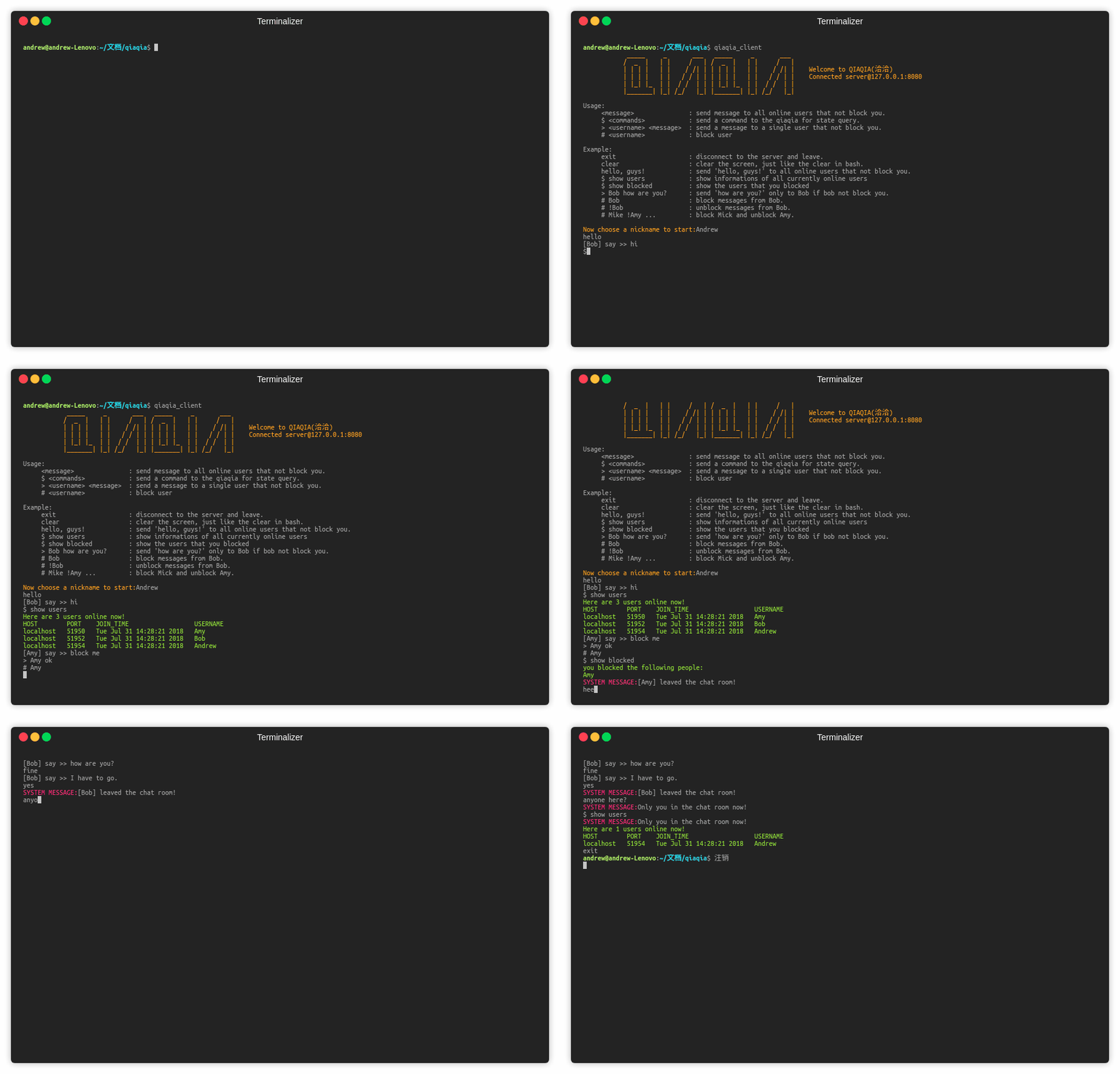
screenshot
click here to see the screenshot.
features
- event based IO multiplexing concurrency model for qiaqia server(epoll).
- support group chat and private chat.
- You can choose to receive or not receive messages from specific online users(block or unblock).
- support state query such as infomations of all online users and the users you blocked.
usage
    <message>               : send message to all online users that not block you.
    $ <commands>            : send a command to the qiaqia for state query.
    > <username> <message>  : send a message to a single user that not block you.
    # <username>            : block or unblock the messages from certain user
example
    exit                    : disconnect to the server and leave.
    clear                   : clear the screen, just like the clear in bash.
    hello, guys!            : send 'hello, guys!' to all online users that not block you.
    $ show users            : show informations of all currently online users
    $ show blocked          : show the users that you blocked
    > Bob how are you?      : send 'how are you?' only to Bob if bob not block you.
    # Bob                   : block messages from Bob.
    # !Bob                  : unblock messages from Bob.
    # Mike !Amy ...         : block Mick and unblock Amy.
install
Qiaqia is made up of two components, the qiaqia_server and the qiaqia_client.
install by source
git clone https://github.com/Andrewpqc/qiaqia.git && cd qiaqia && mkdir build && cd build && cmake .. && make
install by binary
go to the release page to download the qiaqia binary package
start
Before you start qiaqia_client, you must make sure that qiaqia_server is already started on your local machine or anywhere network can reach.
You can start qiaqia_server like the following command:
qiaqia_server -p <port to be listen> -w <number of worker threads>
I already deployed a qiaqia_server on my machine at 120.77.220.239:8765, so you can a quick start like the following:
qiaqia_client -h 120.77.220.239 -p 8585
then,choose a pretty nickname for yourself and start. Enjory!
=========================
            +
            +   +
            +      +
            +          +
            +             O
            +
            +
            +
            +
            +
            +
=========================